Version v2.7.0 of the documentation is no longer actively maintained. The site that you are currently viewing is an archived snapshot. For up-to-date documentation, see the latest version.
Module: MINIO
Min.IO: S3-Compatible Open-Source Multi-Cloud Object Storage
Configuration | Administration | Playbook | Dashboard | Parameter
MinIO is an S3-compatible object storage server. It’s designed to be scalable, secure, and easy to use. It has native multi-node multi-driver HA support and can store documents, pictures, videos, and backups.
Pigsty uses MinIO as an optional PostgreSQL backup storage repo, in addition to the default local posix FS repo.
If the MinIO repo is used, the MINIO module should be installed before any PGSQL modules.
MinIO requires a trusted CA to work, so you have to install it in addition to NODE module.
Beware than MinIO mandates HTTPS access, so please ensure that the MinIO service domain (default to sss.pigsty) correctly points to the MinIO server node:
- You can ask your SA to add a DNS record in the intranet DNS server
- If you enable the DNS server on the Infra node, you can add records in
dns_records - You can also add static resolution records to all nodes in
node_etc_hosts
Example:
prod.yml
Configuration
You have to define a MinIO cluster before deploying it. There are some parameters for MinIO.
- Single-Node Single-Drive
- Single-Node Multi-Drive
- Multi-Node Multi-Drive
- Expose Service
- Access Service
- Expose Admin
Single-Node Single-Drive
Reference: deploy-minio-single-node-single-drive
To define a singleton MinIO instance, it’s straightforward:
The only required params are minio_seq and minio_cluster, which generate a unique identity for each MinIO instance.
Single-Node Single-Driver mode is for development purposes, so you can use a common dir as the data dir, which is /data/minio by default.
Beware that in multi-driver or multi-node mode, MinIO will refuse to start if using a common dir as the data dir rather than a mount point.
Single-Node Multi-Drive
Reference: deploy-minio-single-node-multi-drive
To use multiple disks on a single node, you have to specify the minio_data in the format of {{ prefix }}{x...y}, which defines a series of disk mount points.
This example defines a single-node MinIO cluster with 4 drivers: /data1, /data2, /data3, /data4. You have to mount them properly before launching MinIO:
Multi-Node Multi-Drive
Reference: deploy-minio-multi-node-multi-drive
The extra minio_node param will be used for a multi-node deployment:
The ${minio_cluster} and ${minio_seq} will be replaced with the value of minio_cluster and minio_seq respectively and used as MinIO nodename.
Expose Service
MinIO will serve on port 9000 by default. If a multi-node MinIO cluster is deployed, you can access its service via any node.
It would be better to expose MinIO service via a load balancer, such as the default haproxy on NODE, or use the L2 vip.
To expose MinIO service with haproxy, you have to define an extra service with haproxy_services:
Access Service
To use the exposed service, you have to update/append the MinIO credential in the pgbackrest_repo section:
Expose Admin
MinIO will serve an admin web portal on port 9001 by default.
It’s not wise to expose the admin portal to the public, but if you wish to do so, add MinIO to the infra_portal and refresh the nginx server:
Check the MinIO demo config and special Vagrantfile for more details.
Administration
Here are some common MinIO mcli commands for reference, check MinIO Client for more details.
Create Cluster
To create a defined minio cluster, run the minio.yml playbook on minio group:
Client Setup
To access MinIO servers, you have to configure client mcli alias first:
You can manage business users with mcli as well:
CRUD
You can CRUD minio bucket with mcli:
Or perform object CRUD:
Playbook
There’s a built-in playbook: minio.yml for installing the MinIO cluster. But you have to define it first.
minio.yml
minio-id: generate minio identityminio_os_user: create os user miniominio_install: install minio/mcli rpmminio_clean: remove minio data (not default)minio_dir: create minio directoriesminio_config: generate minio configminio_conf: minio main configminio_cert: minio ssl certminio_dns: write minio dns records
minio_launch: launch minio serviceminio_register: register minio to prometheusminio_provision: create minio aliases/buckets/usersminio_alias: create minio client aliasminio_bucket: create minio bucketsminio_user: create minio biz users
Trusted ca file: /etc/pki/ca.crt should exist on all nodes already. which is generated in role: ca and loaded & trusted by default in role: node.
You should install MINIO module on Pigsty-managed nodes (i.e., Install NODE first)

Dashboard
There are two dashboards for MINIO module.
MinIO Overview: Overview of one single MinIO cluster
MinIO Instance: Detail information about one single MinIO instance
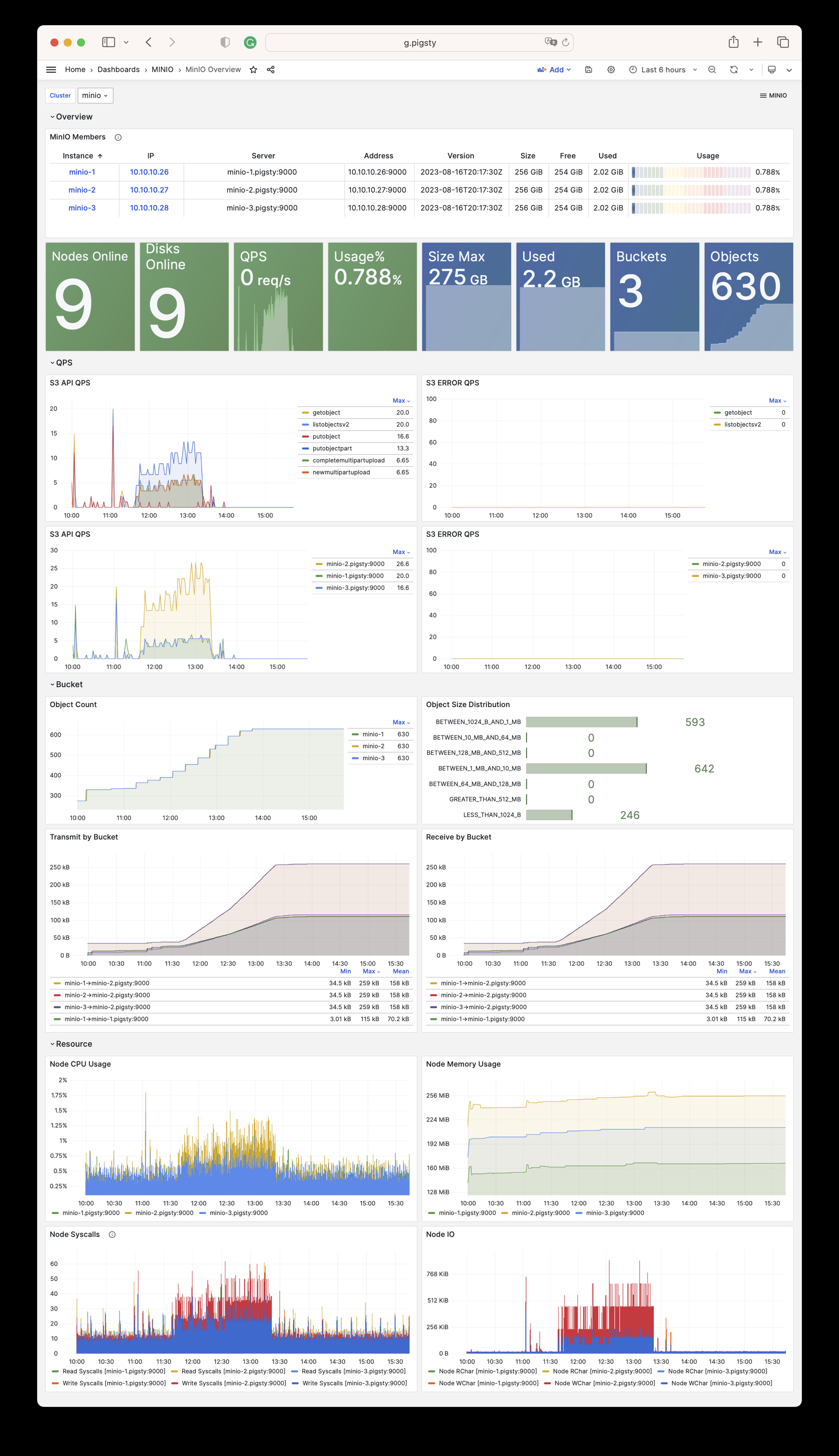
Parameter
There are 15 parameters in MINIO module.
| Parameter | Type | Level | Comment |
|---|---|---|---|
minio_seq |
int | I | minio instance identifier, REQUIRED |
minio_cluster |
string | C | minio cluster name, minio by default |
minio_clean |
bool | G/C/A | cleanup minio during init?, false by default |
minio_user |
username | C | minio os user, minio by default |
minio_node |
string | C | minio node name pattern |
minio_data |
path | C | minio data dir(s), use {x…y} to specify multi drivers |
minio_domain |
string | G | minio external domain name, sss.pigsty by default |
minio_port |
port | C | minio service port, 9000 by default |
minio_admin_port |
port | C | minio console port, 9001 by default |
minio_access_key |
username | C | root access key, minioadmin by default |
minio_secret_key |
password | C | root secret key, minioadmin by default |
minio_extra_vars |
string | C | extra environment variables for minio server |
minio_alias |
string | G | alias name for local minio deployment |
minio_buckets |
bucket[] | C | list of minio bucket to be created |
minio_users |
user[] | C | list of minio user to be created |