Version v2.7.0 of the documentation is no longer actively maintained. The site that you are currently viewing is an archived snapshot. For up-to-date documentation, see the latest version.
Architecture
Modular Architecture and Declarative Interface!
- Pigsty deployment is described by config inventory and materialized with ansible playbooks.
- Pigsty works on Linux x86_64 common nodes, i.e., bare metals or virtual machines.
- Pigsty uses a modular design that can be freely composed for different scenarios.
- The config controls where & how to install modules with parameters
- The playbooks will adjust nodes into the desired status in an idempotent manner.
Modules
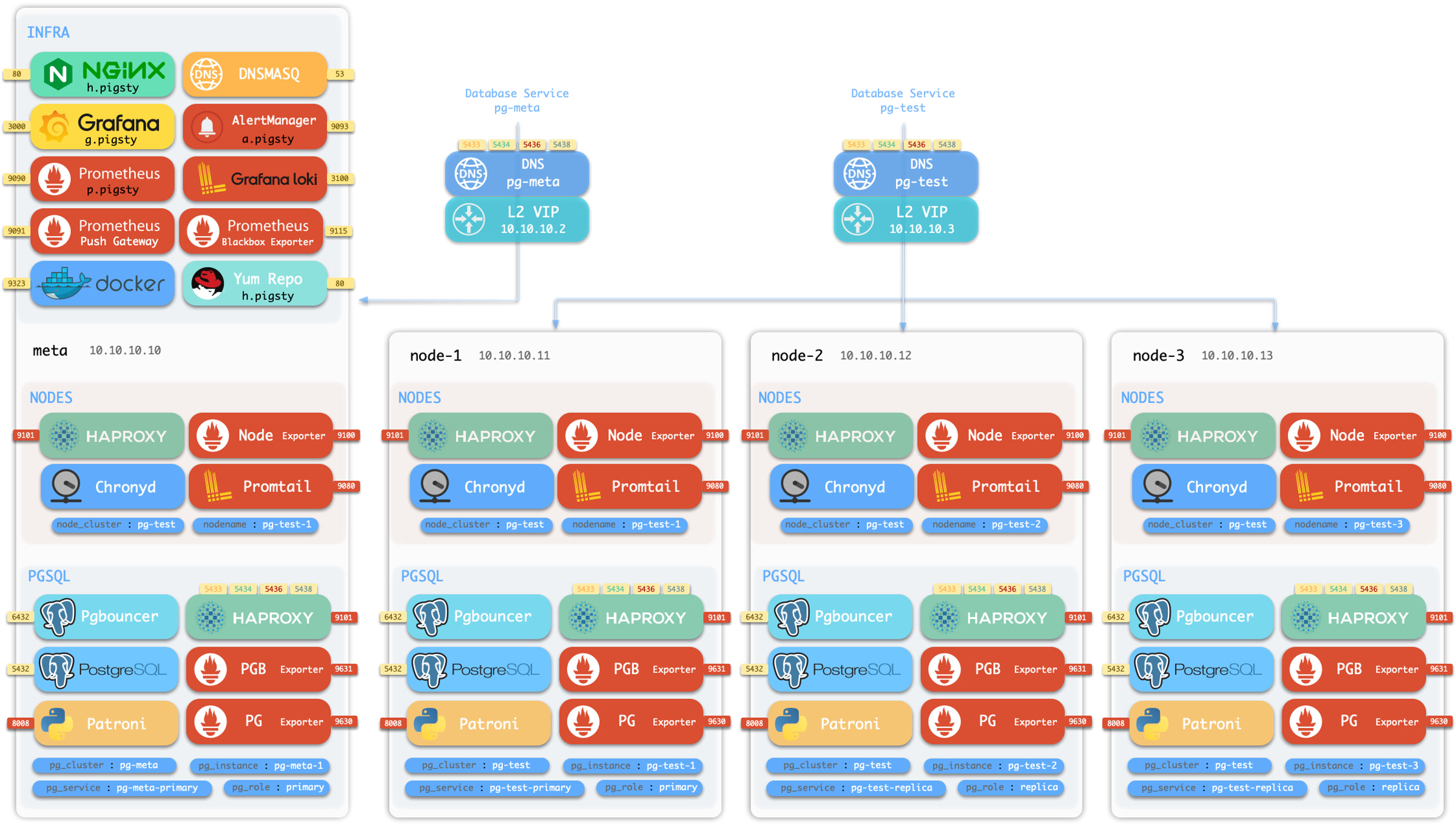
Pigsty uses a modular design, and there are six default modules: PGSQL, INFRA, NODE, ETCD, REDIS, and MINIO.
PGSQL: Autonomous ha Postgres cluster powered by Patroni, Pgbouncer, HAproxy, PgBackrest, etc…INFRA: Local yum/apt repo, Prometheus, Grafana, Loki, AlertManager, PushGateway, Blackbox Exporter…NODE: Tune node to desired state, name, timezone, NTP, ssh, sudo, haproxy, docker, promtail, keepalivedETCD: Distributed key-value store will be used as DCS for high-available Postgres clusters.REDIS: Redis servers in standalone master-replica, sentinel, cluster mode with Redis exporter.MINIO: S3 compatible simple object storage server, can be used as an optional backup center for Postgres.
You can compose them freely in a declarative manner. If you want host monitoring, INFRA & NODE will suffice. Add additional ETCD and PGSQL are used for HA PG Clusters. Deploying them on multiple nodes will form a ha cluster. You can reuse pigsty infra and develop your modules, considering optional REDIS and MINIO as examples.
Singleton Meta
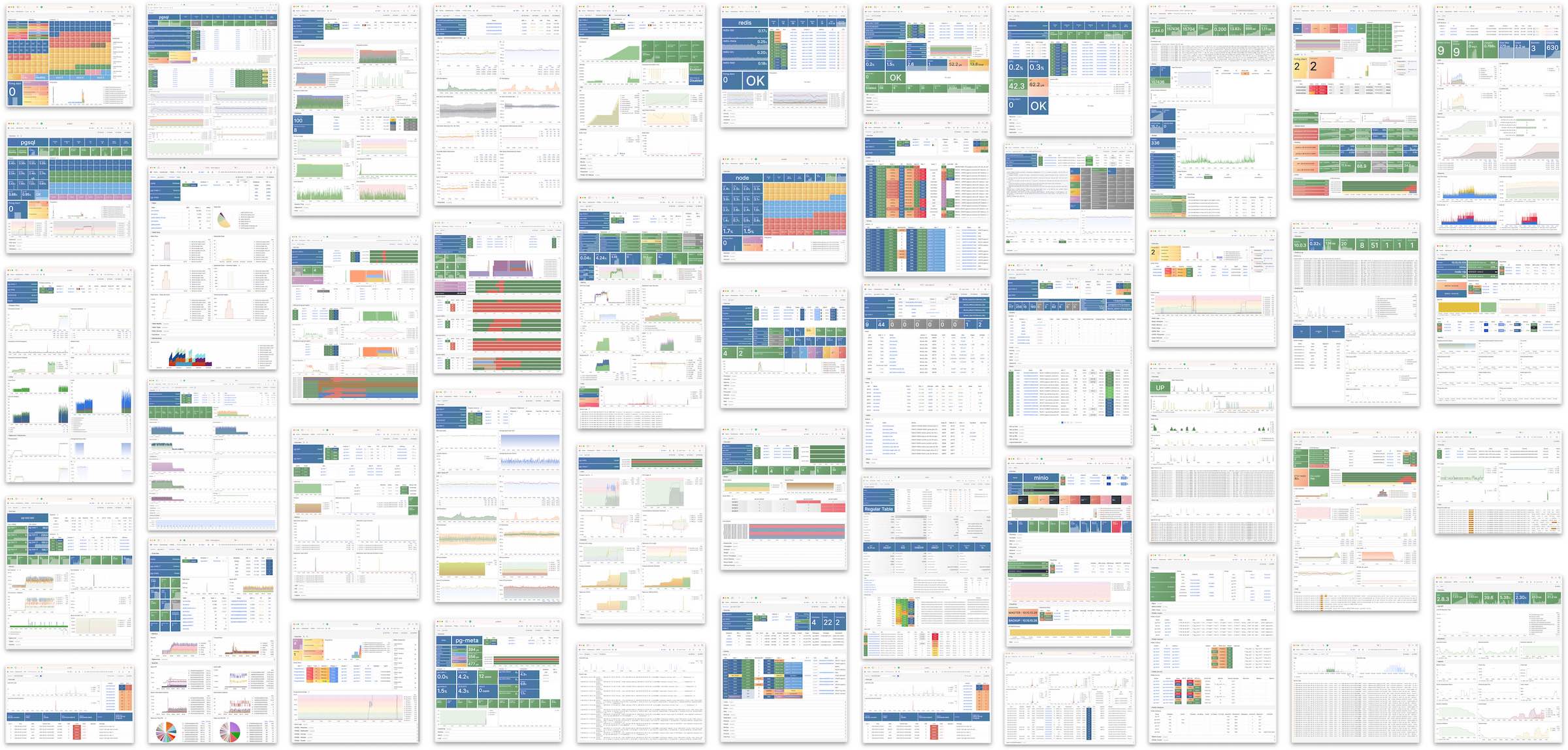
Pigsty will install on a single node (BareMetal / VirtualMachine) by default. The install.yml playbook will install INFRA, ETCD, PGSQL, and optional MINIO modules on the current node, which will give you a full-featured observability infrastructure (Prometheus, Grafana, Loki, AlertManager, PushGateway, BlackboxExporter, etc… ) and a battery-included PostgreSQL Singleton Instance (Named meta).
This node now has a self-monitoring system, visualization toolsets, and a Postgres database with autoconfigured PITR. You can use this node for devbox, testing, running demos, and doing data visualization & analysis. Or, furthermore, adding more nodes to it!
Monitoring
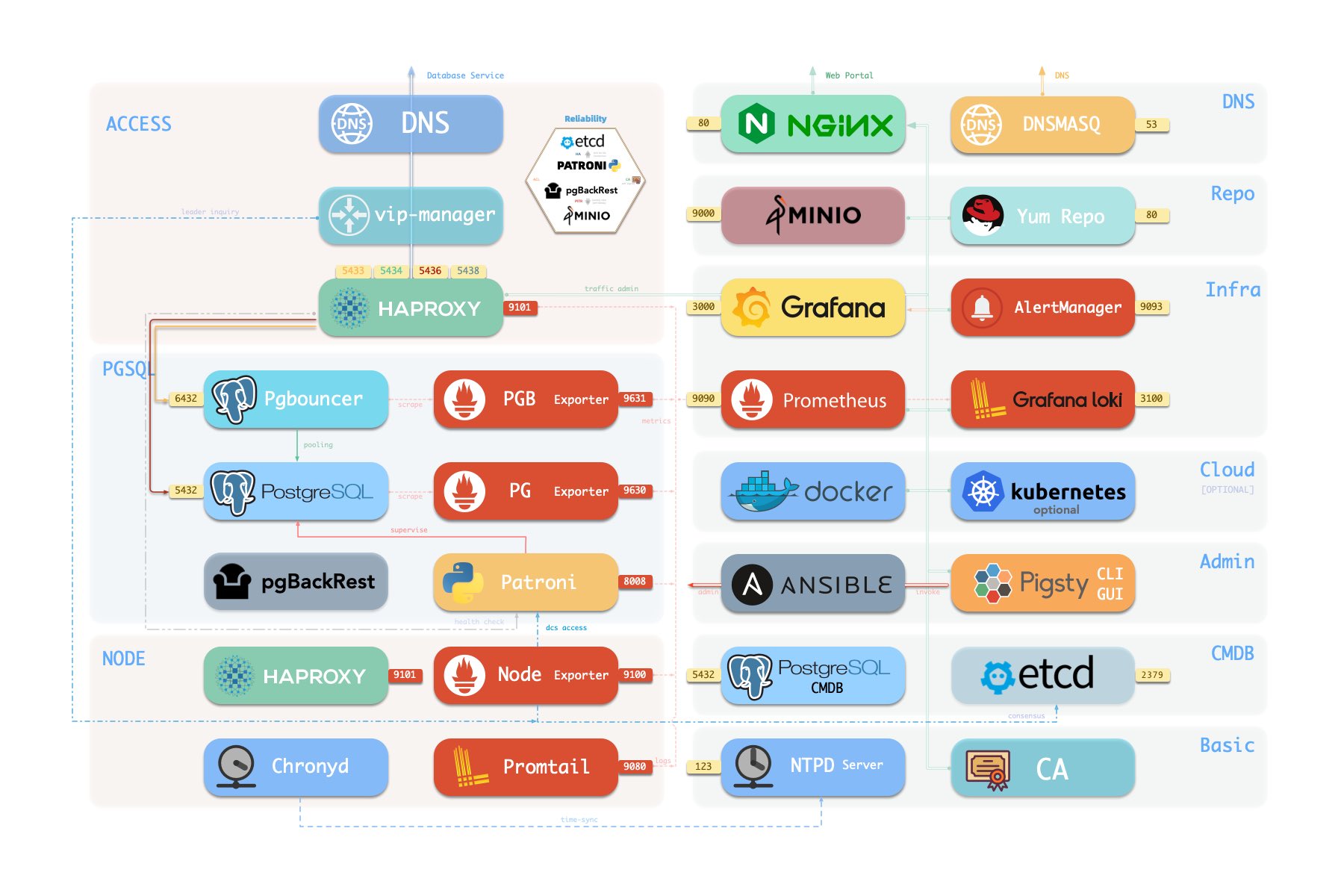
The installed Singleton Meta can be use as an admin node and monitoring center, to take more nodes & Database servers under it’s surveillance & control.
If you want to install the Prometheus / Grafana observability stack, Pigsty just deliver the best practice for you! It has fine-grained dashboards for Nodes & PostgreSQL, no matter these nodes or PostgreSQL servers are managed by Pigsty or not, you can have a production-grade monitoring & alerting immediately with simple configuration.
HA PG Cluster
With Pigsty, you can have your own local production-grade HA PostgreSQL RDS as much as you want.
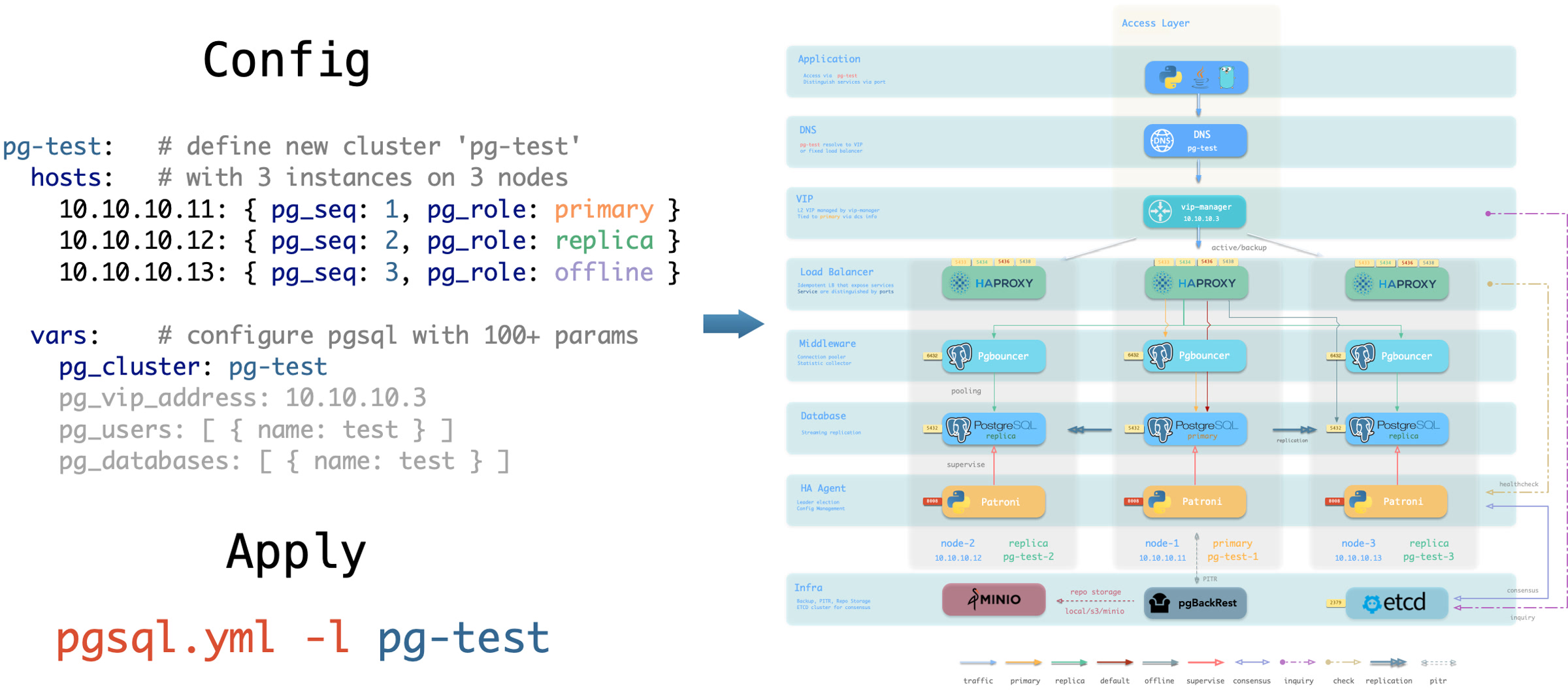
And to create such a HA PostgreSQL cluster, All you have to do is describe it & run the playbook:
Which will gives you a following cluster with monitoring , replica, backup all set.
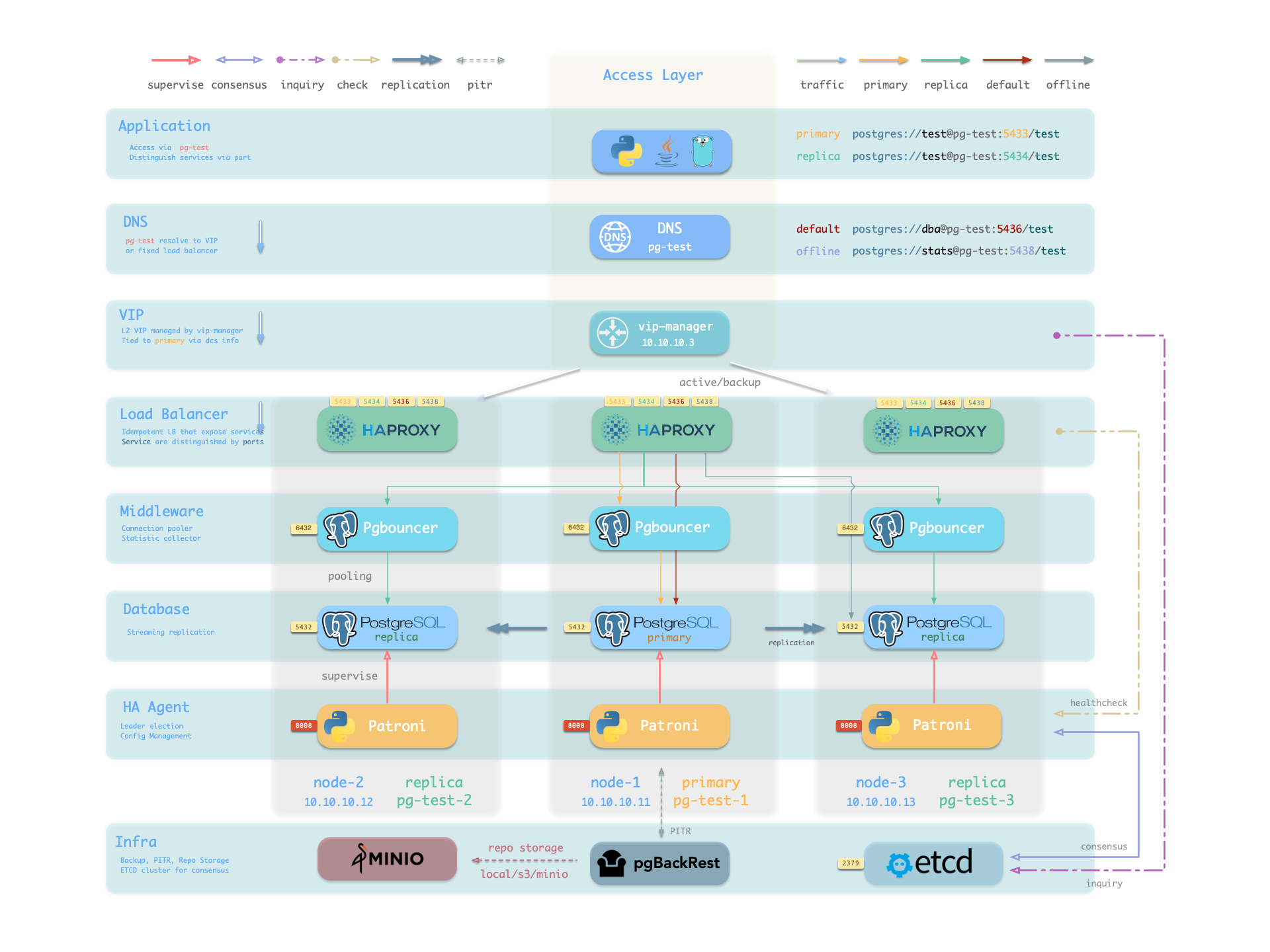
Hardware failures are covered by self-healing HA architecture powered by patroni, etcd, and haproxy, which will perform auto failover in case of leader failure under 30 seconds. With the self-healing traffic control powered by haproxy, the client may not even notice there’s a failure at all, in case of a switchover or replica failure.
Software Failures, human errors, and DC Failure are covered by pgbackrest, and optional MinIO clusters. Which gives you the ability to perform point-in-time recovery to anytime (as long as your storage is capable)
Database as Code
Pigsty follows IaC & GitOPS philosophy: Pigsty deployment is described by declarative Config Inventory and materialized with idempotent playbooks.
The user describes the desired status with Parameters in a declarative manner, and the playbooks tune target nodes into that status in an idempotent manner. It’s like Kubernetes CRD & Operator but works on Bare Metals & Virtual Machines.
Take the default config snippet as an example, which describes a node 10.10.10.10 with modules INFRA, NODE, ETCD, and PGSQL installed.
To materialize it, use the following playbooks:
It would be straightforward to perform regular administration tasks. For example, if you wish to add a new replica/database/user to an existing HA PostgreSQL cluster, all you need to do is add a host in config & run that playbook on it, such as:
You can even manage many PostgreSQL Entities using this approach: User/Role, Database, Service, HBA Rules, Extensions, Schemas, etc…
Check PGSQL Conf for details.