Version v2.7.0 of the documentation is no longer actively maintained. The site that you are currently viewing is an archived snapshot. For up-to-date documentation, see the latest version.
Module: ETCD
ETCD is a distributed, reliable key-value store for the most critical data of a distributed system
Configuration | Administration | Playbook | Dashboard | Parameter
Pigsty use etcd as DCS: Distributed configuration storage (or distributed consensus service). Which is critical to PostgreSQL High-Availability & Auto-Failover.
You have to install ETCD module before any PGSQL modules, since patroni & vip-manager will rely on etcd to work. Unless you are using an external etcd cluster.
You don’t need NODE module to install ETCD, but it requires a valid CA on your local files/pki/ca. Check ETCD Administration SOP for more details.
Configuration
You have to define an etcd cluster before deploying it. There some parameters about etcd.
It is recommending to have at least 3 instances for a serious production environment.
Single Node
Define a group etcd in the inventory, It will create a singleton etcd instance.
This is good enough for development, testing & demonstration, but not recommended in serious production environment.
Three Nodes
You can define etcd cluster with multiple nodes.
You can use more nodes for production environment, but 3 or 5 nodes are recommended. Remember to use odd number for cluster size.
Administration
Here are some useful administration tasks for etcd:
Create Cluster
If etcd_safeguard is true, or etcd_clean is false,
the playbook will abort if any running etcd instance exists to prevent purge etcd by accident.
Destroy Cluster
To destroy an etcd cluster, just use the etcd_clean subtask of etcd.yml, do think before you type.
CLI Environment
Here’s an example of client environment config.
Pigsty use etcd v3 API by default.
CRUD
You can do CRUD with following commands.
Reload Config
If etcd cluster membership changes, we need to refresh etcd endpoints references:
- config file of existing etcd members
- etcdctl client environment variables
- patroni dcs endpoint config
- vip-manager dcs endpoint config
To refresh etcd config file /etc/etcd/etcd.conf on existing members:
To refresh etcdctl client environment variables
To update etcd endpoints reference on patroni:
To update etcd endpoints reference on vip-manager, (optional, if you are using a L2 vip)
Add Member
ETCD Reference: Add a member
You can add new members to existing etcd cluster in 5 steps:
- issue
etcdctl member addcommand to tell existing cluster that a new member is coming (use learner mode) - update inventory group
etcdwith new instance - init the new member with
etcd_init=existing, to join the existing cluster rather than create a new one (VERY IMPORTANT) - promote the new member from leaner to follower
- update etcd endpoints reference with reload-config
Short Version
Detail: Add member to etcd cluster
Here’s the detail, let’s start from one single etcd instance.
Add a learner instance etcd-2 to cluster with etcd member add:
Check the member list with etcdctl member list (or em list), we can see an unstarted member:
Init the new etcd instance etcd-2 with etcd.yml playbook, we can see the new member is started:
Promote the new member, from leaner to follower:
The new member is added, don’t forget to reload config.
Repeat the steps above to add more members. remember to use at least 3 members for production.
Remove Member
To remove a member from existing etcd cluster, it usually takes 3 steps:
- remove/uncomment it from inventory and reload config
- remove it with
etcdctl member remove <server_id>command and kick it out of the cluster - temporarily add it back to inventory and purge that instance, then remove it from inventory permanently
Detail: Remove member from etcd cluster
Here’s the detail, let’s start from a 3 instance etcd cluster:
Then, you’ll have to actually kick it from cluster with etcdctl member remove command:
Finally, you have to shutdown the instance, and purge it from node, you have to uncomment the member in inventory temporarily, then purge it with etcd.yml playbook:
After that, remove the member from inventory permanently, all clear!
Playbook
There’s a built-in playbook: etcd.yml for installing etcd cluster. But you have to define it first.
Here are available sub tasks:
etcd_assert: generate etcd identityetcd_install: install etcd rpm packagesetcd_clean: cleanup existing etcdetcd_check: check etcd instance is runningetcd_purge: remove running etcd instance & data
etcd_dir: create etcd data & conf diretcd_config: generate etcd configetcd_conf: generate etcd main configetcd_cert: generate etcd ssl cert
etcd_launch: launch etcd serviceetcd_register: register etcd to prometheus
If etcd_safeguard is true, or etcd_clean is false,
the playbook will abort if any running etcd instance exists to prevent purge etcd by accident.

Dashboard
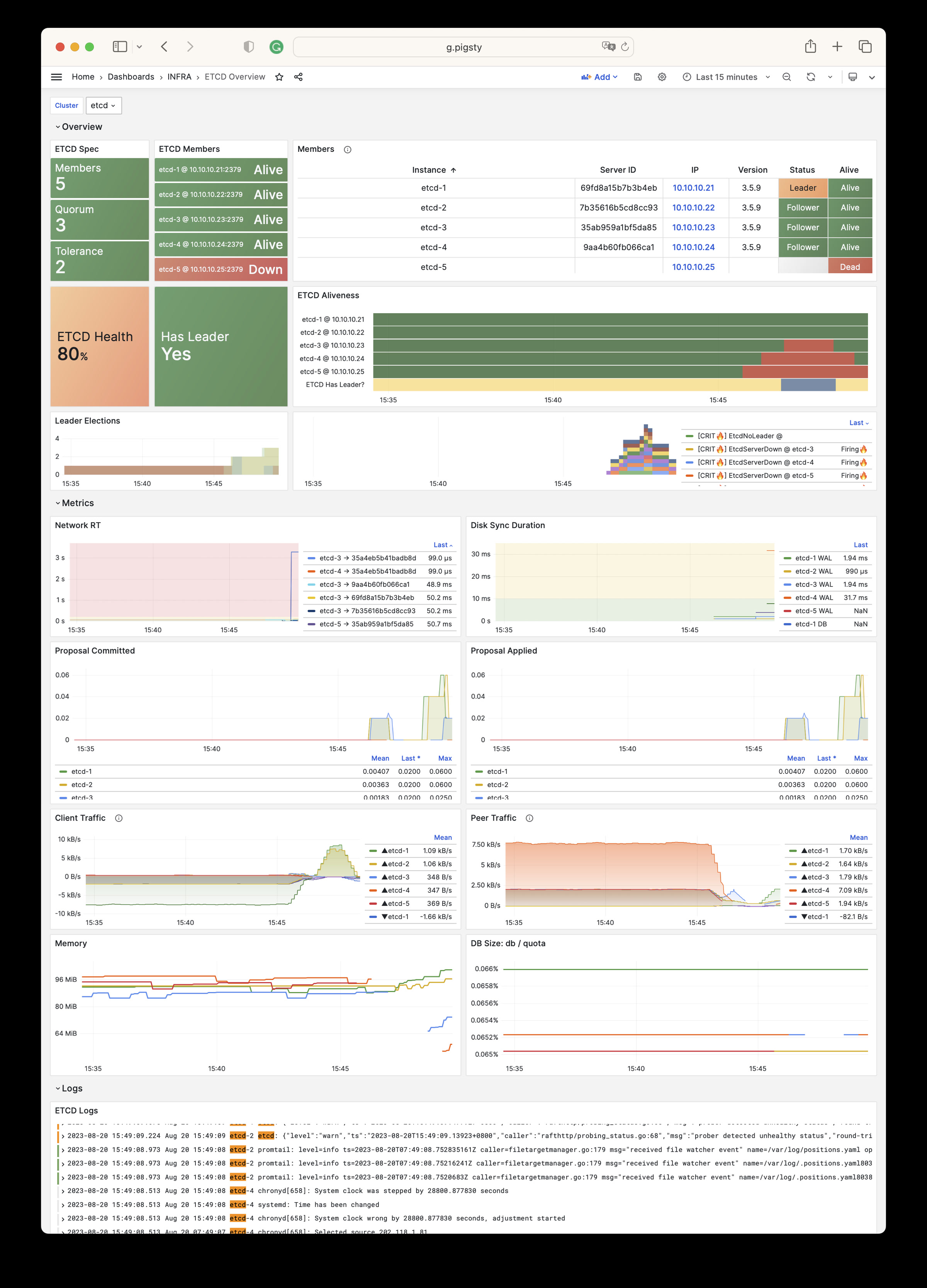
There is one dashboard for ETCD module:
ETCD Overview: Overview of the ETCD cluster
ETCD Overview Dashboard
Parameter
There are 10 parameters about ETCD module.
| Parameter | Type | Level | Comment |
|---|---|---|---|
etcd_seq |
int | I | etcd instance identifier, REQUIRED |
etcd_cluster |
string | C | etcd cluster & group name, etcd by default |
etcd_safeguard |
bool | G/C/A | prevent purging running etcd instance? |
etcd_clean |
bool | G/C/A | purging existing etcd during initialization? |
etcd_data |
path | C | etcd data directory, /data/etcd by default |
etcd_port |
port | C | etcd client port, 2379 by default |
etcd_peer_port |
port | C | etcd peer port, 2380 by default |
etcd_init |
enum | C | etcd initial cluster state, new or existing |
etcd_election_timeout |
int | C | etcd election timeout, 1000ms by default |
etcd_heartbeat_interval |
int | C | etcd heartbeat interval, 100ms by default |