Architecture
Component Overview
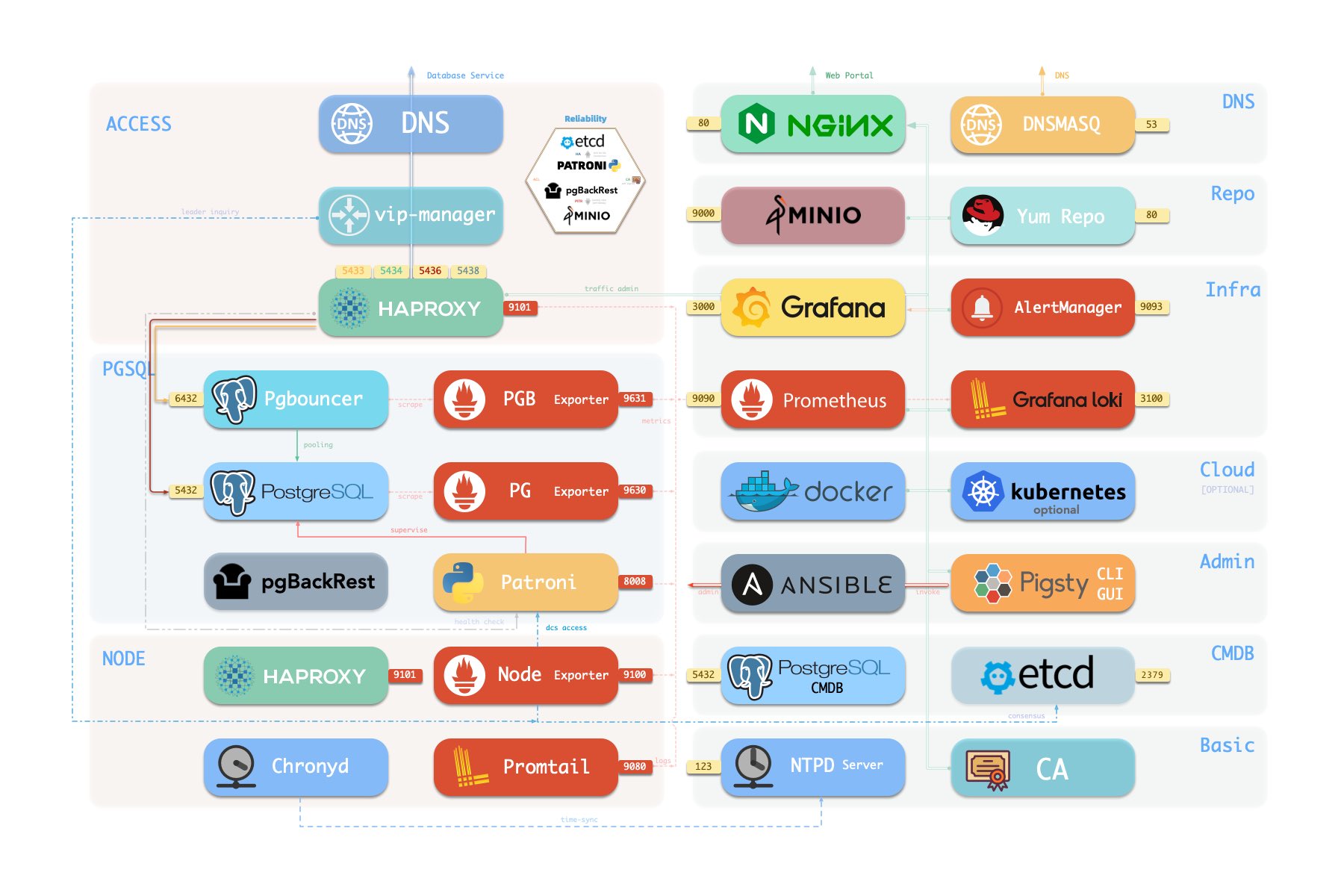
Here is how PostgreSQL module components and their interactions. From top to bottom:
- Cluster DNS is resolved by DNSMASQ on infra nodes
- Cluster VIP is manged by
vip-manager, which will bind to cluster primary.vip-managerwill acquire cluster leader info written bypatronifrometcdcluster directly
- Cluster services are exposed by Haproxy on nodes, services are distinguished by node ports (543x).
- Haproxy port 9101: monitoring metrics & stats & admin page
- Haproxy port 5433: default service that routes to primary pgbouncer: primary
- Haproxy port 5434: default service that routes to replica pgbouncer: replica
- Haproxy port 5436: default service that routes to primary postgres: default
- Haproxy port 5438: default service that routeroutesto offline postgres: offline
- HAProxy will route traffic based on health check information provided by
patroni.
- Pgbouncer is a connection pool middleware that buffers connections, exposes extra metrics, and brings extra flexibility @ port 6432
- Pgbouncer is stateless and deployed with the Postgres server in a 1:1 manner through a local unix socket.
- Production traffic (Primary/Replica) will go through pgbouncer by default (can be skipped by
pg_default_service_dest) - Default/Offline service will always bypass pgbouncer and connect to target Postgres directly.
- Postgres provides relational database services @ port 5432
- Install PGSQL module on multiple nodes will automatically form a HA cluster based on streaming replication
- PostgreSQL is supervised by
patroniby default.
- Patroni will supervise PostgreSQL server @ port 8008 by default
- Patroni spawn postgres servers as the child process
- Patroni uses
etcdas DCS: config storage, failure detection, and leader election. - Patroni will provide Postgres information through a health check. Which is used by HAProxy
- Patroni metrics will be scraped by prometheus on infra nodes
- PG Exporter will expose postgres metrics @ port 9630
- PostgreSQL’s metrics will be scraped by prometheus on infra nodes
- Pgbouncer Exporter will expose pgbouncer metrics @ port 9631
- Pgbouncer’s metrics will be scraped by prometheus on infra nodes
- pgBackRest will work on the local repo by default (
pgbackrest_method)- If
local(default) is used as the backup repo, pgBackRest will create local repo under the primary’spg_fs_bkup - If
miniois used as the backup repo, pgBackRest will create the repo on the dedicated MinIO cluster inpgbackrest_repo.minio
- If
- Postgres-related logs (postgres,pgbouncer,patroni,pgbackrest) are exposed by promtail @ port 9080
- Promtail will send logs to Loki on infra nodes
High Availability
Primary Failure RTO ≈ 30s, RPO < 1MB, Replica Failure RTO≈0 (reset current conn)
Pigsty’s PostgreSQL cluster has battery-included high-availability powered by patroni, etcd, and haproxy
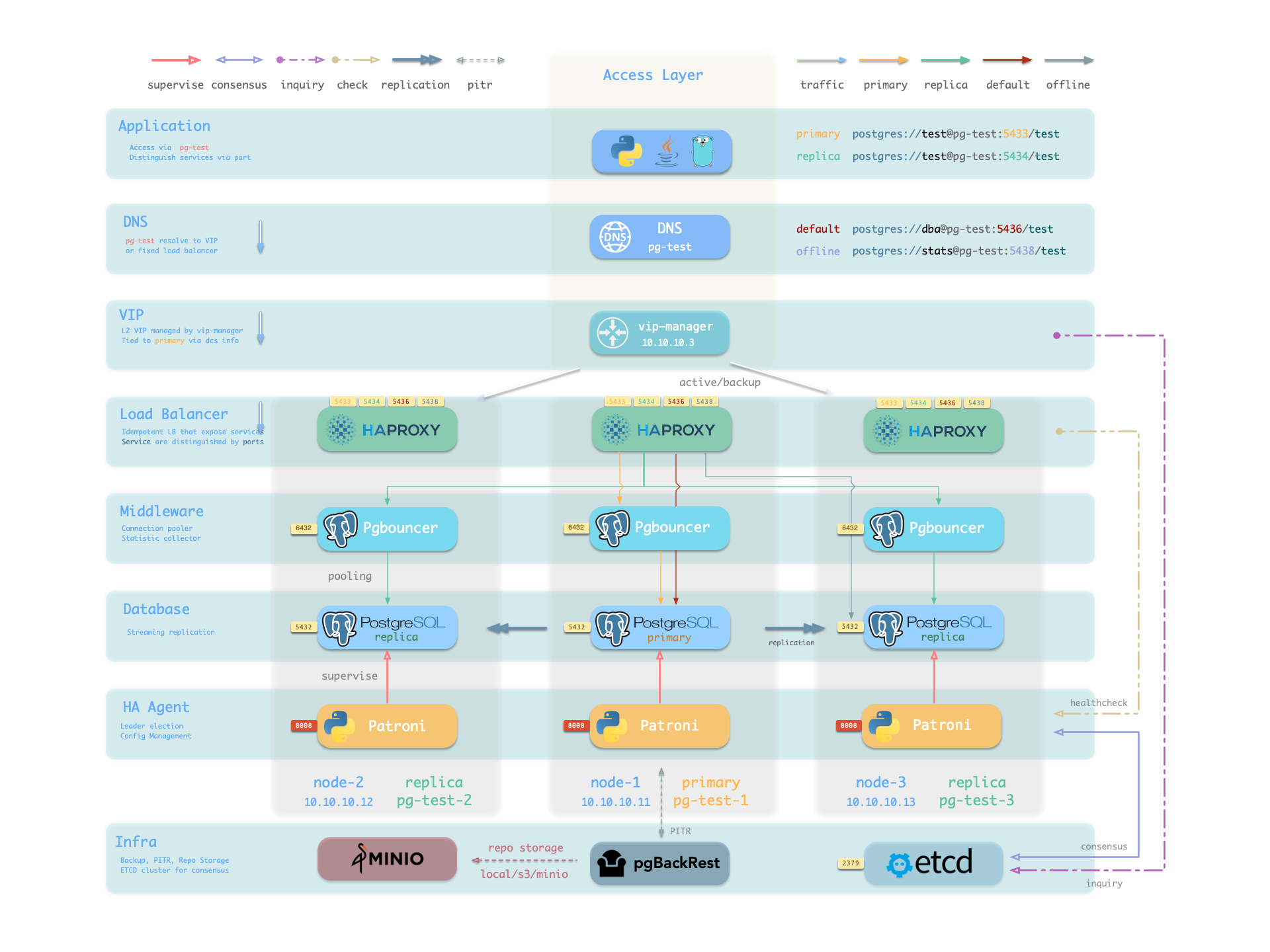
When the primary fails, one of the replicas will be promoted to primary automatically, and read-write traffic will be routed to the new primary immediately. The impact is: write queries will be blocked for 15 ~ 40s until the new leader is elected.
When a replica fails, read-only traffic will be routed to the other replicas, if all replicas fail, read-only traffic will fall back to the primary. The impact would be very small: a few running queries on that replica will abort due to a connection reset.
Failure detection is done by patroni and etcd, the leader will hold a lease, and if it fails, the lease will be released due to timeout, and the other instance will elect a new leader to take over.
The ttl can be tuned with pg_rto, which is 30s by default, increasing it will cause longer failover wait time, while decreasing it will increase the false-positive failover rate (e.g. network jitter).
Pigsty will use availability first mode by default, which means when primary fails, it will try to failover ASAP, data not replicated to the replica may be lost (usually 100KB), and the max potential data loss is controlled by pg_rpo, which is 1MB by default.
Point-In-Time Recovery
Rollback clusters to a past state to mitigate data loss from software bugs or human errors.
Pigsty’s PostgreSQL cluster features auto-configured PITR, leveraging pgBackRest and, optionally, MinIO.
While high availability counters hardware failures, it’s not effective against unintentional data deletions or overwrites: changes sync and apply to replicas instantly. PITR fill this gap. If operating a single instance, PITR can serve as a high availability substitute, providing a safety net.
For cluster rollback to a specific backup, users should maintain regular base backups. For rollbacks to arbitrary points, WAL archives since the last backup are required. Pigsty automates these with pgBackRest for backup management, WAL archiving, and PITR execution.
Backup repositories are configurable (pgbackrest_repo): defaulting to the primary’s local file system (local), but alternatives include other disk paths, bundled MinIO (minio), or cloud S3 services.
Out-of-the-box, Pigsty has two backup strategies: local file system repository with daily full backups or dedicated MinIO/S3 storage with weekly full and daily incremental backups, retaining two weeks’ worth by default.