This is the multi-page printable view of this section. .
Module: PGSQL
- 1: Architecture
- 2: Users
- 3: Databases
- 4: Services
- 5: Extensions
- 6: Authentication
- 7: Configuration
- 8: Playbook
- 9: Administration
- 10: Access Control
- 11: Backup & PITR
- 12: Migration
- 13: Monitoring
- 14: Dashboards
- 15: Metrics
- 16: FAQ
- 17: PGSQL Architecture
The most advanced open-source relational database in the world!
With battery-included observability, reliability, and maintainability powered by Pigsty
Concept
Overview of PostgreSQL in Pigsty
- Architecture
- Configuration
- Extensions
- Databases
- Users
- Services
- HBA Rules
- Access Control
- Administration
- Backup & PITR
- Monitor
- Migration
Configuration
Describe the cluster you want
- Identity: Parameters used for describing a PostgreSQL cluster
- Primary: Define a single instance cluster
- Replica: Define a basic HA cluster with one primary & one replica
- Offline: Define a dedicated instance for OLAP/ETL/Interactive queries.
- Sync Standby: Enable synchronous commit to ensure no data loss
- Quorum Commit: Use quorum sync commit for an even higher consistency level
- Standby Cluster: Clone an existing cluster and follow it
- Delayed Cluster: Clone an existing cluster for emergency data recovery
- Citus Cluster: Define a Citus distributed database cluster
- Major Version: Define a PostgreSQL cluster with specific major version
Administration
Admin your existing clusters
Admin CheatsheetCreate ClusterCreate UserCreate DatabaseReload ServiceReload HBARuleConfig ClusterAppend ReplicaRemove ReplicaRemove ClusterSwitchover ClusterBackup ClusterRestore Cluster
Playbook
Materialize the cluster with idempotent playbooks
pgsql.yml: Init HA PostgreSQL clusters or add new replicas.pgsql-rm.yml: Remove PostgreSQL cluster, or remove replicaspgsql-user.yml: Add new business user to existing PostgreSQL clusterpgsql-db.yml: Add new business database to existing PostgreSQL clusterpgsql-monitor.yml: Monitor remote PostgreSQL instance with local exporterspgsql-migration.yml: Generate Migration manual & scripts for existing PostgreSQL
Example: Install PGSQL module

Example: Remove PGSQL module

Dashboard
There are 26 default grafana dashboards about PostgreSQL and categorized into 4 levels. Check Dashboards for details.
Parameter
API Reference for PGSQL module:
PG_ID: Calculate & Check Postgres IdentityPG_BUSINESS: Postgres Business Object DefinitionPG_INSTALL: Install PGSQL Packages & ExtensionsPG_BOOTSTRAP: Init a HA Postgres Cluster with PatroniPG_PROVISION: Create users, databases, and in-database objectsPG_BACKUP: Setup backup repo with pgbackrestPG_SERVICE: Exposing pg service, bind vip and register DNSPG_EXPORTER: Add Monitor for PGSQL Instance
Parameters
| Parameter | Section | Type | Level | Comment |
|---|---|---|---|---|
pg_mode |
PG_ID |
enum | C | pgsql cluster mode: pgsql,citus,gpsql |
pg_cluster |
PG_ID |
string | C | pgsql cluster name, REQUIRED identity parameter |
pg_seq |
PG_ID |
int | I | pgsql instance seq number, REQUIRED identity parameter |
pg_role |
PG_ID |
enum | I | pgsql role, REQUIRED, could be primary,replica,offline |
pg_instances |
PG_ID |
dict | I | define multiple pg instances on node in {port:ins_vars} format |
pg_upstream |
PG_ID |
ip | I | repl upstream ip addr for standby cluster or cascade replica |
pg_shard |
PG_ID |
string | C | pgsql shard name, optional identity for sharding clusters |
pg_group |
PG_ID |
int | C | pgsql shard index number, optional identity for sharding clusters |
gp_role |
PG_ID |
enum | C | greenplum role of this cluster, could be master or segment |
pg_exporters |
PG_ID |
dict | C | additional pg_exporters to monitor remote postgres instances |
pg_offline_query |
PG_ID |
bool | I | set to true to enable offline query on this instance |
pg_users |
PG_BUSINESS |
user[] | C | postgres business users |
pg_databases |
PG_BUSINESS |
database[] | C | postgres business databases |
pg_services |
PG_BUSINESS |
service[] | C | postgres business services |
pg_hba_rules |
PG_BUSINESS |
hba[] | C | business hba rules for postgres |
pgb_hba_rules |
PG_BUSINESS |
hba[] | C | business hba rules for pgbouncer |
pg_replication_username |
PG_BUSINESS |
username | G | postgres replication username, replicator by default |
pg_replication_password |
PG_BUSINESS |
password | G | postgres replication password, DBUser.Replicator by default |
pg_admin_username |
PG_BUSINESS |
username | G | postgres admin username, dbuser_dba by default |
pg_admin_password |
PG_BUSINESS |
password | G | postgres admin password in plain text, DBUser.DBA by default |
pg_monitor_username |
PG_BUSINESS |
username | G | postgres monitor username, dbuser_monitor by default |
pg_monitor_password |
PG_BUSINESS |
password | G | postgres monitor password, DBUser.Monitor by default |
pg_dbsu_password |
PG_BUSINESS |
password | G/C | dbsu password, empty string means no dbsu password by default |
pg_dbsu |
PG_INSTALL |
username | C | os dbsu name, postgres by default, better not change it |
pg_dbsu_uid |
PG_INSTALL |
int | C | os dbsu uid and gid, 26 for default postgres users and groups |
pg_dbsu_sudo |
PG_INSTALL |
enum | C | dbsu sudo privilege, none,limit,all,nopass. limit by default |
pg_dbsu_home |
PG_INSTALL |
path | C | postgresql home directory, /var/lib/pgsql by default |
pg_dbsu_ssh_exchange |
PG_INSTALL |
bool | C | exchange postgres dbsu ssh key among same pgsql cluster |
pg_version |
PG_INSTALL |
enum | C | postgres major version to be installed, 16 by default |
pg_bin_dir |
PG_INSTALL |
path | C | postgres binary dir, /usr/pgsql/bin by default |
pg_log_dir |
PG_INSTALL |
path | C | postgres log dir, /pg/log/postgres by default |
pg_packages |
PG_INSTALL |
string[] | C | pg packages to be installed, ${pg_version} will be replaced |
pg_extensions |
PG_INSTALL |
string[] | C | pg extensions to be installed, ${pg_version} will be replaced |
pg_safeguard |
PG_BOOTSTRAP |
bool | G/C/A | prevent purging running postgres instance? false by default |
pg_clean |
PG_BOOTSTRAP |
bool | G/C/A | purging existing postgres during pgsql init? true by default |
pg_data |
PG_BOOTSTRAP |
path | C | postgres data directory, /pg/data by default |
pg_fs_main |
PG_BOOTSTRAP |
path | C | mountpoint/path for postgres main data, /data by default |
pg_fs_bkup |
PG_BOOTSTRAP |
path | C | mountpoint/path for pg backup data, /data/backup by default |
pg_storage_type |
PG_BOOTSTRAP |
enum | C | storage type for pg main data, SSD,HDD, SSD by default |
pg_dummy_filesize |
PG_BOOTSTRAP |
size | C | size of /pg/dummy, hold 64MB disk space for emergency use |
pg_listen |
PG_BOOTSTRAP |
ip(s) | C/I | postgres/pgbouncer listen addresses, comma separated list |
pg_port |
PG_BOOTSTRAP |
port | C | postgres listen port, 5432 by default |
pg_localhost |
PG_BOOTSTRAP |
path | C | postgres unix socket dir for localhost connection |
pg_namespace |
PG_BOOTSTRAP |
path | C | top level key namespace in etcd, used by patroni & vip |
patroni_enabled |
PG_BOOTSTRAP |
bool | C | if disabled, no postgres cluster will be created during init |
patroni_mode |
PG_BOOTSTRAP |
enum | C | patroni working mode: default,pause,remove |
patroni_port |
PG_BOOTSTRAP |
port | C | patroni listen port, 8008 by default |
patroni_log_dir |
PG_BOOTSTRAP |
path | C | patroni log dir, /pg/log/patroni by default |
patroni_ssl_enabled |
PG_BOOTSTRAP |
bool | G | secure patroni RestAPI communications with SSL? |
patroni_watchdog_mode |
PG_BOOTSTRAP |
enum | C | patroni watchdog mode: automatic,required,off. off by default |
patroni_username |
PG_BOOTSTRAP |
username | C | patroni restapi username, postgres by default |
patroni_password |
PG_BOOTSTRAP |
password | C | patroni restapi password, Patroni.API by default |
patroni_citus_db |
PG_BOOTSTRAP |
string | C | citus database managed by patroni, postgres by default |
pg_conf |
PG_BOOTSTRAP |
enum | C | config template: oltp,olap,crit,tiny. oltp.yml by default |
pg_max_conn |
PG_BOOTSTRAP |
int | C | postgres max connections, auto will use recommended value |
pg_shared_buffer_ratio |
PG_BOOTSTRAP |
float | C | postgres shared buffer memory ratio, 0.25 by default, 0.1~0.4 |
pg_rto |
PG_BOOTSTRAP |
int | C | recovery time objective in seconds, 30s by default |
pg_rpo |
PG_BOOTSTRAP |
int | C | recovery point objective in bytes, 1MiB at most by default |
pg_libs |
PG_BOOTSTRAP |
string | C | preloaded libraries, pg_stat_statements,auto_explain by default |
pg_delay |
PG_BOOTSTRAP |
interval | I | replication apply delay for standby cluster leader |
pg_checksum |
PG_BOOTSTRAP |
bool | C | enable data checksum for postgres cluster? |
pg_pwd_enc |
PG_BOOTSTRAP |
enum | C | passwords encryption algorithm: md5,scram-sha-256 |
pg_encoding |
PG_BOOTSTRAP |
enum | C | database cluster encoding, UTF8 by default |
pg_locale |
PG_BOOTSTRAP |
enum | C | database cluster local, C by default |
pg_lc_collate |
PG_BOOTSTRAP |
enum | C | database cluster collate, C by default |
pg_lc_ctype |
PG_BOOTSTRAP |
enum | C | database character type, en_US.UTF8 by default |
pgbouncer_enabled |
PG_BOOTSTRAP |
bool | C | if disabled, pgbouncer will not be launched on pgsql host |
pgbouncer_port |
PG_BOOTSTRAP |
port | C | pgbouncer listen port, 6432 by default |
pgbouncer_log_dir |
PG_BOOTSTRAP |
path | C | pgbouncer log dir, /pg/log/pgbouncer by default |
pgbouncer_auth_query |
PG_BOOTSTRAP |
bool | C | query postgres to retrieve unlisted business users? |
pgbouncer_poolmode |
PG_BOOTSTRAP |
enum | C | pooling mode: transaction,session,statement, transaction by default |
pgbouncer_sslmode |
PG_BOOTSTRAP |
enum | C | pgbouncer client ssl mode, disable by default |
pg_provision |
PG_PROVISION |
bool | C | provision postgres cluster after bootstrap |
pg_init |
PG_PROVISION |
string | G/C | provision init script for cluster template, pg-init by default |
pg_default_roles |
PG_PROVISION |
role[] | G/C | default roles and users in postgres cluster |
pg_default_privileges |
PG_PROVISION |
string[] | G/C | default privileges when created by admin user |
pg_default_schemas |
PG_PROVISION |
string[] | G/C | default schemas to be created |
pg_default_extensions |
PG_PROVISION |
extension[] | G/C | default extensions to be created |
pg_reload |
PG_PROVISION |
bool | A | reload postgres after hba changes |
pg_default_hba_rules |
PG_PROVISION |
hba[] | G/C | postgres default host-based authentication rules |
pgb_default_hba_rules |
PG_PROVISION |
hba[] | G/C | pgbouncer default host-based authentication rules |
pgbackrest_enabled |
PG_BACKUP |
bool | C | enable pgbackrest on pgsql host? |
pgbackrest_clean |
PG_BACKUP |
bool | C | remove pg backup data during init? |
pgbackrest_log_dir |
PG_BACKUP |
path | C | pgbackrest log dir, /pg/log/pgbackrest by default |
pgbackrest_method |
PG_BACKUP |
enum | C | pgbackrest repo method: local,minio,etc… |
pgbackrest_repo |
PG_BACKUP |
dict | G/C | pgbackrest repo: https://pgbackrest.org/configuration.html#section-repository |
pg_weight |
PG_SERVICE |
int | I | relative load balance weight in service, 100 by default, 0-255 |
pg_service_provider |
PG_SERVICE |
enum | G/C | dedicate haproxy node group name, or empty string for local nodes by default |
pg_default_service_dest |
PG_SERVICE |
enum | G/C | default service destination if svc.dest=‘default’ |
pg_default_services |
PG_SERVICE |
service[] | G/C | postgres default service definitions |
pg_vip_enabled |
PG_SERVICE |
bool | C | enable a l2 vip for pgsql primary? false by default |
pg_vip_address |
PG_SERVICE |
cidr4 | C | vip address in <ipv4>/<mask> format, require if vip is enabled |
pg_vip_interface |
PG_SERVICE |
string | C/I | vip network interface to listen, eth0 by default |
pg_dns_suffix |
PG_SERVICE |
string | C | pgsql dns suffix, ’’ by default |
pg_dns_target |
PG_SERVICE |
enum | C | auto, primary, vip, none, or ad hoc ip |
pg_exporter_enabled |
PG_EXPORTER |
bool | C | enable pg_exporter on pgsql hosts? |
pg_exporter_config |
PG_EXPORTER |
string | C | pg_exporter configuration file name |
pg_exporter_cache_ttls |
PG_EXPORTER |
string | C | pg_exporter collector ttl stage in seconds, ‘1,10,60,300’ by default |
pg_exporter_port |
PG_EXPORTER |
port | C | pg_exporter listen port, 9630 by default |
pg_exporter_params |
PG_EXPORTER |
string | C | extra url parameters for pg_exporter dsn |
pg_exporter_url |
PG_EXPORTER |
pgurl | C | overwrite auto-generate pg dsn if specified |
pg_exporter_auto_discovery |
PG_EXPORTER |
bool | C | enable auto database discovery? enabled by default |
pg_exporter_exclude_database |
PG_EXPORTER |
string | C | csv of database that WILL NOT be monitored during auto-discovery |
pg_exporter_include_database |
PG_EXPORTER |
string | C | csv of database that WILL BE monitored during auto-discovery |
pg_exporter_connect_timeout |
PG_EXPORTER |
int | C | pg_exporter connect timeout in ms, 200 by default |
pg_exporter_options |
PG_EXPORTER |
arg | C | overwrite extra options for pg_exporter |
pgbouncer_exporter_enabled |
PG_EXPORTER |
bool | C | enable pgbouncer_exporter on pgsql hosts? |
pgbouncer_exporter_port |
PG_EXPORTER |
port | C | pgbouncer_exporter listen port, 9631 by default |
pgbouncer_exporter_url |
PG_EXPORTER |
pgurl | C | overwrite auto-generate pgbouncer dsn if specified |
pgbouncer_exporter_options |
PG_EXPORTER |
arg | C | overwrite extra options for pgbouncer_exporter |
Tutorials
- Fork an existing PostgreSQL cluster.
- Create a standby cluster of an existing PostgreSQL cluster.
- Create a delayed cluster of another pgsql cluster?
- Monitoring an existing postgres instance?
- Migration from an external PostgreSQL with logical replication?
- Use MinIO as a central pgBackRest repo.
- Use dedicate etcd cluster for DCS?
- Use dedicated haproxy for exposing PostgreSQL service.
- Deploy a multi-node MinIO cluster?
- Use CMDB instead of Config as inventory.
- Use PostgreSQL as grafana backend storage ?
- Use PostgreSQL as prometheus backend storage ?
1 - Architecture
Component Overview
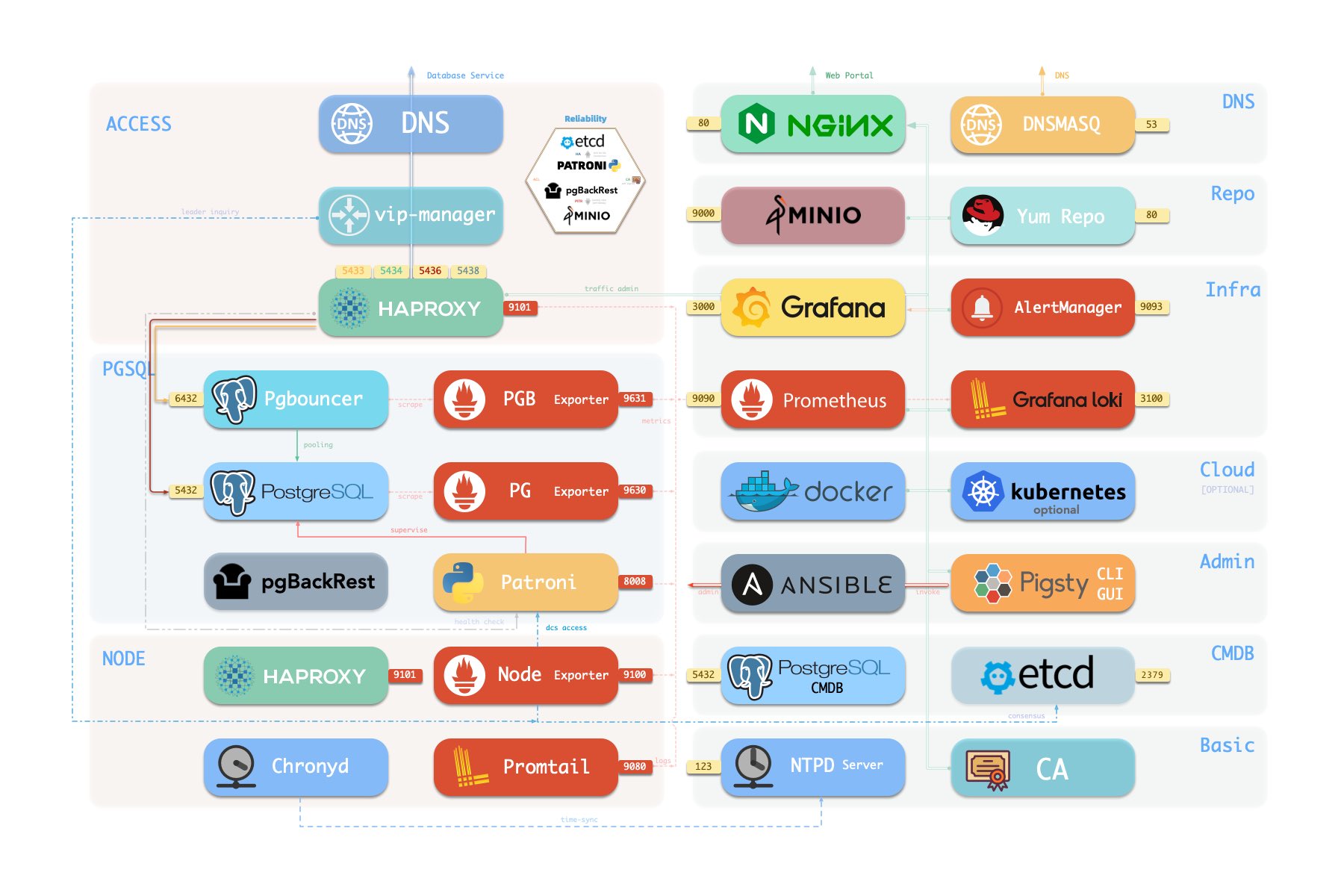
Here is how PostgreSQL module components and their interactions. From top to bottom:
- Cluster DNS is resolved by DNSMASQ on infra nodes
- Cluster VIP is manged by
vip-manager, which will bind to cluster primary.vip-managerwill acquire cluster leader info written bypatronifrometcdcluster directly
- Cluster services are exposed by Haproxy on nodes, services are distinguished by node ports (543x).
- Haproxy port 9101: monitoring metrics & stats & admin page
- Haproxy port 5433: default service that routes to primary pgbouncer: primary
- Haproxy port 5434: default service that routes to replica pgbouncer: replica
- Haproxy port 5436: default service that routes to primary postgres: default
- Haproxy port 5438: default service that routeroutesto offline postgres: offline
- HAProxy will route traffic based on health check information provided by
patroni.
- Pgbouncer is a connection pool middleware that buffers connections, exposes extra metrics, and brings extra flexibility @ port 6432
- Pgbouncer is stateless and deployed with the Postgres server in a 1:1 manner through a local unix socket.
- Production traffic (Primary/Replica) will go through pgbouncer by default (can be skipped by
pg_default_service_dest) - Default/Offline service will always bypass pgbouncer and connect to target Postgres directly.
- Postgres provides relational database services @ port 5432
- Install PGSQL module on multiple nodes will automatically form a HA cluster based on streaming replication
- PostgreSQL is supervised by
patroniby default.
- Patroni will supervise PostgreSQL server @ port 8008 by default
- Patroni spawn postgres servers as the child process
- Patroni uses
etcdas DCS: config storage, failure detection, and leader election. - Patroni will provide Postgres information through a health check. Which is used by HAProxy
- Patroni metrics will be scraped by prometheus on infra nodes
- PG Exporter will expose postgres metrics @ port 9630
- PostgreSQL’s metrics will be scraped by prometheus on infra nodes
- Pgbouncer Exporter will expose pgbouncer metrics @ port 9631
- Pgbouncer’s metrics will be scraped by prometheus on infra nodes
- pgBackRest will work on the local repo by default (
pgbackrest_method)- If
local(default) is used as the backup repo, pgBackRest will create local repo under the primary’spg_fs_bkup - If
miniois used as the backup repo, pgBackRest will create the repo on the dedicated MinIO cluster inpgbackrest_repo.minio
- If
- Postgres-related logs (postgres,pgbouncer,patroni,pgbackrest) are exposed by promtail @ port 9080
- Promtail will send logs to Loki on infra nodes
High Availability
Primary Failure RTO ≈ 30s, RPO < 1MB, Replica Failure RTO≈0 (reset current conn)
Pigsty’s PostgreSQL cluster has battery-included high-availability powered by patroni, etcd, and haproxy
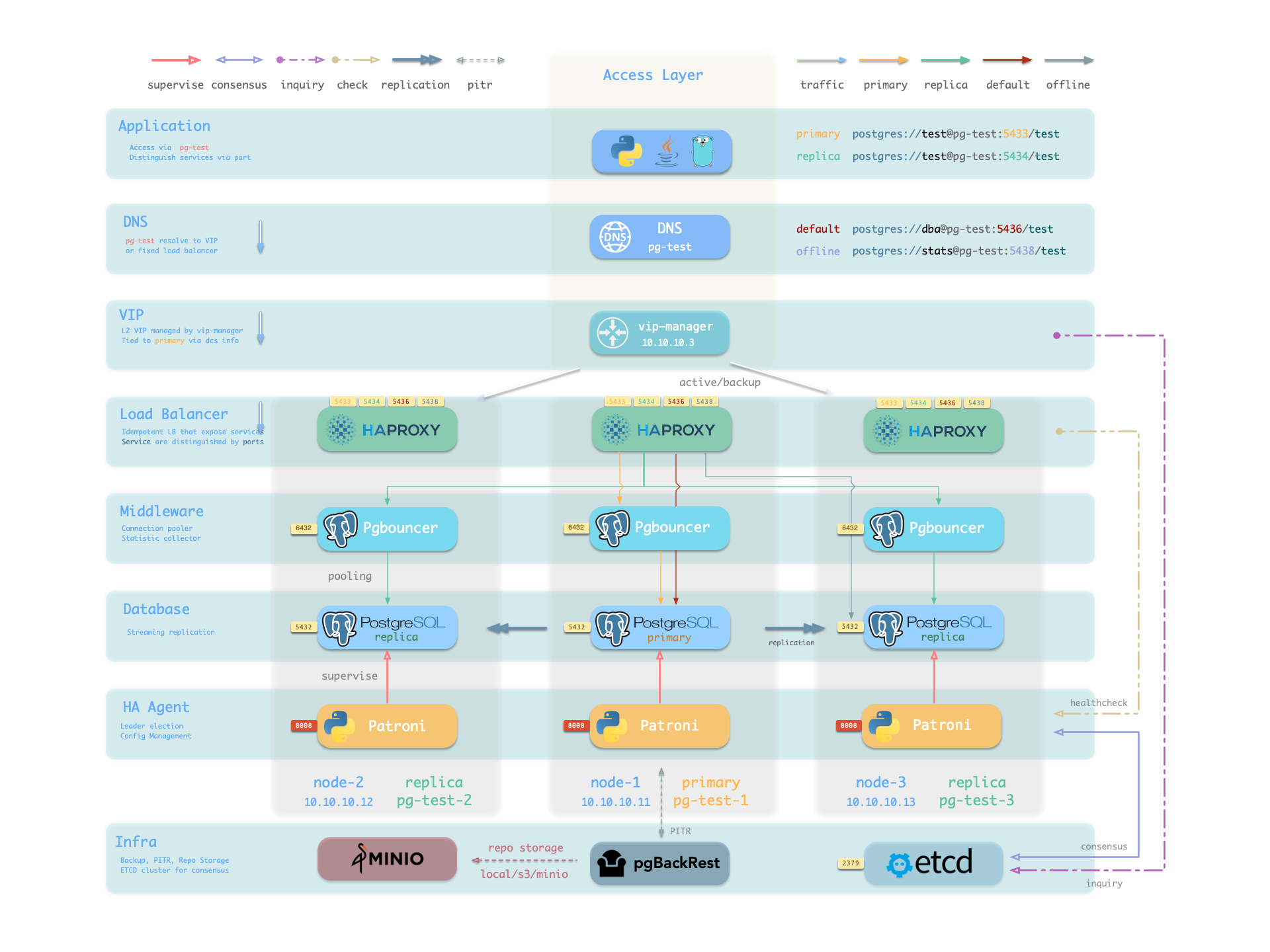
When the primary fails, one of the replicas will be promoted to primary automatically, and read-write traffic will be routed to the new primary immediately. The impact is: write queries will be blocked for 15 ~ 40s until the new leader is elected.
When a replica fails, read-only traffic will be routed to the other replicas, if all replicas fail, read-only traffic will fall back to the primary. The impact would be very small: a few running queries on that replica will abort due to a connection reset.
Failure detection is done by patroni and etcd, the leader will hold a lease, and if it fails, the lease will be released due to timeout, and the other instance will elect a new leader to take over.
The ttl can be tuned with pg_rto, which is 30s by default, increasing it will cause longer failover wait time, while decreasing it will increase the false-positive failover rate (e.g. network jitter).
Pigsty will use availability first mode by default, which means when primary fails, it will try to failover ASAP, data not replicated to the replica may be lost (usually 100KB), and the max potential data loss is controlled by pg_rpo, which is 1MB by default.
Point-In-Time Recovery
Rollback clusters to a past state to mitigate data loss from software bugs or human errors.
Pigsty’s PostgreSQL cluster features auto-configured PITR, leveraging pgBackRest and, optionally, MinIO.
While high availability counters hardware failures, it’s not effective against unintentional data deletions or overwrites: changes sync and apply to replicas instantly. PITR fill this gap. If operating a single instance, PITR can serve as a high availability substitute, providing a safety net.
For cluster rollback to a specific backup, users should maintain regular base backups. For rollbacks to arbitrary points, WAL archives since the last backup are required. Pigsty automates these with pgBackRest for backup management, WAL archiving, and PITR execution.
Backup repositories are configurable (pgbackrest_repo): defaulting to the primary’s local file system (local), but alternatives include other disk paths, bundled MinIO (minio), or cloud S3 services.
Out-of-the-box, Pigsty has two backup strategies: local file system repository with daily full backups or dedicated MinIO/S3 storage with weekly full and daily incremental backups, retaining two weeks’ worth by default.
2 - Users
CREATE USER/ROLEIn this context, the User refers to objects created by SQL
CREATE USER/ROLE.
Define User
There are two parameters related to users:
pg_users: Define business users & roles at cluster levelpg_default_roles: Define system-wide roles & global users at global level
They are both arrays of user/role definition. You can define multiple users/roles in one cluster.
And each user definition may look like:
- The only required field is
name, which should be a valid & unique username in PostgreSQL. - Roles don’t need a
password, while it could be necessary for a login-able user. - The
passwordcan be plain text or a scram-sha-256 / md5 hash string. - User/Role are created one by one in array order. So make sure role/group definition is ahead of its members
login,superuser,createdb,createrole,inherit,replication,bypassrlsare boolean flagspgbounceris disabled by default. To add a business user to the pgbouncer user-list, you should set it totrueexplicitly.
ACL System
Pigsty has a battery-included ACL system, which can be easily used by assigning roles to users:
dbrole_readonly: The role for global read-only accessdbrole_readwrite: The role for global read-write accessdbrole_admin: The role for object creationdbrole_offline: The role for restricted read-only access (offline instance)
If you wish to re-design your ACL system, check the following parameters & templates.
pg_default_roles: System-wide roles & global userspg_default_privileges: Default privileges for newly created objectsroles/pgsql/templates/pg-init-roles.sql: Role creation SQL templateroles/pgsql/templates/pg-init-template.sql: Privilege SQL template
Create User
Users & Roles defined in pg_default_roles and pg_users will be automatically created one by one during cluster bootstrap.
If you wish to create user on an existing cluster, the bin/pgsql-user util can be used.
Add new user definition to all.children.<cls>.pg_users, and create that database with:
The playbook is idempotent, so it’s ok to run this multiple times on the existing cluster.
If you are using the default pgbouncer, You MUST create new users with bin/pgsql-user util, or pgsql-user.yml playbook,
The playbook will add and configure database user to the pgbouncer userlist for your.
Pgbouncer User
Pgbouncer is enabled by default and serves as a connection pool middleware, and its user is managed by default.
Pigsty will add all users in pg_users with pgbouncer: true flag to the pgbouncer userlist by default.
The user is listed in /etc/pgbouncer/userlist.txt:
And user level parameters are listed in /etc/pgbouncer/useropts.txt:
The userlist & useropts file will be updated automatically when you add a new user with pgsql-user util, or pgsql-user.yml playbook.
You can use pgbouncer_auth_query to simplify pgbouncer user management (with the cost of reliability & security).
3 - Databases
CREATE DATABASEIn this context, Database refers to the object created by SQL
CREATE DATABASE.
A PostgreSQL server can serve multiple databases simultaneously. And you can customize each database with Pigsty API.
Define Database
Business databases are defined by pg_databases, which is a cluster-level parameter.
For example, the default meta database is defined in the pg-meta cluster:
Each database definition is a dict with the following fields:
The only required field is name, which should be a valid and unique database name in PostgreSQL.
Newly created databases are forked from template1 database by default. which is customized by PG_PROVISION during cluster bootstrap.
Check ACL: Database Privilege for details about database-level privilege.
Create Database
Databases defined in pg_databases will be automatically created during cluster bootstrap.
If you wish to create database on an existing cluster, the bin/pgsql-db util can be used.
Add new database definition to all.children.<cls>.pg_databases, and create that database with:
It’s usually not a good idea to execute this on the existing database again when a baseline script is used.
If you are using the default pgbouncer as the proxy middleware, YOU MUST create the new database with pgsql-db util or pgsql-db.yml playbook. Otherwise, the new database will not be added to the pgbouncer database list.
Remember, if your database definition has a non-trivial owner (dbsu postgres by default ), make sure the owner user exists.
That is to say, always create the user before the database.
Pgbouncer Database
Pgbouncer is enabled by default and serves as a connection pool middleware.
Pigsty will add all databases in pg_databases to the pgbouncer database list by default.
You can disable the pgbouncer proxy for a specific database by setting pgbouncer: false in the database definition.
The database is listed in /etc/pgbouncer/database.txt, with extra database-level parameters such as:
The Pgbouncer database list will be updated when create database with Pigsty util & playbook.
To access pgbouncer administration functionality, you can use the pgb alias as dbsu.
There’s a util function defined in /etc/profile.d/pg-alias.sh, allowing you to reroute pgbouncer database traffic to a new host quickly, which can be used during zero-downtime migration.
4 - Services
Split read & write, route traffic to the right place, and achieve stable & reliable access to the PostgreSQL cluster.
Service is an abstraction to seal the details of the underlying cluster, especially during cluster failover/switchover.
Personal User
Service is meaningless to personal users. You can access the database with raw IP address or whatever method you like.
Service Overview
We utilize a PostgreSQL database cluster based on replication in real-world production environments. Within the cluster, only one instance is the leader (primary) that can accept writes. Other instances (replicas) continuously fetch WAL from the leader to stay synchronized. Additionally, replicas can handle read-only queries and offload the primary in read-heavy, write-light scenarios. Thus, distinguishing between write and read-only requests is a common practice.
Moreover, we pool requests through a connection pooling middleware (Pgbouncer) for high-frequency, short-lived connections to reduce the overhead of connection and backend process creation. And, for scenarios like ETL and change execution, we need to bypass the connection pool and directly access the database servers. Furthermore, high-availability clusters may undergo failover during failures, causing a change in the cluster leadership. Therefore, the RW requests should be re-routed automatically to the new leader.
These varied requirements (read-write separation, pooling vs. direct connection, and client request failover) have led to the abstraction of the service concept.
Typically, a database cluster must provide this basic service:
- Read-write service (primary): Can read and write to the database.
For production database clusters, at least these two services should be provided:
- Read-write service (primary): Write data: Only carried by the primary.
- Read-only service (replica): Read data: Can be carried by replicas, but fallback to the primary if no replicas are available.
Additionally, there might be other services, such as:
- Direct access service (default): Allows (admin) users to bypass the connection pool and directly access the database.
- Offline replica service (offline): A dedicated replica that doesn’t handle online read traffic, used for ETL and analytical queries.
- Synchronous replica service (standby): A read-only service with no replication delay, handled by synchronous standby/primary for read queries.
- Delayed replica service (delayed): Accesses older data from the same cluster from a certain time ago, handled by delayed replicas.
Default Service
Pigsty will enable four default services for each PostgreSQL cluster:
| service | port | description |
|---|---|---|
| primary | 5433 | pgbouncer read/write, connect to primary 5432 or 6432 |
| replica | 5434 | pgbouncer read-only, connect to replicas 5432/6432 |
| default | 5436 | admin or direct access to primary |
| offline | 5438 | OLAP, ETL, personal user, interactive queries |
Take the default pg-meta cluster as an example, you can access these services in the following ways:
Here the pg-meta domain name point to the cluster’s L2 VIP, which in turn points to the haproxy load balancer on the primary instance. It is responsible for routing traffic to different instances, check Access Services for details.
Service Implementation
In Pigsty, services are implemented using haproxy on nodes, differentiated by different ports on the host node.
Every node has Haproxy enabled to expose services. From the database perspective, nodes in the cluster may be primary or replicas, but from the service perspective, all nodes are the same. This means even if you access a replica node, as long as you use the correct service port, you can still use the primary’s read-write service. This design seals the complexity: as long as you can access any instance on the PostgreSQL cluster, you can fully access all services.
This design is akin to the NodePort service in Kubernetes. Similarly, in Pigsty, every service includes these two core elements:
- Access endpoints exposed via NodePort (port number, from where to access?)
- Target instances chosen through Selectors (list of instances, who will handle it?)
The boundary of Pigsty’s service delivery stops at the cluster’s HAProxy. Users can access these load balancers in various ways. Please refer to Access Service.
All services are declared through configuration files. For instance, the default PostgreSQL service is defined by the pg_default_services parameter:
You can also define new service in pg_services. And pg_default_services 与 pg_services are both array of Service Definition.
Define Service
The default services are defined in pg_default_services.
While you can define your extra PostgreSQL services with pg_services @ the global or cluster level.
These two parameters are both arrays of service objects. Each service definition will be rendered as a haproxy config in /etc/haproxy/<svcname>.cfg, check service.j2 for details.
Here is an example of an extra service definition: standby
And it will be translated to a haproxy config file /etc/haproxy/pg-test-standby.conf:
Primary Service
The primary service may be the most critical service for production usage.
It will route traffic to the primary instance, depending on pg_default_service_dest:
pgbouncer: route traffic to primary pgbouncer port (6432), which is the default behaviorpostgres: route traffic to primary postgres port (5432) directly if you don’t want to use pgbouncer
It means all cluster members will be included in the primary service (selector: "[]"), but the one and only one instance that past health check (check: /primary) will be used as the primary instance.
Patroni will guarantee that only one instance is primary at any time, so the primary service will always route traffic to THE primary instance.
Example: pg-test-primary haproxy config
Replica Service
The replica service is used for production read-only traffic.
There may be many more read-only queries than read-write queries in real-world scenarios. You may have many replicas.
The replica service will route traffic to Pgbouncer or postgres depending on pg_default_service_dest, just like the primary service.
The replica service traffic will try to use common pg instances with pg_role = replica to alleviate the load on the primary instance as much as possible. It will try NOT to use instances with pg_role = offline to avoid mixing OLAP & OLTP queries as much as possible.
All cluster members will be included in the replica service (selector: "[]") when it passes the read-only health check (check: /read-only).
primary and offline instances are used as backup servers, which will take over in case of all replica instances are down.
Example: pg-test-replica haproxy config
Default Service
The default service will route to primary postgres (5432) by default.
It is quite like the primary service, except it will always bypass pgbouncer, regardless of pg_default_service_dest.
Which is useful for administration connection, ETL writes, CDC changing data capture, etc…
Example: pg-test-default haproxy config
Offline Service
The Offline service will route traffic to dedicate postgres instance directly.
Which could be a pg_role = offline instance, or a pg_offline_query flagged instance.
If no such instance is found, it will fall back to any replica instances. the bottom line is: it will never route traffic to the primary instance.
Reload Service
When cluster membership has changed, such as append / remove replicas, switchover/failover, or adjust relative weight, You have to reload service to make the changes take effect.
Access Service
Pigsty expose service with haproxy. Which is enabled on all nodes by default.
haproxy load balancers are idempotent among same pg cluster by default, you use ANY / ALL of them by all means.
The typical method is access via cluster domain name, which resolve to cluster L2 VIP, or all instances ip address in a round-robin manner.
Service can be implemented in different ways, You can even implement you own access method such as L4 LVS, F5, etc… instead of haproxy.

You can use different combination of host & port, they are provide PostgreSQL service in different ways.
Host
| type | sample | description |
|---|---|---|
| Cluster Domain Name | pg-test |
via cluster domain name (resolved by dnsmasq @ infra nodes) |
| Cluster VIP Address | 10.10.10.3 |
via a L2 VIP address managed by vip-manager, bind to primary |
| Instance Hostname | pg-test-1 |
Access via any instance hostname (resolved by dnsmasq @ infra nodes) |
| Instance IP Address | 10.10.10.11 |
Access any instance ip address |
Port
Pigsty uses different ports to distinguish between pg services
| port | service | type | description |
|---|---|---|---|
| 5432 | postgres | database | Direct access to postgres server |
| 6432 | pgbouncer | middleware | Go through connection pool middleware before postgres |
| 5433 | primary | service | Access primary pgbouncer (or postgres) |
| 5434 | replica | service | Access replica pgbouncer (or postgres) |
| 5436 | default | service | Access primary postgres |
| 5438 | offline | service | Access offline postgres |
Combinations
Override Service
You can override default service configuration with several ways:
Bypass Pgbouncer
When defining a service, if svc.dest='default', this parameter pg_default_service_dest will be used as the default value.
pgbouncer is used by default, you can use postgres instead, so the default primary & replica service will bypass pgbouncer and route traffic to postgres directly
If you don’t need connection pooling at all, you can change pg_default_service_dest to postgres, and remove default and offline services.
If you don’t need read-only replicas for online traffic, you can remove replica from pg_default_services too.
Delegate Service
Pigsty expose PostgreSQL services with haproxy on node. All haproxy instances among the cluster are configured with the same service definition.
However, you can delegate pg service to a specific node group (e.g. dedicate haproxy lb cluster) rather than cluster members.
To do so, you will have to override the default service definition with pg_default_services and set pg_service_provider to the proxy group name.
For example, this configuration will expose pg cluster primary service on haproxy node group proxy with port 10013.
It’s user’s responsibility to make sure each delegate service port is unique among the proxy cluster.
5 - Extensions
Extensions are the soul of PostgreSQL, and Pigsty deeply integrates the core extension plugins of the PostgreSQL ecosystem, providing you with battery-included distributed temporal, geospatial text, graph, and vector database capabilities! Check extension list for details.
Pigsty includes 255 PostgreSQL extension plugins and has compiled, packaged, integrated, and maintained many extensions not included in the official PGDG source. It also ensures through thorough testing that all these plugins can work together seamlessly. Including some potent extensions:
- PostGIS: Add geospatial data support to PostgreSQL
- TimescaleDB: Add time-series/continuous-aggregation support to PostgreSQL
- PGVector: AI vector/embedding data type support, and ivfflat / hnsw index access method
- Citus: Turn a standalone primary-replica postgres cluster into a horizontally scalable distributed cluster
- Apache AGE: Add OpenCypher graph query language support to PostgreSQL, works like Neo4J
- PG GraphQL: Add GraphQL language support to PostgreSQL
- zhparser : Add Chinese word segmentation support to PostgreSQL, works like ElasticSearch
- Supabase: Open-Source Firebase alternative based on PostgreSQL
- FerretDB: Open-Source MongoDB alternative based on PostgreSQL
- PostgresML: Use machine learning algorithms and pretrained models with SQL
- ParadeDB: Open-Source ElasticSearch Alternative (based on PostgreSQL)
Plugins are already included and placed in the yum repo of the infra nodes, which can be directly enabled through PGSQL Cluster Config. Pigsty also introduces a complete compilation environment and infrastructure, allowing you to compile extensions not included in Pigsty & PGDG.
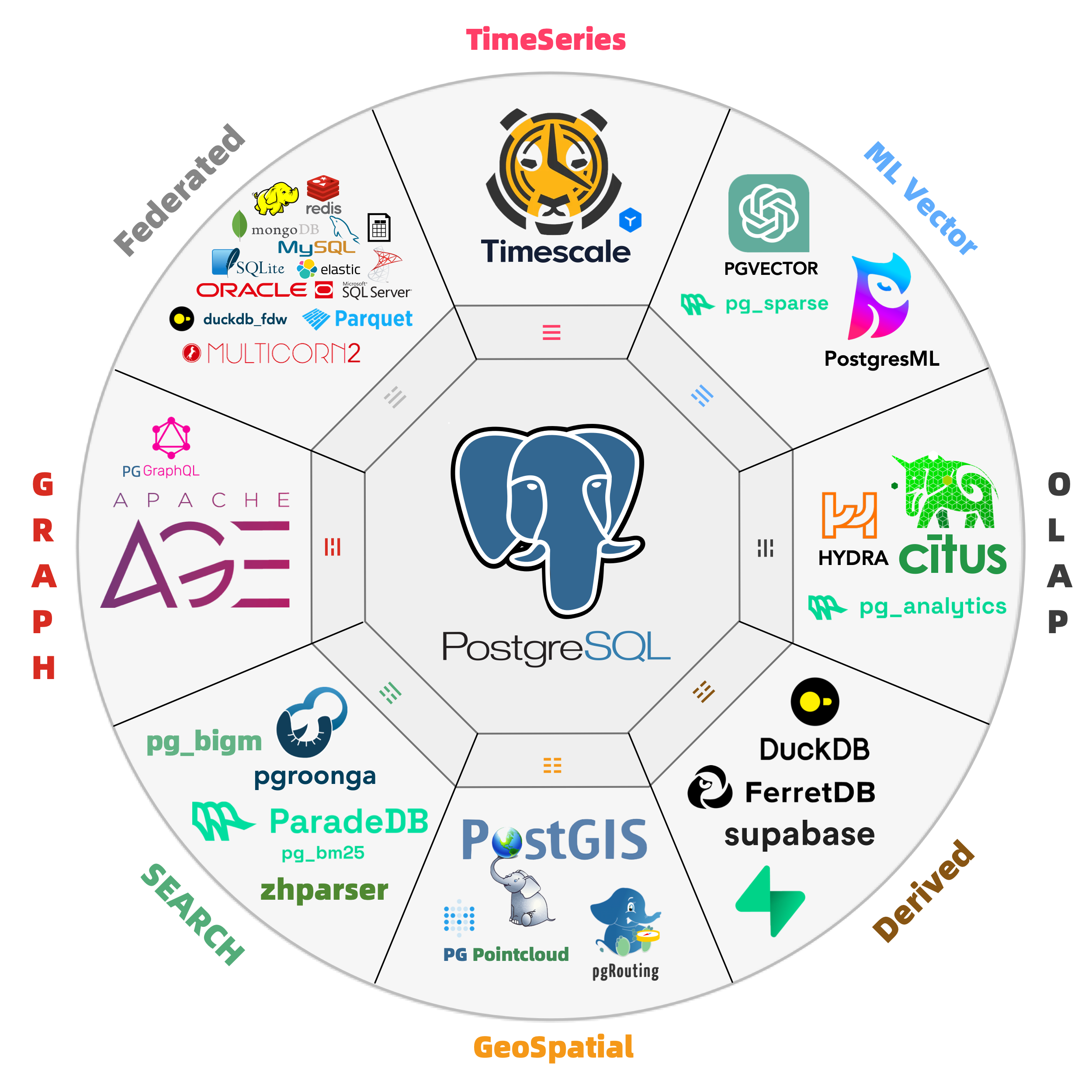
Some “database” are not actual PostgreSQL extensions, but also supported by pigsty, such as:
- Supabase: Open-Source Firebase Alternative (based on PostgreSQL)
- FerretDB: Open-Source MongoDB Alternative (based on PostgreSQL)
- NocoDB: Open-Source Airtable Alternative (based on PostgreSQL)
- DuckDB: Open-Source Analytical SQLite Alternative (PostgreSQL Compatible)
Install Extension
When you init a PostgreSQL cluster, the extensions listed in pg_packages & pg_extensions will be installed.
For default EL systems, the default values of pg_packages and pg_extensions are defined as follows:
For ubuntu / debian, package names are different, and passwordcheck_cracklib is not available.
Here, ${pg_version} is a placeholder that will be replaced with the actual major version number pg_version of that PostgreSQL cluster
Therefore, the default configuration will install these extensions:
pg_repack: Extension for online table bloat processing.wal2json: Extracts changes in JSON format through logical decoding.passwordcheck_cracklib: Enforce password policy. (EL only)postgis: Geospatial database extension (postgis34, EL7: postgis33)timescaledb: Time-series database extensionpgvector: Vector datatype and ivfflat/hnsw indexcitus: Distributed/columnar storage extension, (citus is conflict withhydra, choose one of them on EL systems)
If you want to enable certain extensions in a target cluster that has not yet been created, you can directly declare them with the parameters:
You can run the pg_extension sub-task in pgsql.yml to add extensions to clusters that have already been created.
To install all available extensions in one pass, you can just specify pg_extensions: ['*${pg_version}*'], which is really a bold move.
Install Manually
After the PostgreSQL cluster is inited, you can manually install plugins via Ansible or Shell commands. For example, if you want to enable a specific extension on a cluster that has already been initialized:
Most plugins are already included in the yum repository on the infrastructure node and can be installed directly using the yum command. If not included, you can consider downloading from the PGDG upstream source using the repotrack / apt download command or compiling source code into RPMs for distribution.
After the extension installation, you should be able to see them in the pg_available_extensions view of the target database cluster. Next, execute in the database where you want to install the extension:
6 - Authentication
Host-Based Authentication in Pigsty
PostgreSQL has various authentication methods. You can use all of them, while pigsty’s battery-include ACL system focuses on HBA, password, and SSL authentication.
Client Authentication
To connect to a PostgreSQL database, the user has to be authenticated (with a password by default).
You can provide the password in the connection string (not secure) or use the PGPASSWORD env or .pgpass file. Check psql docs and PostgreSQL connection string for more details.
The default connection string for the meta database:
To connect with the SSL certificate, you can use the PGSSLCERT and PGSSLKEY env or sslkey & sslcert parameters.
While the client certificate (CN = username) can be issued with local CA & cert.yml.
Define HBA
There are four parameters for HBA Rules in Pigsty:
pg_hba_rules: postgres ad-hoc hba rulespg_default_hba_rules: postgres default hba rulespgb_hba_rules: pgbouncer ad-hoc hba rulespgb_default_hba_rules: pgbouncer default hba rules
Which are array of hba rule objects, and each hba rule is one of the following forms:
1. Raw Form
In the form, the title will be rendered as a comment line, followed by the rules as hba string one by one.
An HBA Rule is installed when the instance’s pg_role is the same as the role.
HBA Rule with role: common will be installed on all instances.
HBA Rule with role: offline will be installed on instances with pg_role = offline or pg_offline_query = true.
2. Alias Form
The alias form, which replace rules with addr, auth, user, and db fields.
addr: whereworld: all IP addressesintra: all intranet cidr:'10.0.0.0/8', '172.16.0.0/12', '192.168.0.0/16'infra: IP addresses of infra nodesadmin:admin_ipaddresslocal: local unix socketlocalhost: local unix socket + tcp 127.0.0.1/32cluster: all IP addresses of pg cluster members<cidr>: any standard CIDR blocks or IP addresses
auth: howdeny: reject accesstrust: trust authenticationpwd: usemd5orscram-sha-256password auth according topg_pwd_encsha/scram-sha-256: enforcescram-sha-256password authenticationmd5:md5password authenticationssl: enforce host ssl in addition topwdauthssl-md5: enforce host ssl in addition tomd5password authssl-sha: enforce host ssl in addition toscram-sha-256password authos/ident: useidentos user authenticationpeer: usepeerauthenticationcert: use certificate-based client authentication
user: whoall: all users${dbsu}: database superuser specified bypg_dbsu${repl}: replication user specified bypg_replication_username${admin}: admin user specified bypg_admin_username${monitor}: monitor user specified bypg_monitor_username- ad hoc users & roles.
db: whichall: all databasesreplication: replication database- ad hoc database name
3. Where to Define
Typically, global HBA is defined in all.vars. If you want to modify the global default HBA rules, you can copy from the full.yml template to all.vars for modification.
pg_default_hba_rules: postgres global default HBA rulespgb_default_hba_rules: pgbouncer global default HBA rules
Cluster-specific HBA rules are defined in the cluster-level configuration of the database:
pg_hba_rules: postgres HBA rules for the clusterpgb_hba_rules:pgbouncer HBA rules for the cluster
Here are some examples of cluster HBA rule definitions.
Reload HBA
To reload postgres/pgbouncer hba rules:
The underlying command: are:
Default HBA
Pigsty has a default set of HBA rules, which is pretty secure for most cases.
The rules are self-explained in alias form.
Example: Rendered pg_hba.conf
Example: Rendered pgb_hba.conf
Security Enhancement
For those critical cases, we have a security.yml template with the following hba rule set as a reference:
7 - Configuration
You can define different types of instances & clusters.
- Identity: Parameters used for describing a PostgreSQL cluster
- Primary: Define a single instance cluster.
- Replica: Define a basic HA cluster with one primary & one replica.
- Offline: Define a dedicated instance for OLAP/ETL/Interactive queries
- Sync Standby: Enable synchronous commit to ensure no data loss.
- Quorum Commit: Use quorum sync commit for an even higher consistency level.
- Standby Cluster: Clone an existing cluster and follow it
- Delayed Cluster: Clone an existing cluster for emergency data recovery
- Citus Cluster: Define a Citus distributed database cluster
- Major Version: Create postgres cluster with different major version
Primary
Let’s start with the simplest case, singleton meta:
Use the following command to create a primary database instance on the 10.10.10.11 node.
Replica
To add a physical replica, you can assign a new instance to pg-test with pg_role set to replica
You can create an entire cluster or append a replica to the existing cluster:
Offline
The offline instance is a dedicated replica to serve slow queries, ETL, OLAP traffic and interactive queries, etc…
To add an offline instance, assign a new instance with pg_role set to offline.
Offline instance works like common replica instances, but it is used as a backup server in pg-test-replica service.
That is to say, offline and primary instance serves only when all replica instances are down.
You can have ad hoc access control offline with pg_default_hba_rules and pg_hba_rules.
It will apply to the offline instance and any instances with pg_offline_query flag.
Sync Standby
Pigsty uses asynchronous stream replication by default. Which may have a small replication lag. (10KB / 10ms).
A small window of data loss may occur when the primary fails (can be controlled with pg_rpo.), but it is acceptable for most scenarios.
But in some critical scenarios (e.g. financial transactions), data loss is totally unacceptable or read-your-write consistency is required. In this case, you can enable synchronous commit to ensure that.
To enable sync standby mode, you can simply use crit.yml template in pg_conf
To enable sync standby on existing clusters, config the cluster and enable synchronous_mode:
If synchronous_mode: true, the synchronous_standby_names parameter will be managed by patroni.
It will choose a sync standby from all available replicas and write its name to the primary’s configuration file.
Quorum Commit
When sync standby is enabled, PostgreSQL will pick one replica as the standby instance, and all other replicas as candidates. Primary will wait until the standby instance flushes to disk before a commit is confirmed, and the standby instance will always have the latest data without any lags.
However, you can achieve an even higher/lower consistency level with the quorum commit (trade-off with availability).
For example, to have all 2 replicas to confirm a commit:
If you have more replicas and wish to have more sync standby, increase synchronous_node_count accordingly.
Beware of adjust synchronous_node_count accordingly when you append or remove replicas.
The postgres synchronous_standby_names parameter will be managed by patroni:
Example: Multiple Sync Standby
And we can see that the two replicas are selected as sync standby now.
The classic quorum commit is to use majority of replicas to confirm a commit.
Example: Enable Quorum Commit
After applying the configuration, we can see that all replicas are no longer sync standby, but just normal replicas.
After that, when we can check pg_stat_replication.sync_state, it becomes quorum instead of sync or async.
Standby Cluster
You can clone an existing cluster and create a standby cluster, which can be used for migration, horizontal split, multi-az deployment, or disaster recovery.
A standby cluster’s definition is just the same as any other normal cluster, except there’s a pg_upstream defined on the primary instance.
For example, you have a pg-test cluster, to create a standby cluster pg-test2, the inventory may look like this:
And pg-test2-1, the primary of pg-test2 will be a replica of pg-test and serve as a Standby Leader in pg-test2.
Just make sure that the pg_upstream parameter is configured on the primary of the backup cluster to pull backups from the original upstream automatically.
Example: Change Replication Upstream
You can change the replication upstream of the standby cluster when necessary (e.g. upstream failover).
To do so, just change the standby_cluster.host to the new upstream IP address and apply.
Example: Promote Standby Cluster
You can promote the standby cluster to a standalone cluster at any time.
To do so, you have to config the cluster and wipe the entire standby_cluster section then apply.
Example: Cascade Replica
If the pg_upstream is specified for replica rather than primary, the replica will be configured as a cascade replica with the given upstream ip instead of the cluster primary
Delayed Cluster
A delayed cluster is a special type of standby cluster, which is used to recover “drop-by-accident” ASAP.
For example, if you wish to have a cluster pg-testdelay which has the same data as 1-day ago pg-test cluster:
You can also configure a replication delay on the existing standby cluster.
When some tuples & tables are dropped by accident, you can advance this delayed cluster to a proper time point and select data from it.
It takes more resources, but can be much faster and have less impact than PITR
Citus Cluster
Pigsty has native citus support. Check files/pigsty/citus.yml & prod.yml for example.
To define a citus cluster, you have to specify the following parameters:
pg_modehas to be set tocitusinstead of defaultpgsqlpg_shard&pg_grouphas to be defined on each sharding clusterpatroni_citus_dbhas to be defined to specify the database to be managedpg_dbsu_passwordhas to be set to a non-empty string plain password if you want to use thepg_dbsupostgresrather than defaultpg_admin_usernameto perform admin commands
Besides, extra hba rules that allow ssl access from local & other data nodes are required. Which may looks like this
And you can create distributed table & reference table on the coordinator node. Any data node can be used as the coordinator node since citus 11.2.
Major Version
Pigsty works on PostgreSQL 10+. While the pre-packaged packages only includes 12 - 16 for now.
| version | Comment | Packages |
|---|---|---|
| 16 | Default stable major version with the full v2.7 extension set | Core, L1,L2,L3 |
| 15 | Previous stable major version; adjust repository packages | Core, L1,L2 |
| 14 | The old stable major version, ith L1 extension support only | Core, L1 |
| 13 | Older major version, with L1 extension support only | Core, L1 |
| 12 | Older major version, with L1 extension support only | Core, L1 |
- Core:
postgresql*, available on PG 12 - 16 - L1 extensions:
wal2json,pg_repack,passwordcheck_cracklib(PG 12 - 16) - L2 extensions:
postgis,citus,timescaledb,pgvector(PG15, PG16) - L3 extensions: Other miscellaneous extensions in the default v2.7 PG16 repository
Since the default v2.7 repository focuses on PG16, you may have to change pg_extensions and pg_libs to fit your needs.
Here are some example cluster definition with different major versions.
Beware that these extensions are just not included in Pigsty’s default repo. You can have these extensions on older pg version with proper configuration.
8 - Playbook
Pigsty has a series of playbooks for PostgreSQL:
pgsql.yml: Init HA PostgreSQL clusters or add new replicas.pgsql-rm.yml: Remove PostgreSQL cluster, or remove replicaspgsql-user.yml: Add new business user to existing PostgreSQL clusterpgsql-db.yml: Add new business database to existing PostgreSQL clusterpgsql-monitor.yml: Monitor remote PostgreSQL instance with local exporterspgsql-migration.yml: Generate Migration manual & scripts for existing PostgreSQL
Safeguard
Beware, when using the pgsql.yml and pgsql-rm.yml playbooks, it can pose a risk of accidentally deleting databases if misused!
- When using
pgsql.yml, please check the--tags|-tand--limit|-lparameters. - Adding the -l parameter when executing playbooks is strongly recommended to limit execution hosts.
- Think thrice before proceeding.
To prevent accidental deletions, the PGSQL module offers a safeguard option controlled by the following two parameters:
pg_safeguardis set tofalseby default: do not prevent purging by default.pg_cleanis set totrueby default, meaning it will clean existing instances.
Effects on the init playbook
When meeting a running instance with the same config during the execution of the pgsql.yml playbook:
pg_safeguard / pg_clean |
pg_clean=true |
pg_clean=false |
|---|---|---|
pg_safeguard=false |
Purge | Abort |
pg_safeguard=true |
Abort | Abort |
- If
pg_safeguardis enabled, the playbook will abort to avoid purging the running instance. - If the safeguard is disabled, it will further decide whether to remove the existing instance according to the value of
pg_clean.- If
pg_cleanistrue, the playbook will directly clean up the existing instance to make room for the new instance. This is the default behavior. - If
pg_cleanisfalse, the playbook will abort, which requires explicit configuration.
- If
Effects on the remove playbook
When meeting a running instance with the same config during the execution of the pgsql-rm.yml playbook:
pg_safeguard / pg_clean |
pg_clean=true |
pg_clean=false |
|---|---|---|
pg_safeguard=false |
Purge & rm data | Purge |
pg_safeguard=true |
Abort | Abort |
- If
pg_safeguardis enabled, the playbook will abort to avoid purging the running instance. - If the safeguard is disabled, it purges the running instance and will further decide whether to remove the existing data along with the instance according to the value of
pg_clean.- If
pg_cleanistrue, the playbook will directly clean up the PostgreSQL data cluster. - If
pg_cleanisfalse, the playbook will skip data purging, which requires explicit configuration.
- If
pgsql.yml
The pgsql.yml is used for init HA PostgreSQL clusters or adding new replicas.
This playbook contains following subtasks:
Administration Tasks that use this playbook
Some notes about this playbook
When running this playbook on a single replica, You should make sure the cluster primary is already initialized.
- you may have to run
Reload HBARuleandAppend Replicaafter replica init. - The wrap script
pgsql-addwill do this, check SOP: Add Instance for details.
pgsql-rm.yml
The playbook pgsql-rm.yml can remove PostgreSQL cluster, or specific replicas from cluster.
This playbook contains following subtasks:
Some arguments can affect the behavior of this playbook:
Administration Tasks that use this playbook
Some notes about this playbook
Do not run this playbook on single cluster primary directly when there are still replicas.
- otherwise the rest replicas will trigger automatic failover.
- It won’t be a problem if you remove all replicas before removing primary.
- If you run this on the entire cluster, you don’t have to worry about this.
Reload service after removing replicas from cluster
- When a replica is removed, it is still in the configuration file of the haproxy load balancer.
- It is a dead server, so it won’t affect the cluster service.
- But you should reload service in time to ensure the consistency between the environment and the config inventory.
pgsql-user.yml
The playbook pgsql-user.yml can add new business user to existing PostgreSQL cluster.
Check admin SOP: Create User
pgsql-db.yml
The playbook pgsql-db.yml can add new business database to existing PostgreSQL cluster.
Check admin SOP: Create Database
pgsql-monitor.yml
The playbook pgsql-monitor.yml can monitor remote postgres instance with local exporters.
Check admin SOP: Monitor Postgres
pgsql-migration.yml
The playbook pgsql-migration.yml can generate migration manual & scripts for existing PostgreSQL cluster.
Check admin SOP: Migration
9 - Administration
How to maintain an existing PostgreSQL cluster with Pigsty?
Here are some SOP for common pgsql admin tasks
- Case 1: Create Cluster
- Case 2: Create User
- Case 3: Create Database
- Case 4: Reload Service
- Case 5: Reload HBARule
- Case 6: Config Cluster
- Case 7: Append Replica
- Case 8: Remove Replica
- Case 9: Remove Cluster
- Case 10: Switchover
- Case 11: Backup Cluster
- Case 12: Restore Cluster
- Case 13: Adding Packages
- Case 14: Install Extension
- Case 15: Minor Upgrade
- Case 16: Major Upgrade
Cheatsheet
PGSQL playbooks and shortcuts:
Patroni admin command and shortcuts:
pgBackRest backup & restore command and shortcuts:
Systemd components quick reference
Create Cluster
To create a new Postgres cluster, define it in the inventory first, then init with:
Beware, perform
bin/node-addfirst, thenbin/pgsql-add, PGSQL works on managed nodes only.
Example: Create Cluster

Create User
To create a new business user on the existing Postgres cluster, add user definition to all.children.<cls>.pg_users, then create the user as follows:
Example: Create Business User

Create Database
To create a new database user on the existing Postgres cluster, add database definition to all.children.<cls>.pg_databases, then create the database as follows:
Note: If the database has specified an owner, the user should already exist, or you’ll have to Create User first.
Example: Create Business Database

Reload Service
Services are exposed access point served by HAProxy.
This task is used when cluster membership has changed, e.g., append/remove replicas, switchover/failover / exposing new service or updating existing service’s config (e.g., LB Weight)
To create new services or reload existing services on entire proxy cluster or specific instances:
Example: Reload PG Service to Kick one Instance

Reload HBARule
This task is used when your Postgres/Pgbouncer HBA rules have changed, you may have to reload hba to apply changes.
If you have any role-specific HBA rules, you may have to reload hba after a switchover/failover, too.
To reload postgres & pgbouncer HBA rules on entire cluster or specific instances:
Example: Reload Cluster HBA Rules

Config Cluster
To change the config of a existing Postgres cluster, you have to initiate control command on admin node with admin user:
Change patroni parameters & postgresql.parameters, save & apply changes with the wizard.
Example: Config Cluster in Non-Interactive Manner
You can skip interactive mode and use -p option to override postgres parameters, for example:
Example: Change Cluster Config with Patroni REST API
You can also use Patroni REST API to change the config in a non-interactive mode, for example:
Note: patroni unsafe RestAPI access is limit from infra/admin nodes and protected with an HTTP basic auth username/password and an optional HTTPS mode.
Example: Config Cluster with patronictl

Append Replica
To add a new replica to the existing Postgres cluster, you have to add its definition to the inventory: all.children.<cls>.hosts, then:
It will add node <ip> to pigsty and init it as a replica of the cluster <cls>.
Cluster services will be reloaded to adopt the new member
Example: Add replica to pg-test

For example, if you want to add a pg-test-3 / 10.10.10.13 to the existing cluster pg-test, you’ll have to update the inventory first:
then apply the change as follows:
which is similar to cluster init but only works on single instance。
Remove Replica
To remove a replica from the existing PostgreSQL cluster:
It will remove instance <ip> from cluster <cls>.
Cluster services will be reloaded to kick the removed instance from load balancer.
Example: Remove replica from pg-test

For example, if you want to remove pg-test-3 / 10.10.10.13 from the existing cluster pg-test:
And remove instance definition from the inventory:
Finally, you can update pg service and kick the removed instance from load balancer:
Remove Cluster
To remove the entire Postgres cluster, just run:
Example: Remove Cluster
Example: Force removing a cluster
Note: if pg_safeguard is configured for this cluster (or globally configured to true), pgsql-rm.yml will abort to avoid removing a cluster by accident.
You can use playbook command line args to explicitly overwrite it to force the purge:
Switchover
You can perform a PostgreSQL cluster switchover with patroni cmd.
Example: Switchover pg-test

To do so with Patroni API (schedule a switchover from 2 to 1 at a specific time):
Backup Cluster
To create a backup with pgBackRest, run as local dbsu:
Check Backup & PITR for details.
Example: Make Backups

Example: Create routine backup crontab
You can add crontab to node_crontab to specify your backup policy.
Restore Cluster
To restore a cluster to a previous time point (PITR), run as local dbsu:
And follow the instructions wizard, Check Backup & PITR for details.
Example: PITR with raw pgBackRest Command
Adding Packages
To add newer version of RPM packages, you have to add them to repo_packages and repo_url_packages
Then rebuild repo on infra nodes with ./infra.yml -t repo_build subtask, Then you can install these packages with ansible module package:
Update Packages Manually
For example, you can then install or upgrade packages with:
Install Extension
If you want to install extension on pg clusters, Add them to pg_extensions and make sure them installed with:
Some extension needs to be loaded in shared_preload_libraries, You can add them to pg_libs, or Config an existing cluster.
Finally, CREATE EXTENSION <extname>; on the cluster primary instance to install it.
Example: Install pg_cron on pg-test cluster
Check PGSQL Extensions: Install for details.
Minor Upgrade
To perform a minor server version upgrade/downgrade, you have to add packages to yum/apt repo first.
Then perform a rolling upgrade/downgrade from all replicas, then switchover the cluster to upgrade the leader.
Example: Downgrade PostgreSQL 15.2 to 15.1
Add 15.1 packages to yum/apt repo and refresh node package manager cache:
Perform a downgrade and restart the cluster:
Example: Upgrade PostgreSQL 15.1 back to 15.2
This time we upgrade in a rolling fashion:
Major Upgrade
The simplest way to achieve a major version upgrade is to create a new cluster with the new version, then migration with logical replication & green/blue deployment.
You can also perform an in-place major upgrade, which is not recommended especially when certain extensions are installed. But it is possible.
Assume you want to upgrade PostgreSQL 14 to 15, you have to add packages to yum/apt repo, and guarantee the extensions has exact same version too.
10 - Access Control
Pigsty has a battery-included access control model based on Role System and Privileges.
Role System
Pigsty has a default role system consist of four default roles and four default users:
| Role name | Attributes | Member of | Description |
|---|---|---|---|
dbrole_readonly |
NOLOGIN |
role for global read-only access | |
dbrole_readwrite |
NOLOGIN |
dbrole_readonly | role for global read-write access |
dbrole_admin |
NOLOGIN |
pg_monitor,dbrole_readwrite | role for object creation |
dbrole_offline |
NOLOGIN |
role for restricted read-only access | |
postgres |
SUPERUSER |
system superuser | |
replicator |
REPLICATION |
pg_monitor,dbrole_readonly | system replicator |
dbuser_dba |
SUPERUSER |
dbrole_admin | pgsql admin user |
dbuser_monitor |
pg_monitor | pgsql monitor user |
Default Roles
There are four default roles in pigsty:
- Read Only (
dbrole_readonly): Role for global read-only access - Read Write (
dbrole_readwrite): Role for global read-write access, inheritsdbrole_readonly. - Admin (
dbrole_admin): Role for DDL commands, inheritsdbrole_readwrite. - Offline (
dbrole_offline): Role for restricted read-only access (offline instance)
Default roles are defined in pg_default_roles, change default roles is not recommended.
Default Users
There are four default users in pigsty, too.
- Superuser (
postgres), the owner and creator of the cluster, same as the OS dbsu. - Replication user (
replicator), the system user used for primary-replica. - Monitor user (
dbuser_monitor), a user used to monitor database and connection pool metrics. - Admin user (
dbuser_dba), the admin user who performs daily operations and database changes.
Default users’ username/password are defined with dedicate parameters (except for dbsu password):
pg_dbsu: os dbsu name, postgres by default, better not change itpg_replication_username: postgres replication username,replicatorby defaultpg_replication_password: postgres replication password,DBUser.Replicatorby defaultpg_admin_username: postgres admin username,dbuser_dbaby defaultpg_admin_password: postgres admin password in plain text,DBUser.DBAby defaultpg_monitor_username: postgres monitor username,dbuser_monitorby defaultpg_monitor_password: postgres monitor password,DBUser.Monitorby default
!> Remember to change these password in production deployment !
To define extra options, specify them in pg_default_roles:
Privileges
Pigsty has a battery-included privilege model that works with default roles.
- All users have access to all schemas.
- Read-Only user can read from all tables. (SELECT, EXECUTE)
- Read-Write user can write to all tables run DML. (INSERT, UPDATE, DELETE).
- Admin user can create object and run DDL (CREATE, USAGE, TRUNCATE, REFERENCES, TRIGGER).
- Offline user is Read-Only user with limited access on offline instance (
pg_role = 'offline'orpg_offline_query = true) - Object created by admin users will have correct privilege.
- Default privileges are installed on all databases, including template database.
- Database connect privilege is covered by database definition
CREATEprivileges of database & public schema are revoked fromPUBLICby default
Object Privilege
Default object privileges are defined in pg_default_privileges.
Newly created objects will have corresponding privileges when it is created by admin users
The \ddp+ may looks like:
| Type | Access privileges |
|---|---|
| function | =X |
| dbrole_readonly=X | |
| dbrole_offline=X | |
| dbrole_admin=X | |
| schema | dbrole_readonly=U |
| dbrole_offline=U | |
| dbrole_admin=UC | |
| sequence | dbrole_readonly=r |
| dbrole_offline=r | |
| dbrole_readwrite=wU | |
| dbrole_admin=rwU | |
| table | dbrole_readonly=r |
| dbrole_offline=r | |
| dbrole_readwrite=awd | |
| dbrole_admin=arwdDxt |
Default Privilege
ALTER DEFAULT PRIVILEGES allows you to set the privileges that will be applied to objects created in the future.
It does not affect privileges assigned to already-existing objects, and objects created by non-admin users.
Pigsty will use the following default privileges:
Which will be rendered in pg-init-template.sql alone with ALTER DEFAULT PRIVILEGES statement for admin users.
These SQL command will be executed on postgres & template1 during cluster bootstrap, and newly created database will inherit it from tempalte1 by default.
That is to say, to maintain the correct object privilege, you have to run DDL with admin users, which could be:
{{ pg_dbsu }},postgresby default{{ pg_admin_username }},dbuser_dbaby default- Business admin user granted with
dbrole_admin
It’s wise to use postgres as global object owner to perform DDL changes.
If you wish to create objects with business admin user, YOU MUST USE SET ROLE dbrole_admin before running that DDL to maintain the correct privileges.
You can also ALTER DEFAULT PRIVILEGE FOR ROLE <some_biz_admin> XXX to grant default privilege to business admin user, too.
Database Privilege
Database privilege is covered by database definition.
There are 3 database level privileges: CONNECT, CREATE, TEMP, and a special ‘privilege’: OWNERSHIP.
- If
ownerexists, it will be used as database owner instead of default{{ pg_dbsu }} - If
revokeconnisfalse, all users have theCONNECTprivilege of the database, this is the default behavior. - If
revokeconnis set totrueexplicitly:CONNECTprivilege of the database will be revoked fromPUBLICCONNECTprivilege will be granted to{{ pg_replication_username }},{{ pg_monitor_username }}and{{ pg_admin_username }}CONNECTprivilege will be granted to database owner withGRANT OPTION
revokeconn flag can be used for database access isolation, you can create different business users as the owners for each database and set the revokeconn option for all of them.
Example: Database Isolation
Create Privilege
Pigsty revokes the CREATE privilege on database from PUBLIC by default, for security consideration.
And this is the default behavior since PostgreSQL 15.
The database owner have the full capability to adjust these privileges as they see fit.
11 - Backup & PITR
Pigsty uses pgBackRest for PITR backup & restore.
In the case of a hardware failure, a physical replica failover could be the best choice. Whereas for data corruption scenarios (whether machine or human errors), Point-in-Time Recovery (PITR) is often more appropriate.
Backup
Use the following command to perform the backup:
Use the following command to print backup info:
You can also acquire backup info from the monitoring system: PGCAT Instance - Backup
Backup Info Example
Restore
Use the following command to perform restore
The pg-pitr script will generate instructions for you to perform PITR.
For example, if you wish to rollback current cluster status back to "2023-02-07 12:38:00+08":
Policy
You can customize your backup policy with node_crontab and pgbackrest_repo
- Schedule full or incr backup with
node_crontab - setup backup retention policy with
pgbackrest_repo
local repo
For example, the default pg-meta will take a full backup every day at 1 am.
With the default local repo retention policy, it will keep at most two full backups and temporarily allow three during backup.
Your backup disk storage should be at least three x database file size + WAL archive in 3 days.
MinIO repo
When using MinIO, storage capacity is usually not a problem. You can keep backups as long as you want.
For example, the default pg-test will take a full backup on Monday and incr backup on other weekdays.
And with a 14-day time retention policy, backup in the last two weeks will be kept. But beware, this guarantees a week’s PITR period only.
12 - Migration
Pigsty has a built-in playbook pgsql-migration.yml to perform online database migration based on logical replication.
With proper automation, the downtime could be minimized to several seconds. But beware that logical replication requires PostgreSQL 10+ to work. You can still use the facility here and use a pg_dump | psql instead of logical replication.
Define a Migration Task
You have to create a migration task definition file to use this playbook.
Check files/migration/pg-meta.yml for example.
It will try to migrate the pg-meta.meta to pg-test.test.
You have to tell pigsty where is the source cluster and destination cluster. The database to be migrated, and the primary IP address.
You should have superuser privileges on both sides to proceed
You can overwrite the superuser connection to the source cluster with src_pg, and logical replication connection string with sub_conn, Otherwise, pigsty default admin & replicator credentials will be used.
Generate Migration Plan
The playbook does not migrate src to dst, but it will generate everything your need to do so.
After the execution, you will find migration context dir under ~/migration/pg-meta.meta by default
Following the README.md and executing these scripts one by one, you will do the trick!
Caveats
You can use ./copy-seq 1000 to advance all sequences by a number (e.g. 1000) after syncing sequences.
Which may prevent potential serial primary key conflict in new clusters.
You have to implement your own ./re-routing script to route your application traffic from src to dst.
Since we don’t know how your traffic is routed (e.g dns, VIP, haproxy, or pgbouncer).
Of course, you can always do that by hand…
You have to implement your own ./disable-src script to restrict the src cluster.
You can do that by changing HBA rules & reload (recommended), or just shutting down postgres, pgbouncer, or haproxy…
13 - Monitoring
Overview
Pigsty uses the modern observability stack for PostgreSQL monitoring:
- Grafana for metrics visualization and PostgreSQL datasource.
- Prometheus for PostgreSQL / Pgbouncer / Patroni / HAProxy / Node metrics
- Loki for PostgreSQL / Pgbouncer / Patroni / pgBackRest logs
- Battery-Include dashboards for PostgreSQL and everything else
Metrics
PostgreSQL’s metrics are defined by collector files: pg_exporter.yml. Prometheus record rules and alert evaluation will further process it: files/prometheus/rules/pgsql.yml
There are three identity labels: cls, ins, ip, which will be attached to all metrics & logs. node & haproxy will try to reuse the same identity to provide consistent metrics & logs.
Logs
PostgreSQL-related logs are collected by promtail and sent to Loki on infra nodes by default.
pg_log_dir: postgres log dir,/pg/log/postgresby defaultpgbouncer_log_dir: pgbouncer log dir,/pg/log/pgbouncerby defaultpatroni_log_dir: patroni log dir,/pg/log/patroniby defaultpgbackrest_log_dir: pgbackrest log dir,/pg/log/pgbackrestby default
Targets
Prometheus monitoring targets are defined in static files under /etc/prometheus/targets/pgsql/. Each instance will have a corresponding file. Take pg-meta-1 as an example:
When the global flag patroni_ssl_enabled is set, the patroni target will be managed as /etc/prometheus/targets/patroni/<ins>.yml because it requires a different scrape endpoint (https).
Prometheus monitoring target will be removed when a cluster is removed by bin/pgsql-rm or pgsql-rm.yml. You can use playbook subtasks, or remove them manually:
Remote RDS targets are managed as /etc/prometheus/targets/pgrds/<cls>.yml. It will be created by the pgsql-monitor.yml playbook or bin/pgmon-add script.
Monitor Mode
There are three ways to monitor PostgreSQL instances in Pigsty:
| Item \ Level | L1 | L2 | L3 |
|---|---|---|---|
| Name | Remote Database Service | Existing Deployment | Fully Managed Deployment |
| Abbr | RDS | MANAGED | FULL |
| Scenes | connect string URL only | ssh-sudo-able | Instances created by Pigsty |
| PGCAT Functionality | ✅ Full Availability | ✅ Full Availability | ✅ Full Availability |
| PGSQL Functionality | ✅ PG metrics only | ✅ PG and node metrics | ✅ Full Support |
| Connection Pool Metrics | ❌ Not available | ⚠️ Optional | ✅ Pre-Configured |
| Load Balancer Metrics | ❌ Not available | ⚠️ Optional | ✅ Pre-Configured |
| PGLOG Functionality | ❌ Not Available | ⚠️ Optional | ⚠️ Optional |
| PG Exporter | ⚠️ On infra nodes | ✅ On DB nodes | ✅ On DB nodes |
| Node Exporter | ❌ Not Deployed | ✅ On DB nodes | ✅ On DB nodes |
| Intrusion into DB nodes | ✅ Non-Intrusive | ⚠️ Installing Exporter | ⚠️ Fully Managed by Pigsty |
| Instance Already Exists | ✅ Yes | ✅ Yes | ⚠️ Created by Pigsty |
| Monitoring users and views | ⚠️Manually Setup | ⚠️Manually Setup | ✅ Auto configured |
| Deployment Usage Playbook | bin/pgmon-add <cls> |
subtasks of pgsql.ym/node.yml |
pgsql.yml |
| Required Privileges | connectable PGURL from infra nodes | DB node ssh and sudo privileges | DB node ssh and sudo privileges |
| Function Overview | PGCAT + PGRDS | Most Functionality | Full Functionality |
Monitor Existing Cluster
Suppose the target DB node can be managed by Pigsty (accessible via ssh and sudo is available). In that case, you can use the pg_exporter task in the pgsql.yml playbook to deploy the monitoring component PG Exporter on the target node in the same manner as a standard deployment.
You can also deploy the connection pool and its monitoring on existing instance nodes using the pgbouncer and pgbouncer_exporter tasks from the same playbook. Additionally, you can deploy host monitoring, load balancing, and log collection components using the node_exporter, haproxy, and promtail tasks from the node.yml playbook, achieving a similar user experience with the native Pigsty cluster.
The definition method for existing clusters is very similar to the normal clusters managed by Pigsty. Selectively run certain tasks from the pgsql.yml playbook instead of running the entire playbook.
Since the target database cluster already exists, you must manually setup monitoring users, schemas, and extensions on the target database cluster.
Monitor RDS
If you can only access the target database via PGURL (database connection string), you can refer to the instructions here for configuration. In this mode, Pigsty deploys the corresponding PG Exporter on the INFRA node to fetch metrics from the remote database, as shown below:
The monitoring system will no longer have host/pooler/load balancer metrics. But the PostgreSQL metrics & catalog info are still available. Pigsty has two dedicated dashboards for that: PGRDS Cluster and PGRDS Instance. Overview and Database level dashboards are reused. Since Pigsty cannot manage your RDS, you have to setup monitor on the target database in advance.
Below, we use a sandbox environment as an example: now we assume that the pg-meta cluster is an RDS instance pg-foo-1 to be monitored, and the pg-test cluster is an RDS cluster pg-bar to be monitored:
-
Create monitoring schemas, users, and permissions on the target. Refer to Monitoring Object Configuration for details.
-
Declare the cluster in the configuration list. For example, suppose we want to monitor the “remote”
pg-meta&pg-testclusters:The databases listed in the
pg_databasesfield will be registered in Grafana as a PostgreSQL data source, providing data support for the PGCAT monitoring panel. If you don’t want to use PGCAT and register the database in Grafana, setpg_databasesto an empty array or leave it blank.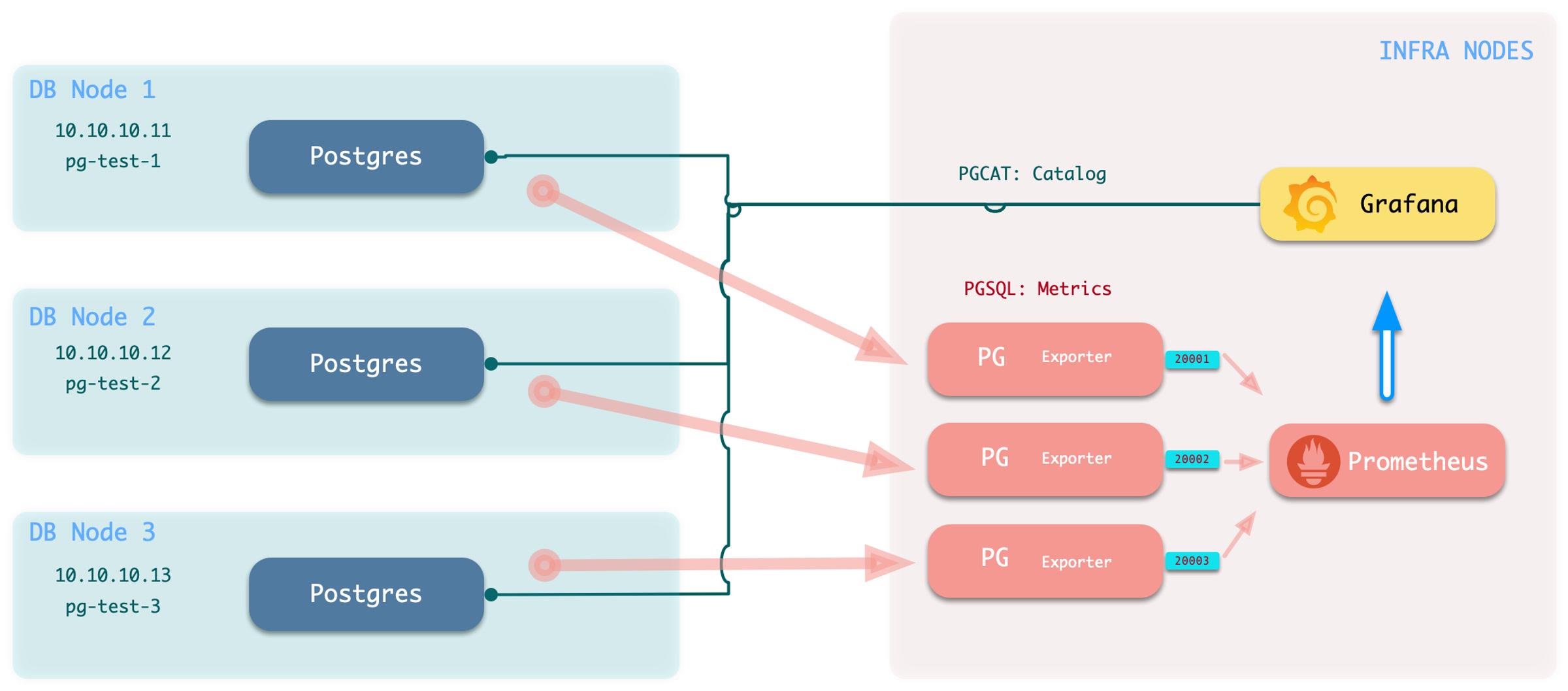
-
Execute the command to add monitoring:
bin/pgmon-add <clsname> -
To remove a remote cluster from monitoring, use
bin/pgmon-rm <clsname>
You can use more parameters to override the default pg_exporter options. Here is an example for monitoring Aliyun RDS and PolarDB with Pigsty:
Monitor Setup
When you want to monitor existing instances, whether it’s RDS or a self-built PostgreSQL instance, you need to make some configurations on the target database so that Pigsty can access them.
To bring an external existing PostgreSQL instance into monitoring, you need a connection string that can access that instance/cluster. Any accessible connection string (business user, superuser) can be used, but we recommend using a dedicated monitoring user to avoid permission leaks.
- Monitor User: The default username used is
dbuser_monitor. This user belongs to thepg_monitorgroup, or ensure it has the necessary view permissions. - Monitor HBA: Default password is
DBUser.Monitor. You need to ensure that the HBA policy allows the monitoring user to access the database from the infra nodes. - Monitor Schema: It’s optional but recommended to create a dedicate schema
monitorfor monitoring views and extensions. - Monitor Extension:It is strongly recommended to enable the built-in extension
pg_stat_statements. - Monitor View: Monitoring views are optional but can provide additional metrics. Which is recommended.
Monitor User
Create a monitor user on the target database cluster. For example, dbuser_monitor is used by default in Pigsty.
The monitor user here should have consistent pg_monitor_username and pg_monitor_password with Pigsty config inventory.
Monitor HBA
You also need to configure pg_hba.conf to allow monitoring user access from infra/admin nodes.
If your RDS does not support the RAW HBA format, add admin/infra node IP to the whitelist.
Monitor Schema
Monitor schema is optional, but we strongly recommend creating one.
Monitor Extension
Monitor extension is optional, but we strongly recommend enabling pg_stat_statements extension.
Note that this extension must be listed in shared_preload_libraries to take effect, and changing this parameter requires a database restart.
You should create this extension inside the admin database: postgres. If your RDS does not grant CREATE on the database postgres. You can create that extension in the default public schema:
As long as your monitor user can access pg_stat_statements view without schema qualification, it should be fine.
Monitor View
It’s recommended to create the monitor views in all databases that need to be monitored.
Monitor Schema & View Definition
Shmem allocation for PostgreSQL 13+
14 - Dashboards

There are 26 default grafana dashboards about PostgreSQL and categorized into 4 levels. and categorized into PGSQL, PGCAT & PGLOG by datasource.
Overview
- pgsql-overview : The main dashboard for PGSQL module
- pgsql-alert : Global PGSQL key metrics and alerting events
- pgsql-shard : Overview of a horizontal sharded PGSQL cluster, e.g. citus / gpsql cluster
Cluster
- pgsql-cluster: The main dashboard for a PGSQL cluster
- pgrds-cluster: The PGSQL Cluster dashboard for RDS, focus on all postgres metrics only.
- pgsql-activity: Cares about the Session/Load/QPS/TPS/Locks of a PGSQL cluster
- pgsql-replication: Cares about PGSQL cluster replication, slots, and pub/sub.
- pgsql-service: Cares about PGSQL cluster services, proxies, routes, and load balancers.
- pgsql-databases: Cares about database CRUD, slow queries, and table statistics cross all instances.
- pgsql-patroni: Cares about cluster HA agent: patroni status.
- pgsql-pitr: Cares about context of cluster status during PITR procedure
Instance
- pgsql-instance: The main dashboard for a single PGSQL instance
- pgrds-instance: The PGSQL Instance dashboard for RDS, focus on all postgres metrics only.
- pgcat-instance: Instance information from database catalog directly
- pgsql-persist: Metrics about persistence: WAL, XID, Checkpoint, Archive, IO
- pgsql-proxy: Metrics about haproxy the service provider
- pgsql-queries: Overview of all queries in a single instance
- pgsql-session: Metrics about sessions and active/idle time in a single instance
- pgsql-xacts: Metrics about transactions, locks, queries, etc…
- pgsql-exporter: Postgres & Pgbouncer exporter self monitoring metrics
Database
- pgsql-database: The main dashboard for a single PGSQL database
- pgcat-database: Database information from database catalog directly
- pgsql-tables : Table/Index access metrics inside a single database
- pgsql-table: Detailed information (QPS/RT/Index/Seq…) about a single table
- pgcat-table: Detailed information (Stats/Bloat/…) about a single table from database catalog directly
- pgsql-query: Detailed information (QPS/RT) about a single query
- pgcat-query: Detailed information (SQL/Stats) about a single query from database catalog directly
Overview
PGSQL Overview : The main dashboard for PGSQL module
PGSQL Overview
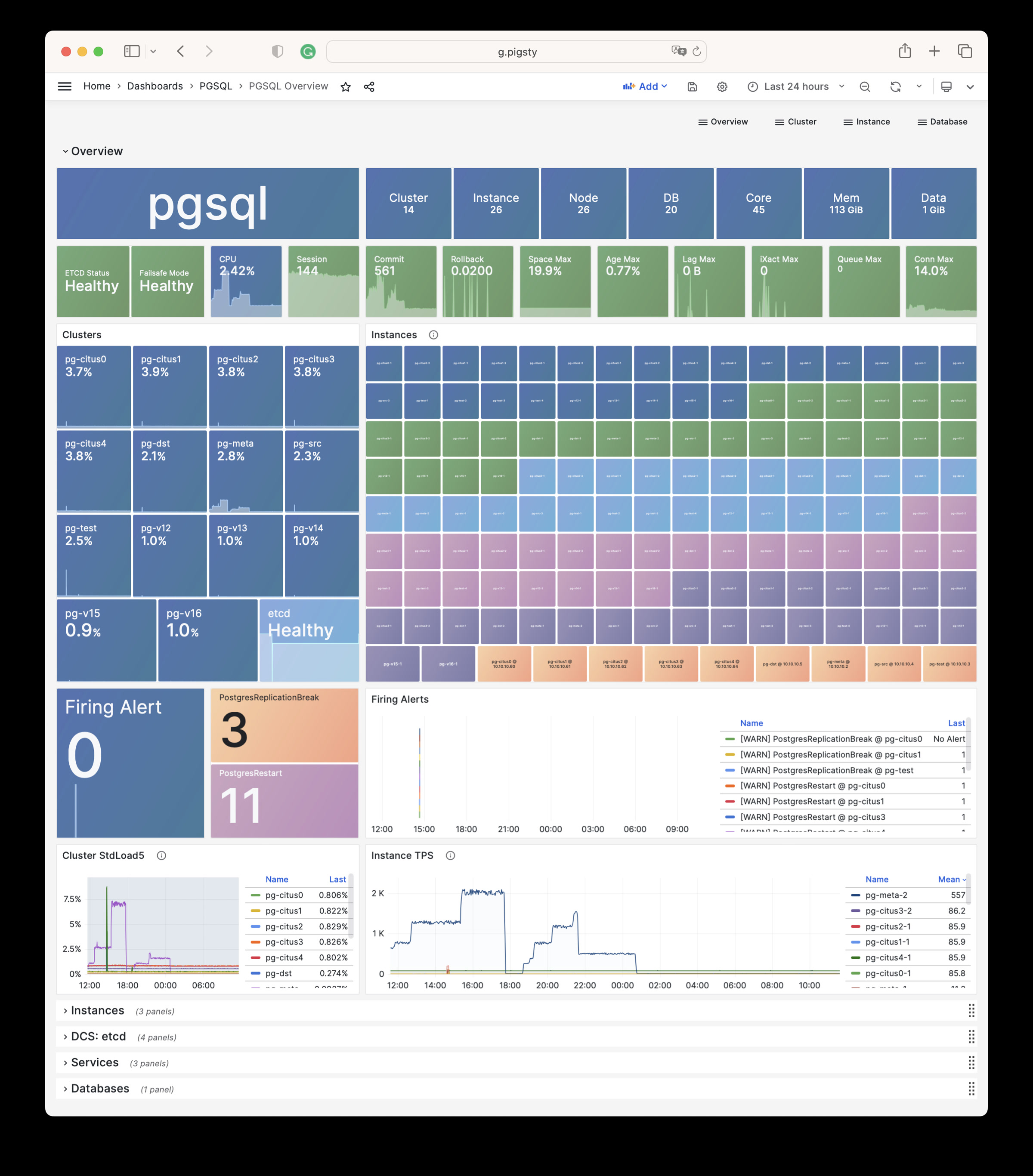
PGSQL Alert : Global PGSQL key metrics and alerting events
PGSQL Alert
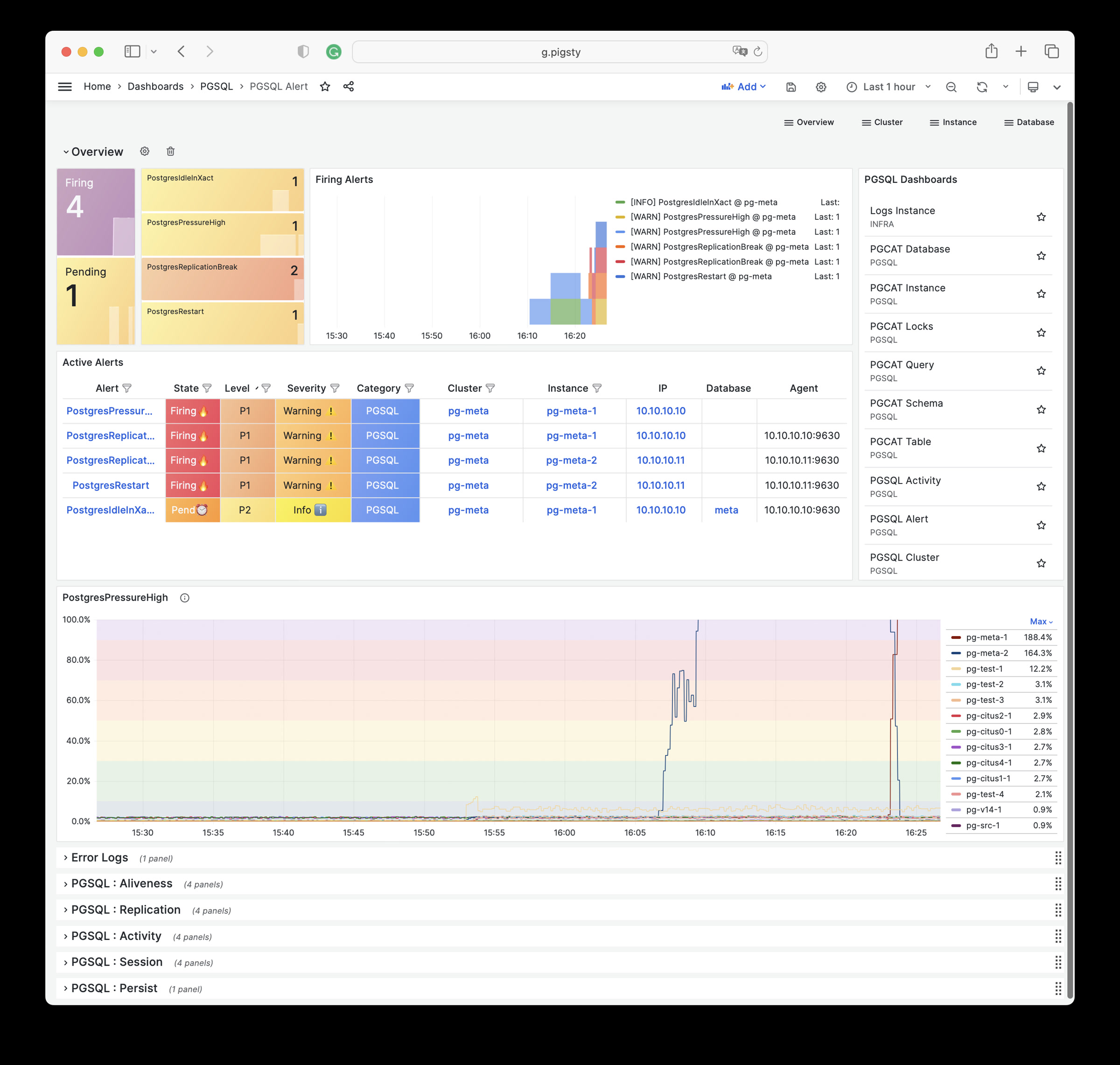
PGSQL Shard : Overview of a horizontal sharded PGSQL cluster, e.g. CITUS / GPSQL cluster
PGSQL Shard
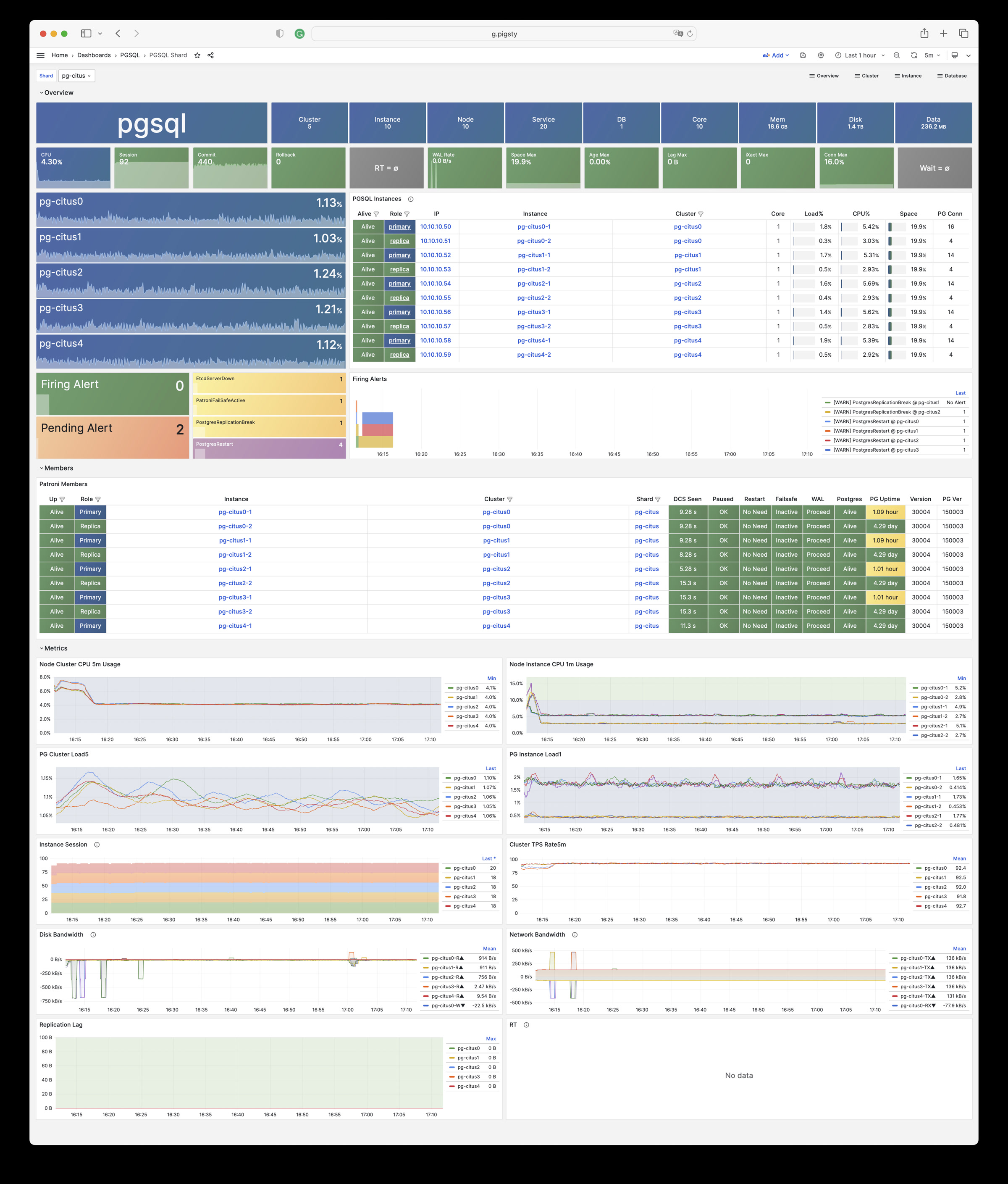
Cluster
PGSQL Cluster: The main dashboard for a PGSQL cluster
PGSQL Cluster
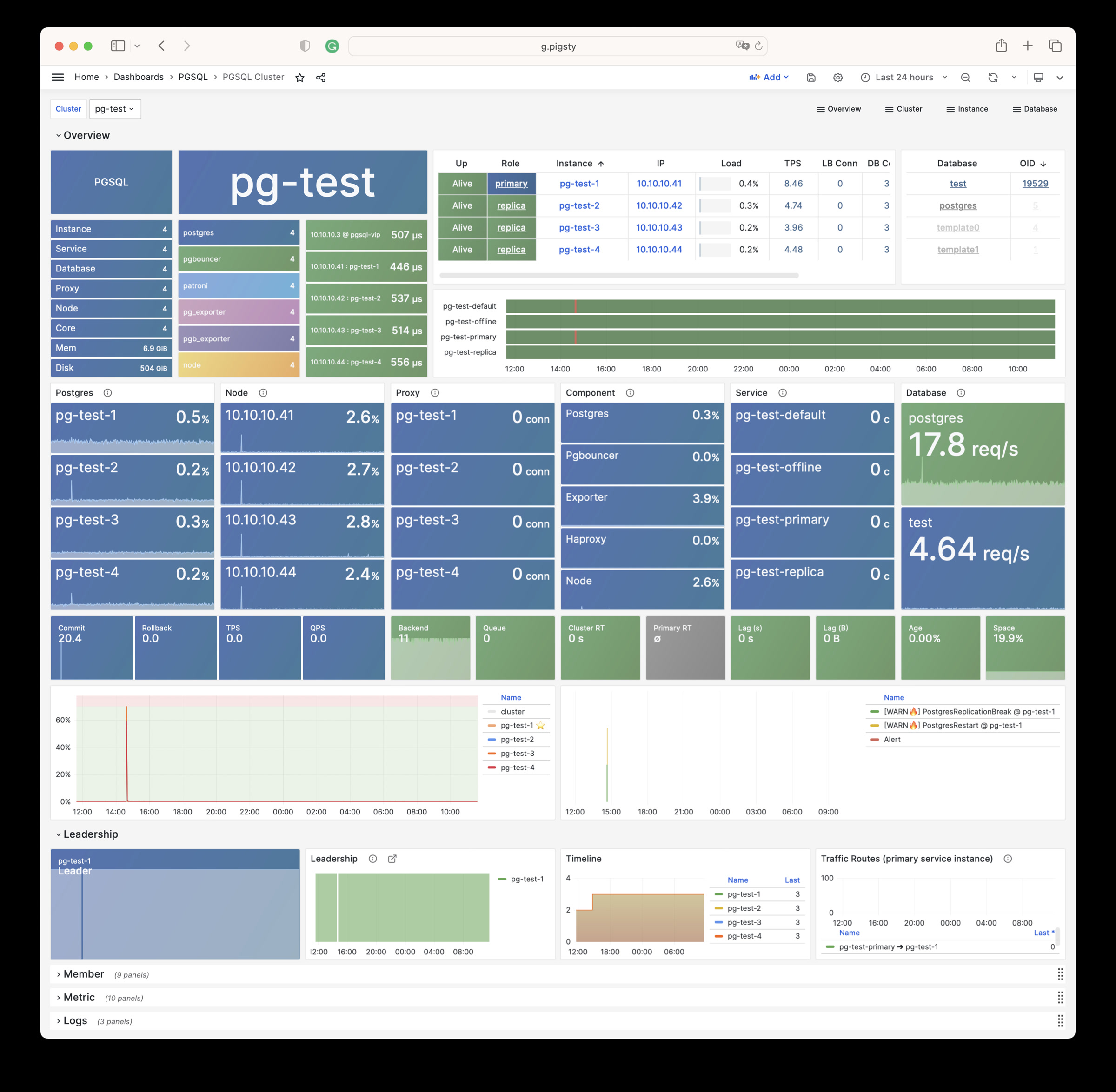
PGRDS Cluster: The PGSQL Cluster dashboard for RDS, focus on all postgres metrics only.
PGRDS Cluster
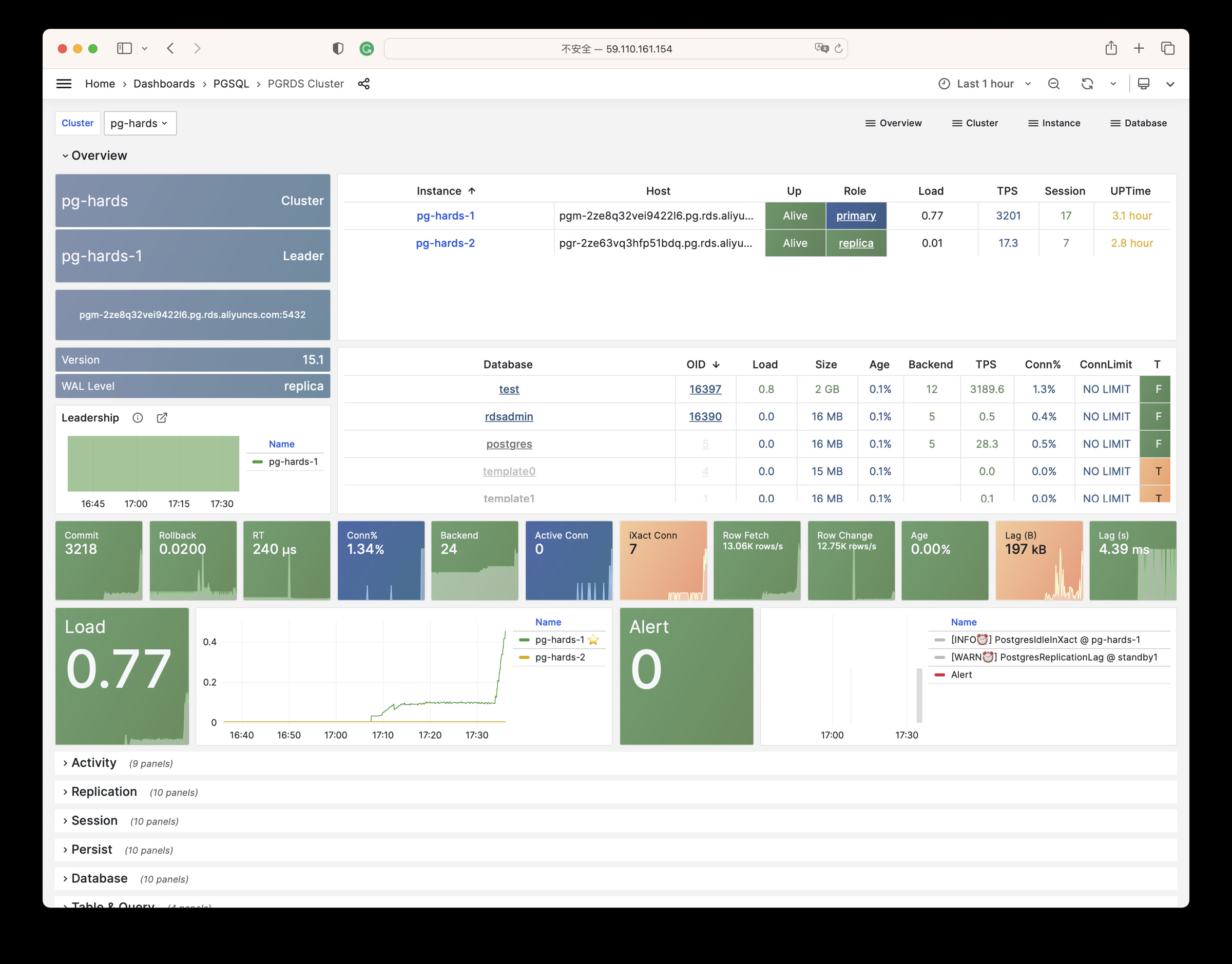
PGSQL Service: Cares about PGSQL cluster services, proxies, routes, and load balancers.
PGSQL Service
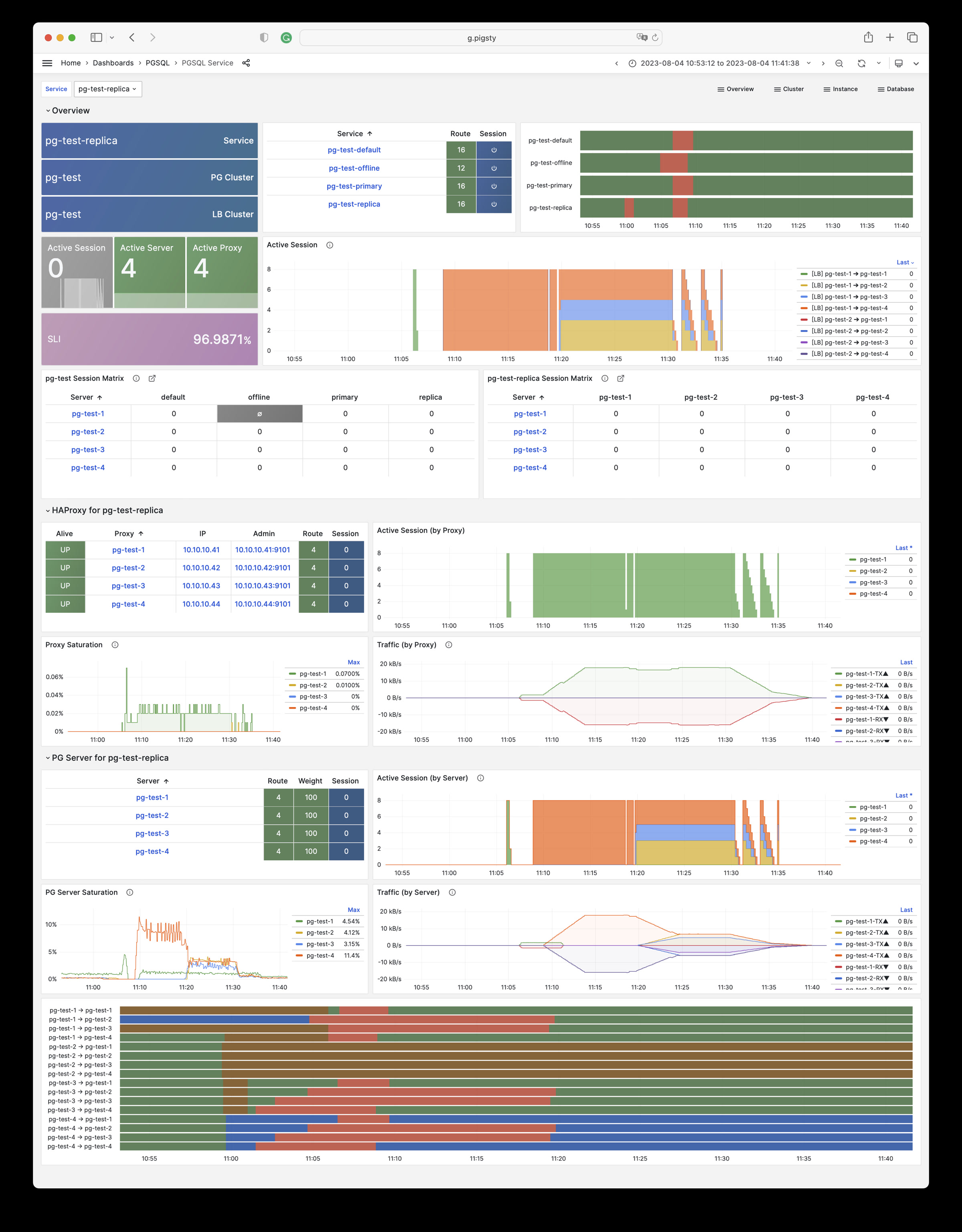
PGSQL Activity: Cares about the Session/Load/QPS/TPS/Locks of a PGSQL cluster
PGSQL Activity
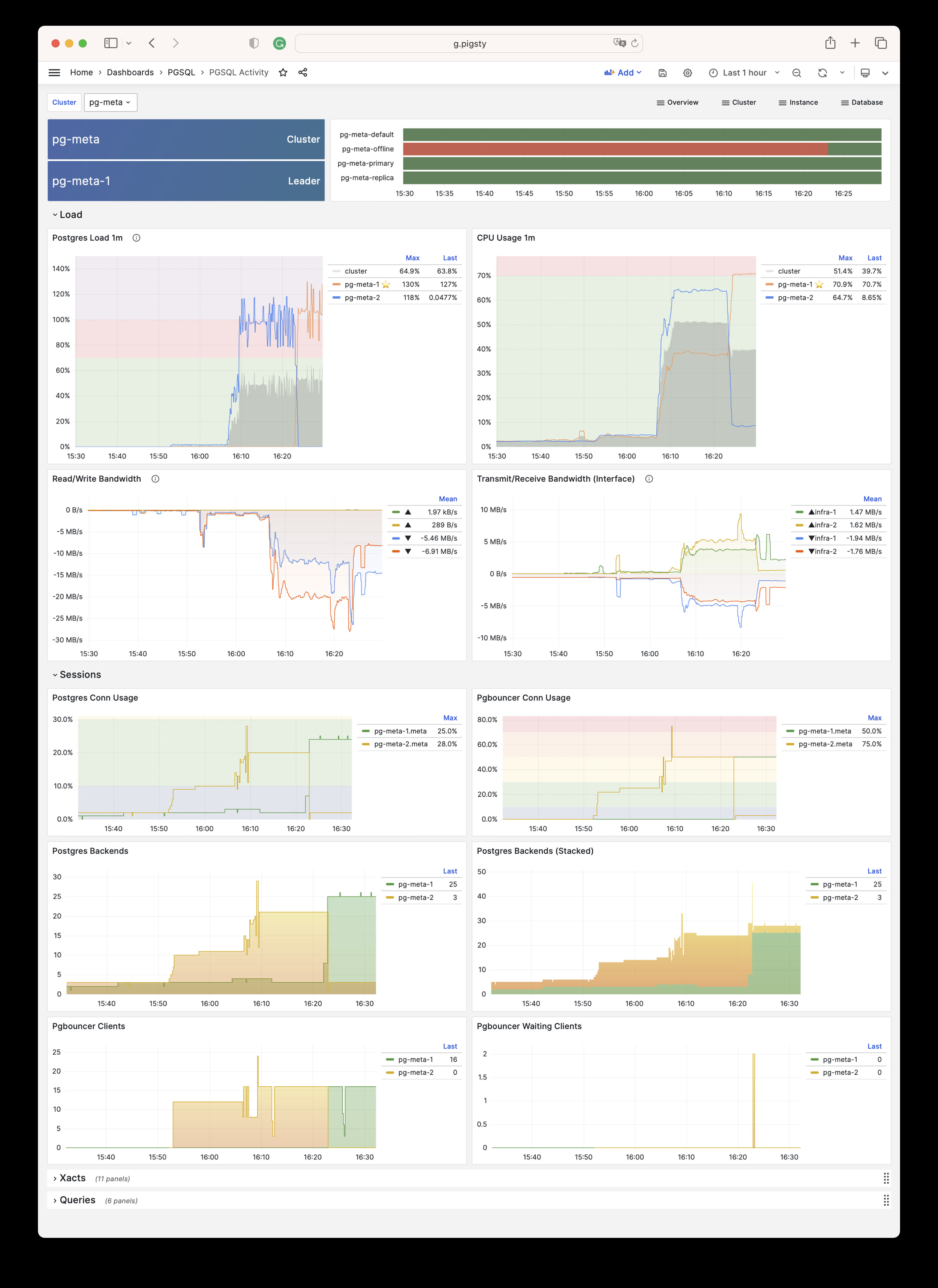
PGSQL Replication: Cares about PGSQL cluster replication, slots, and pub/sub.
PGSQL Replication
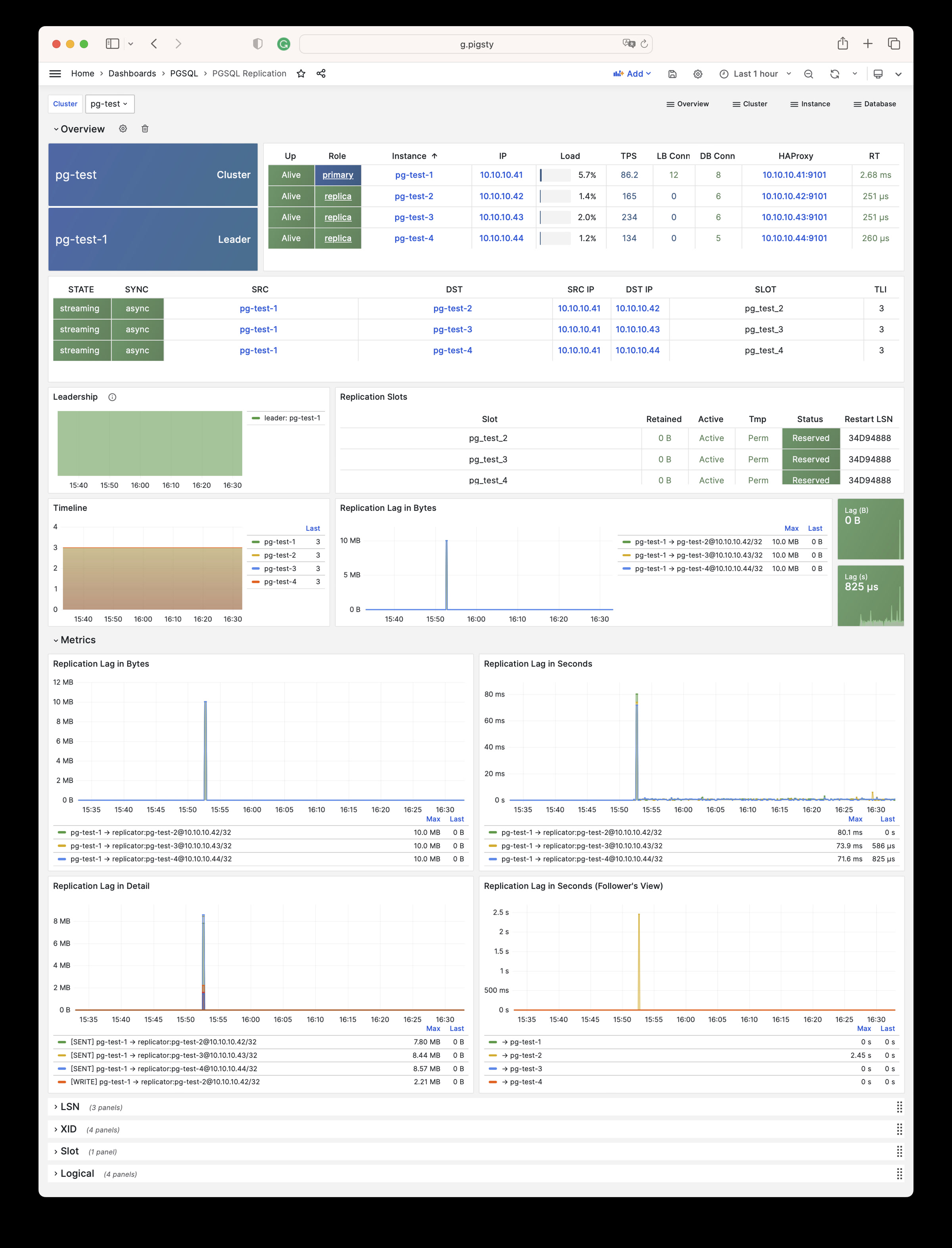
PGSQL Databases: Cares about database CRUD, slow queries, and table statistics cross all instances.
PGSQL Databases
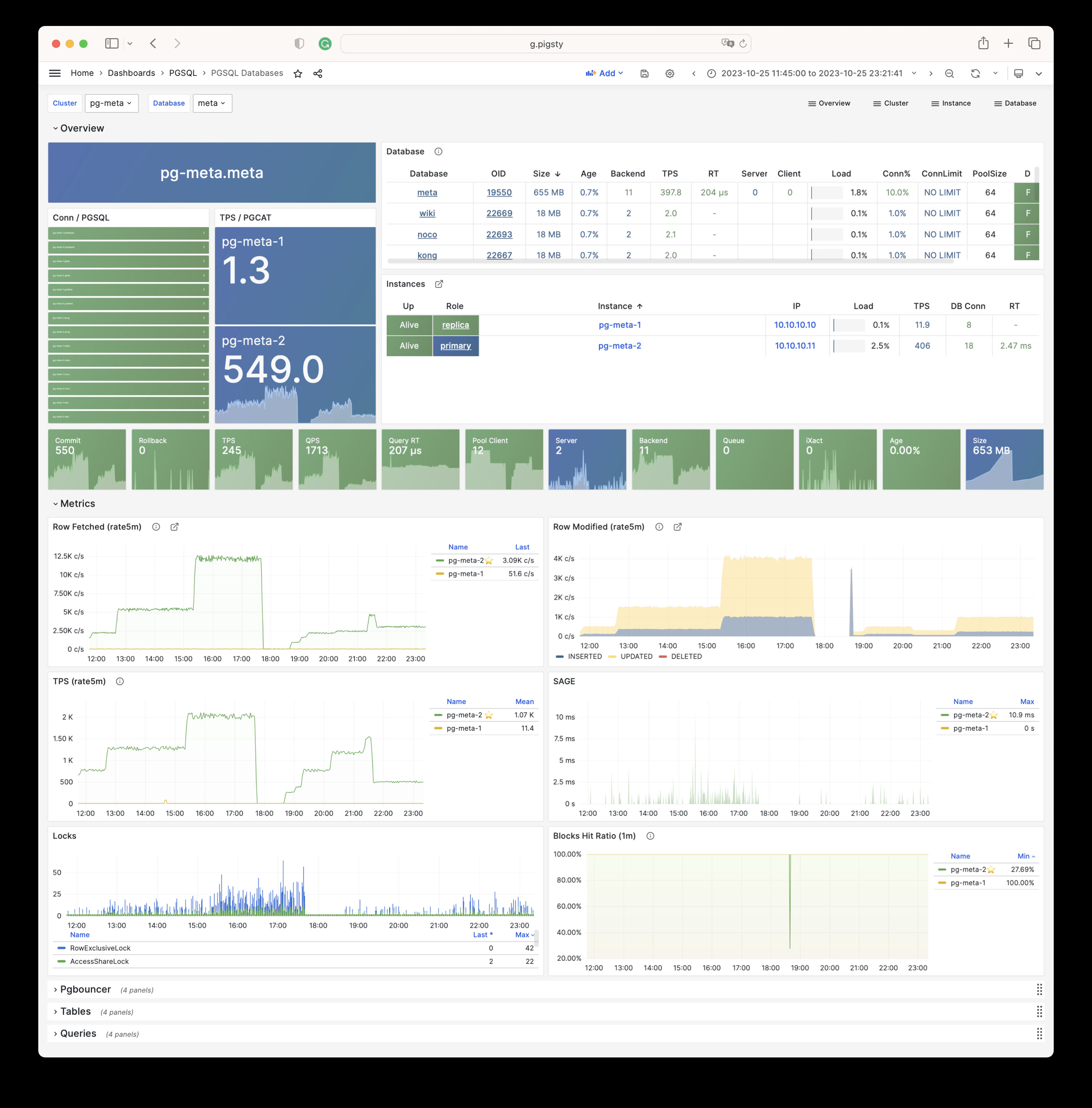
PGSQL Patroni: Cares about cluster HA agent: patroni status.
PGSQL Patroni
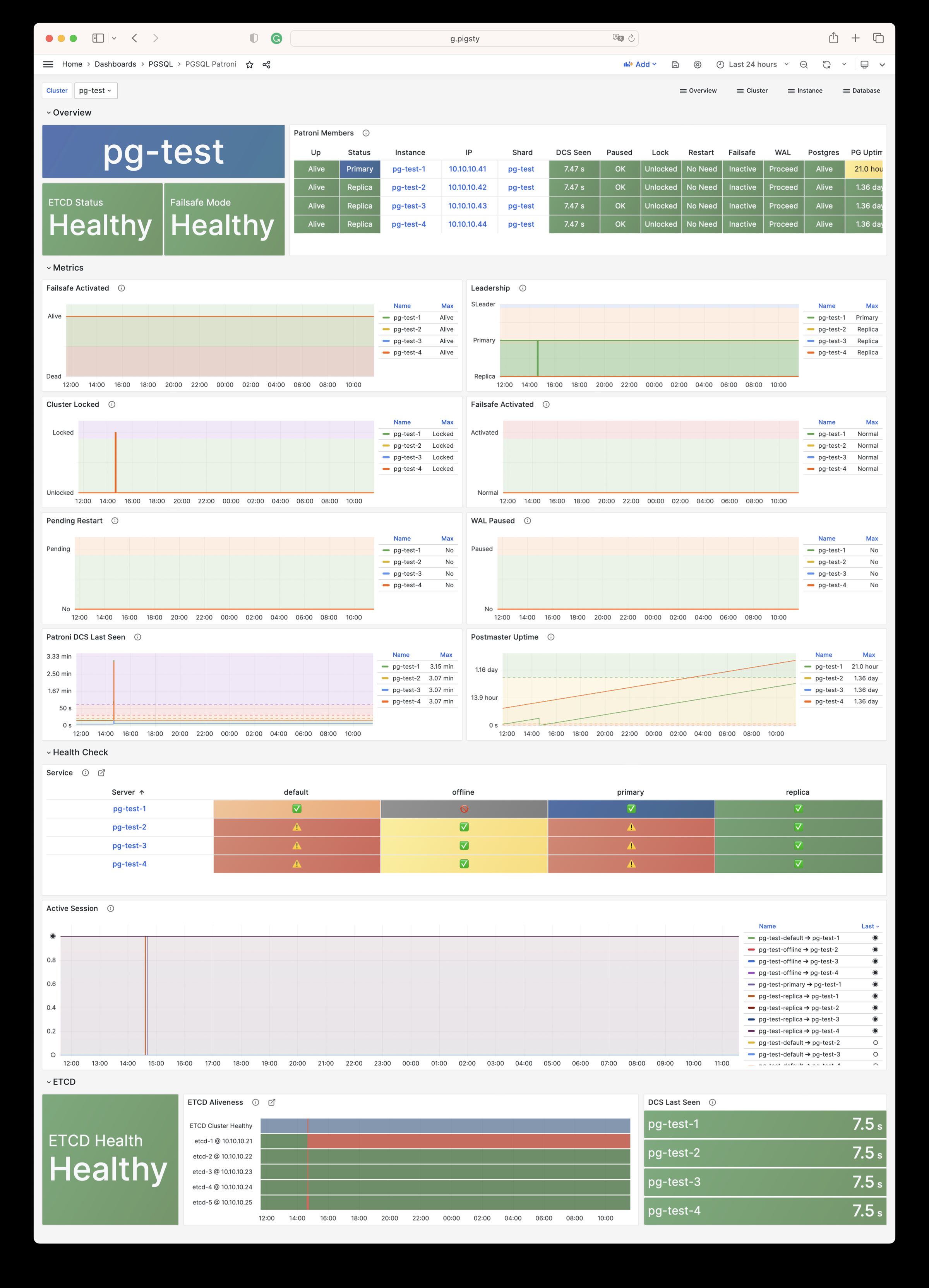
PGSQL PITR: Cares about context of cluster status during PITR procedure
PGSQL PITR
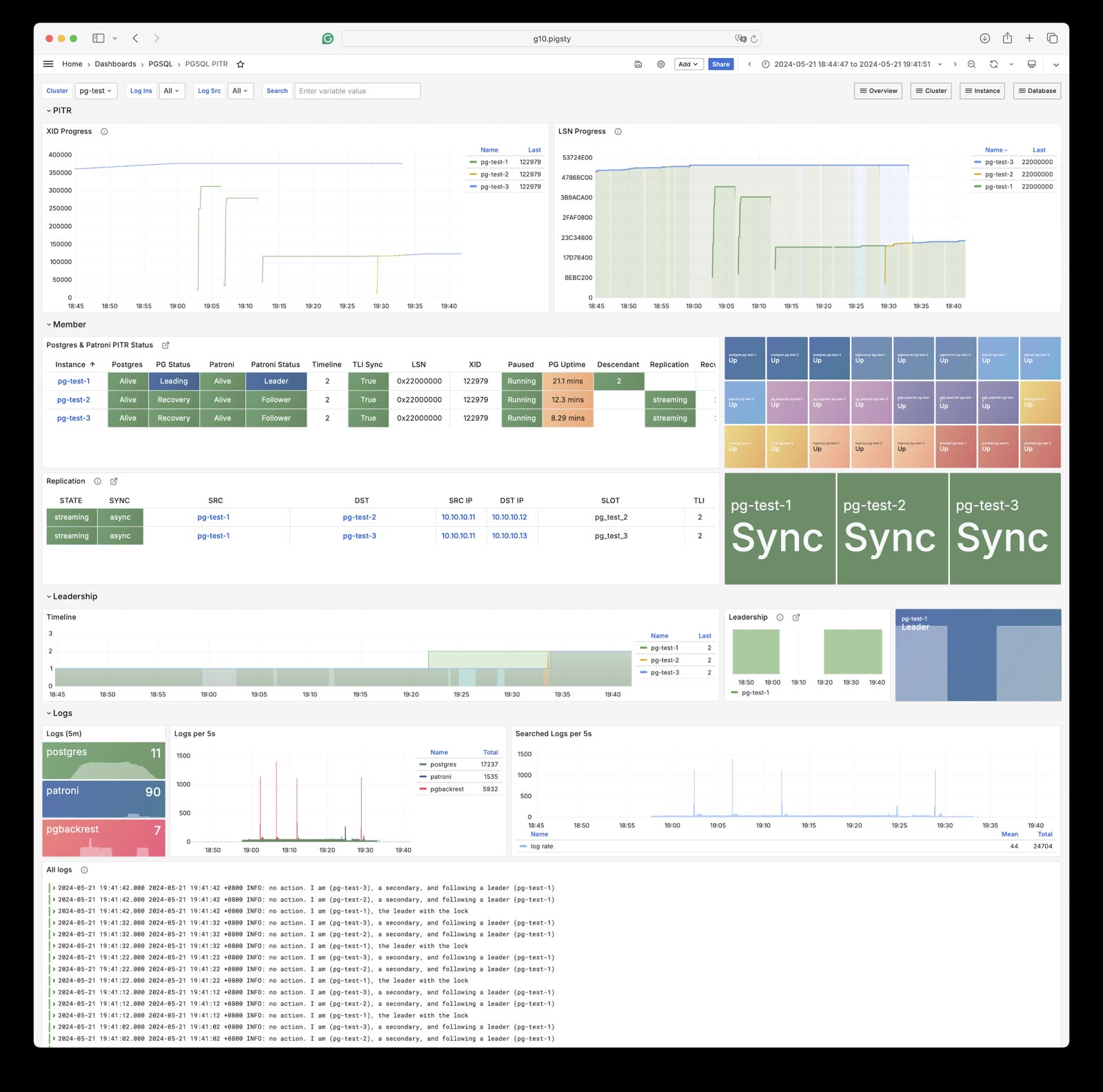
Instance
PGSQL Instance: The main dashboard for a single PGSQL instance
PGSQL Instance
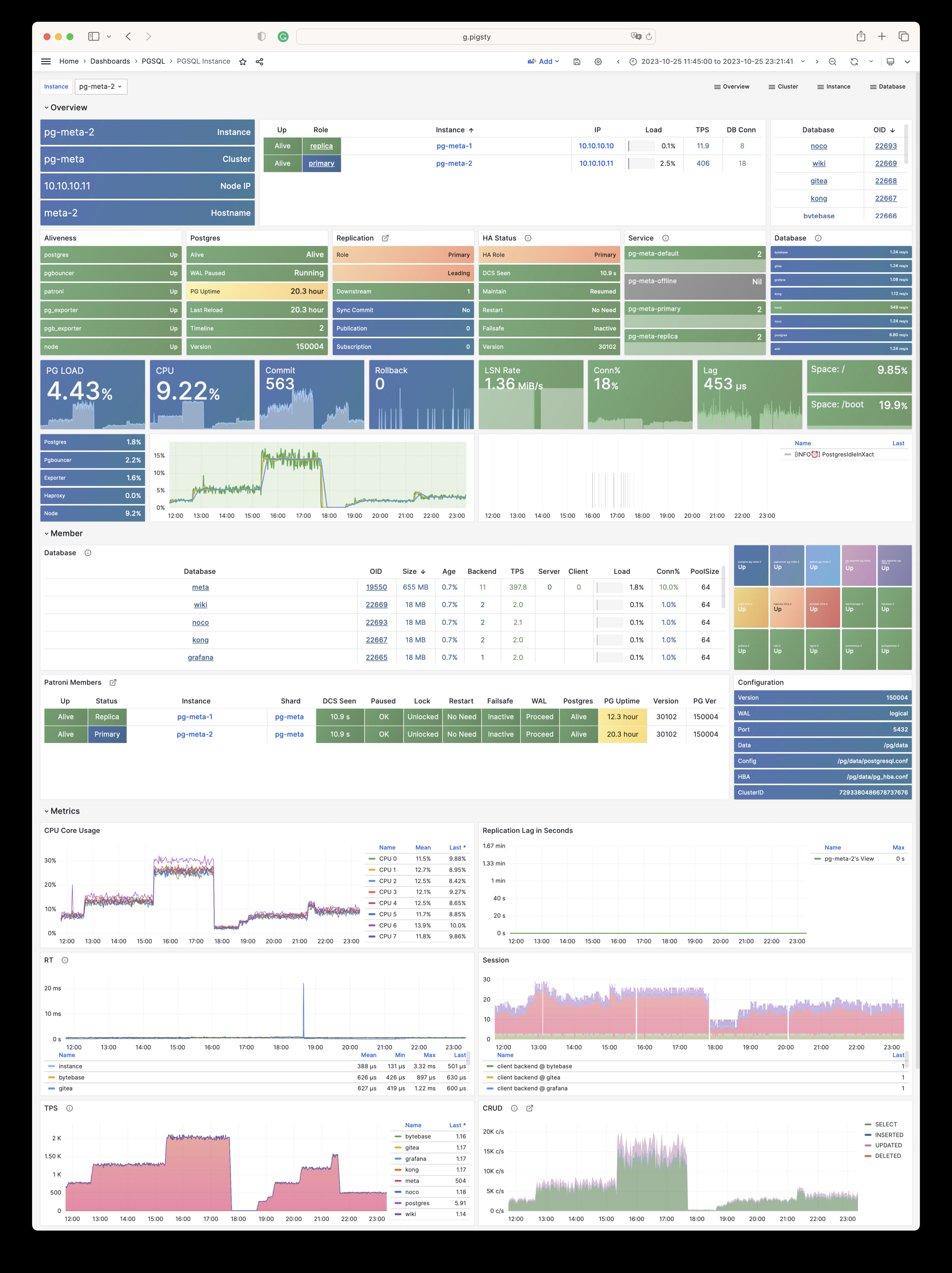
PGRDS Instance: The PGSQL Instance dashboard for RDS, focus on all postgres metrics only.
PGRDS Instance
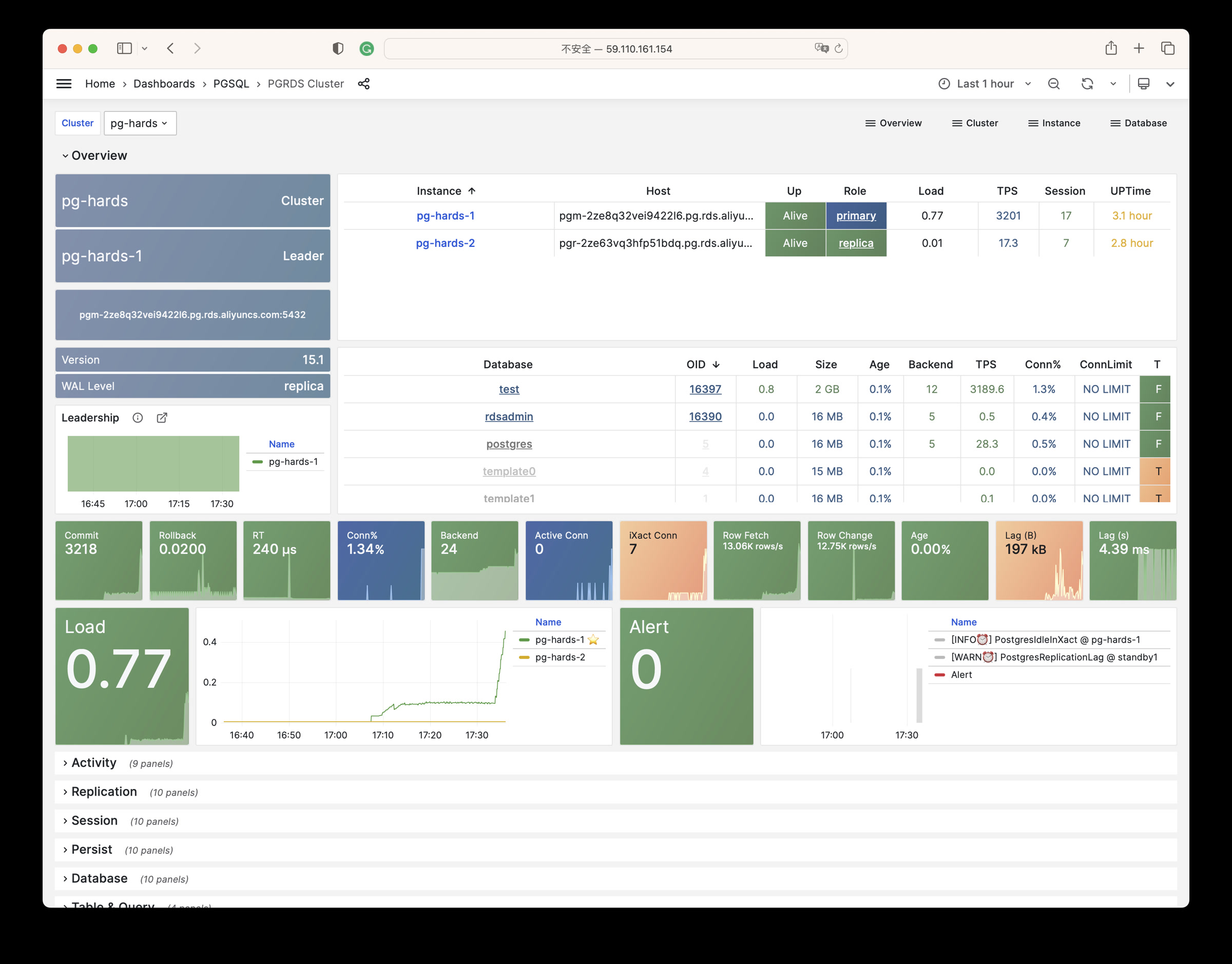
PGSQL Proxy: Metrics about haproxy the service provider
PGSQL Proxy
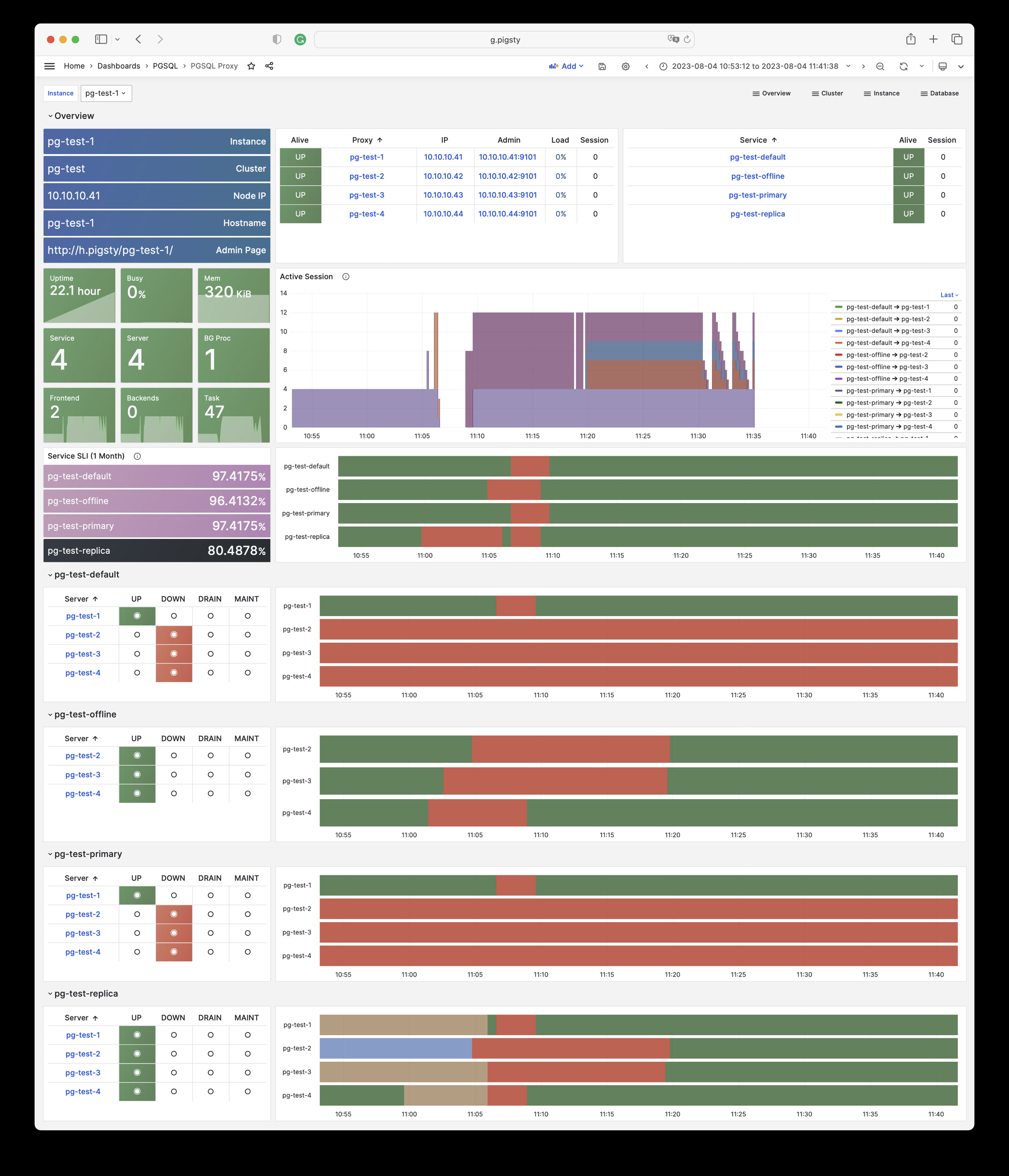
PGSQL Pgbouncer: Metrics about one single pgbouncer connection pool instance
PGSQL Pgbouncer
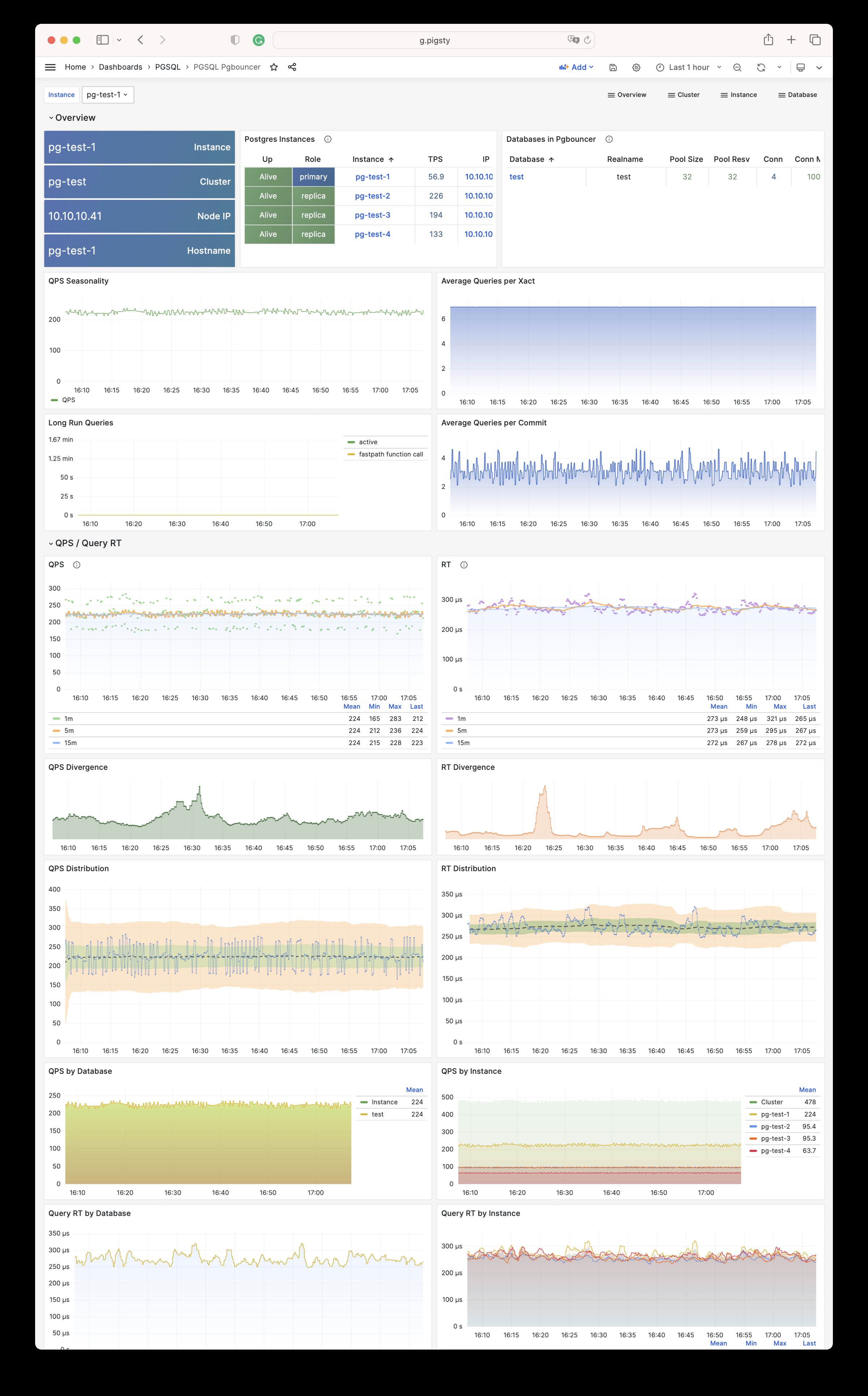
PGSQL Persist: Metrics about persistence: WAL, XID, Checkpoint, Archive, IO
PGSQL Persist
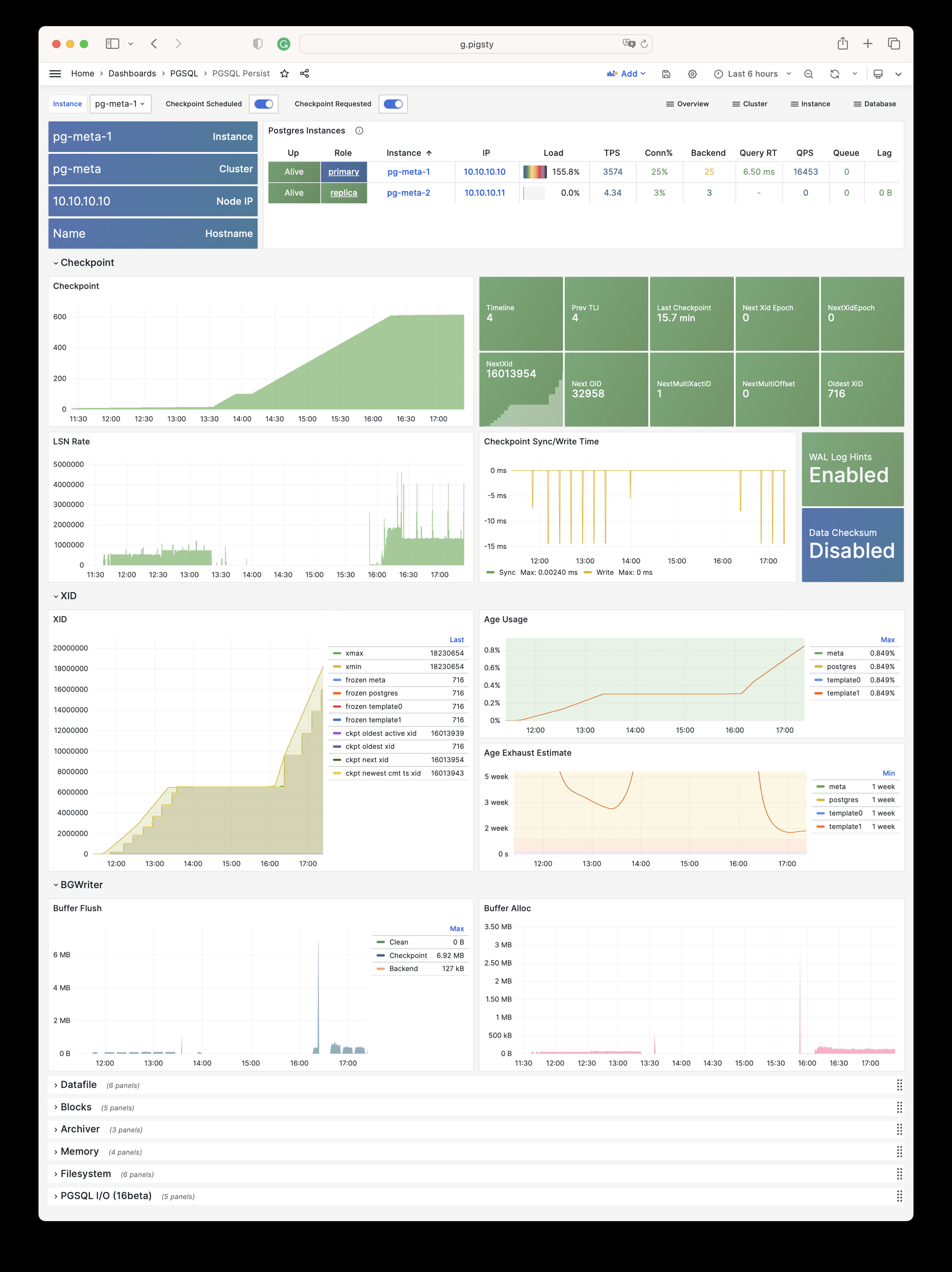
PGSQL Xacts: Metrics about transactions, locks, queries, etc…
PGSQL Xacts
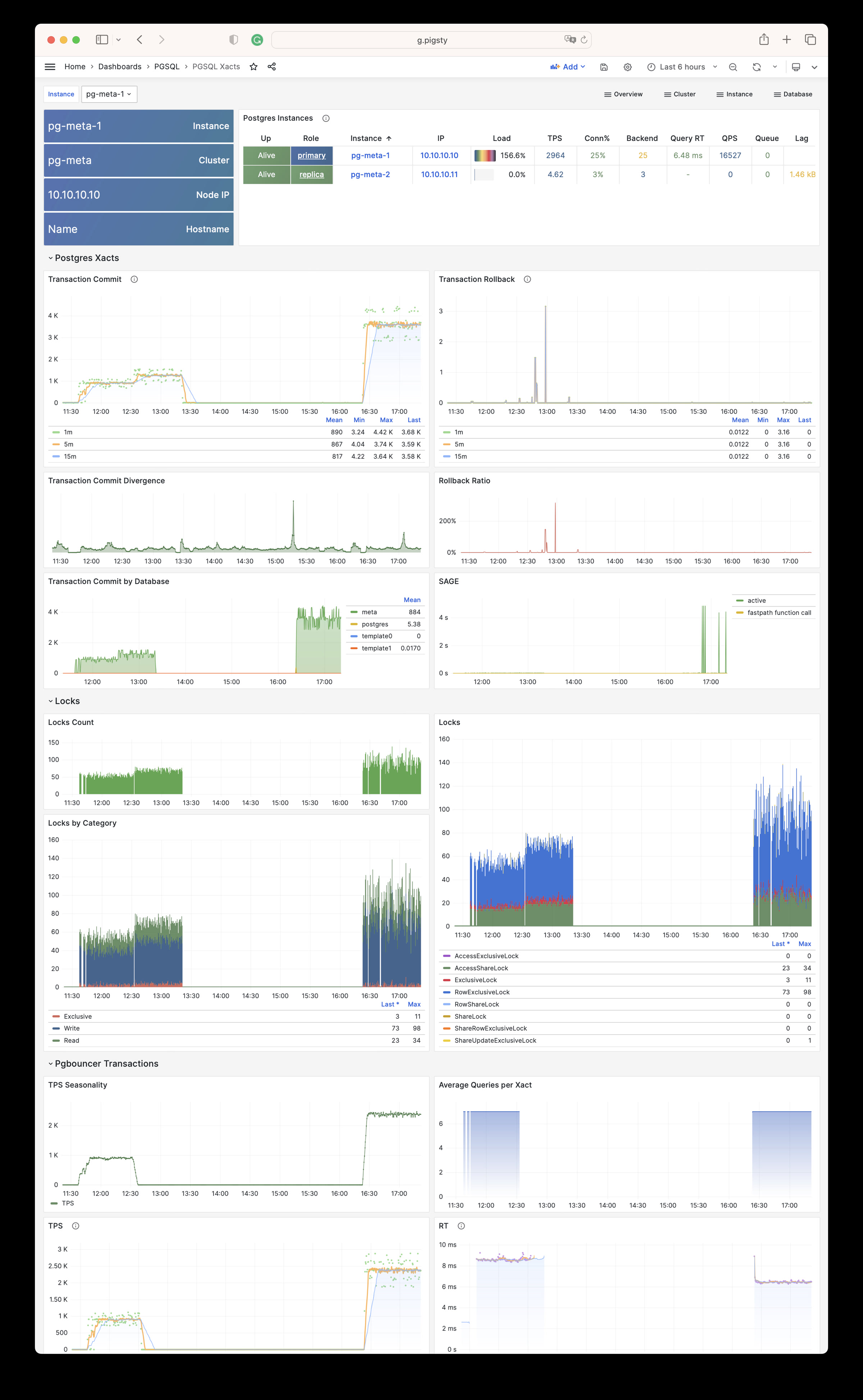
PGSQL Session: Metrics about sessions and active/idle time in a single instance
PGSQL Session
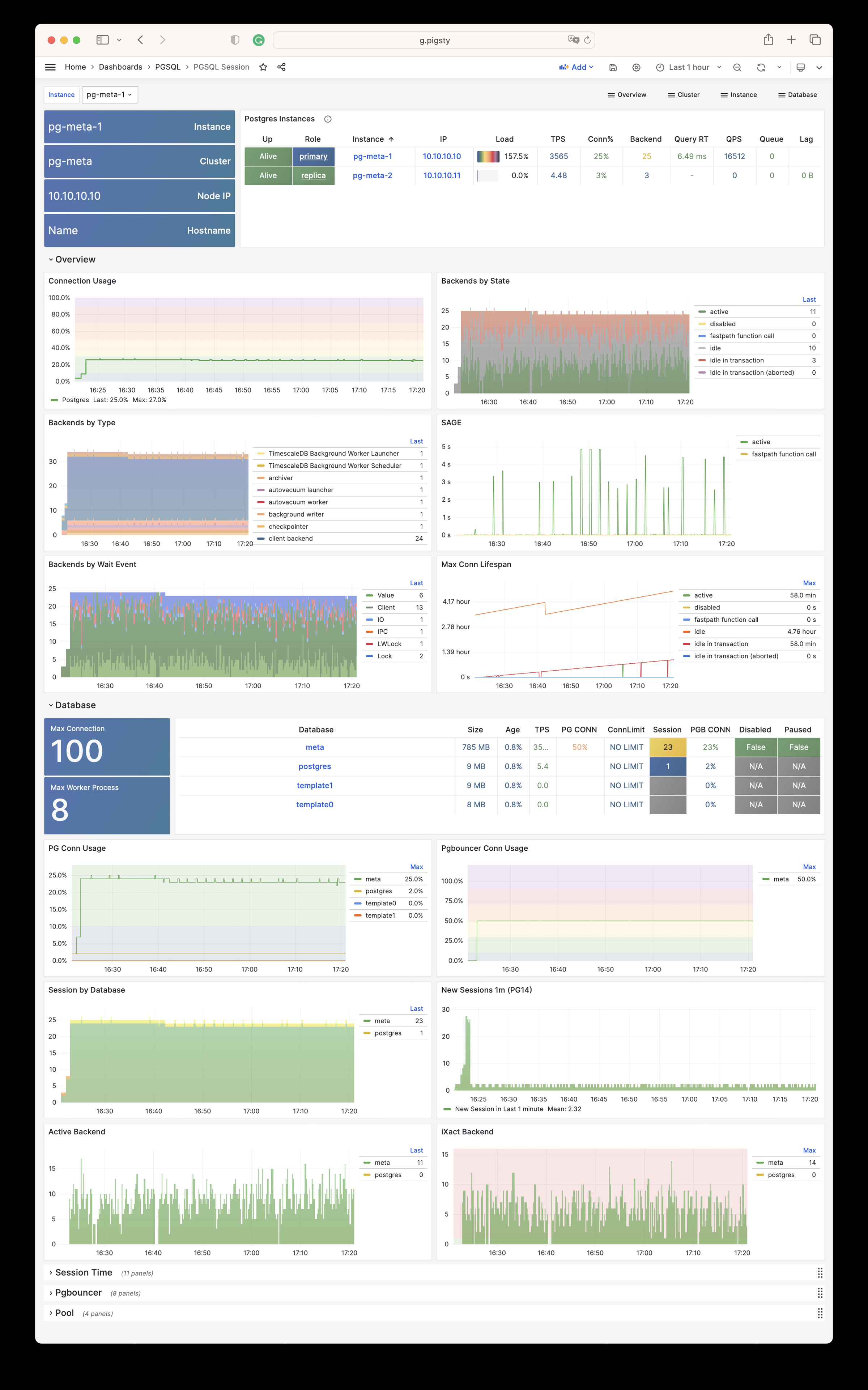
PGSQL Exporter: Postgres & Pgbouncer exporter self monitoring metrics
PGSQL Exporter
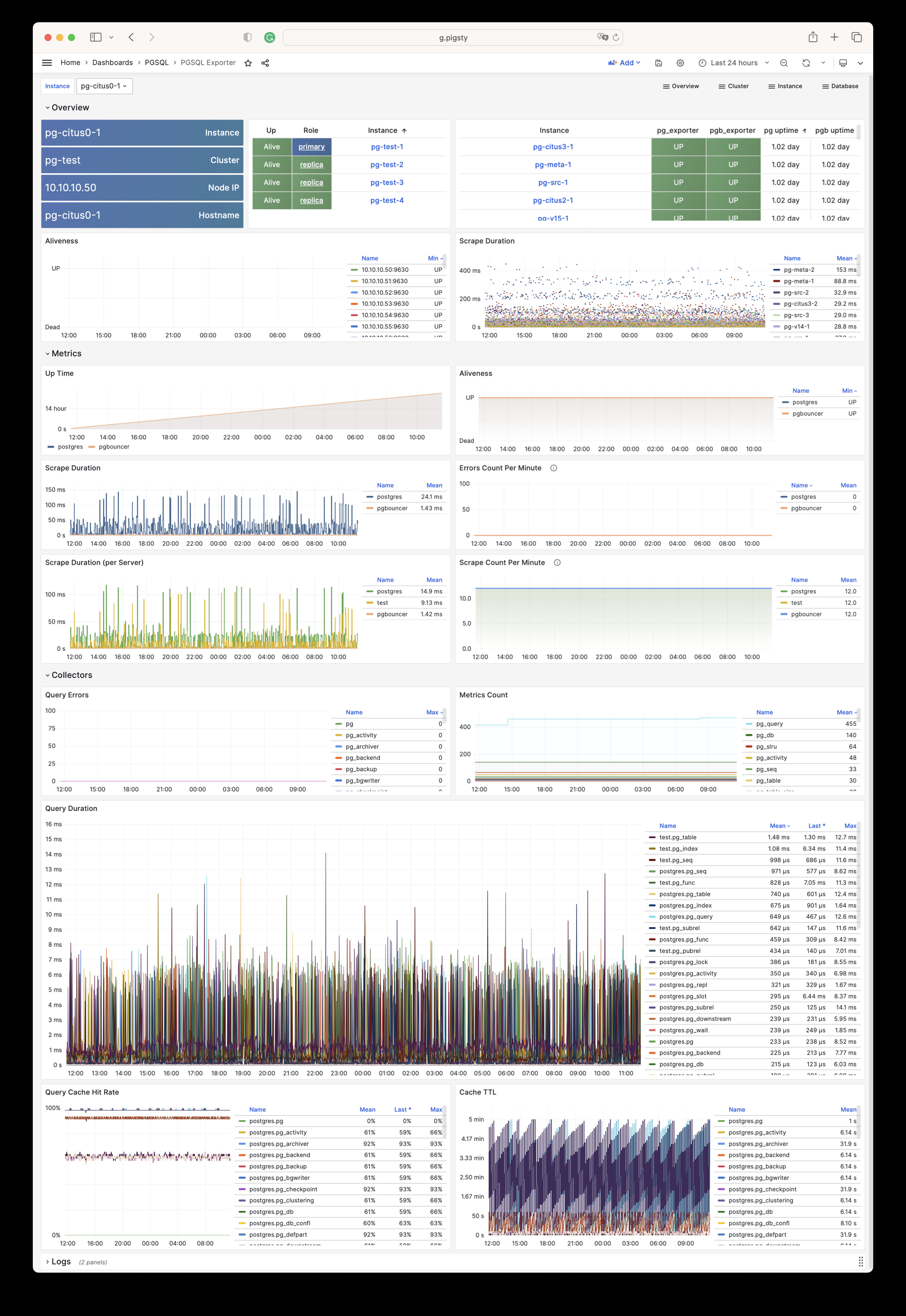
Database
PGSQL Database: The main dashboard for a single PGSQL database
PGSQL Database
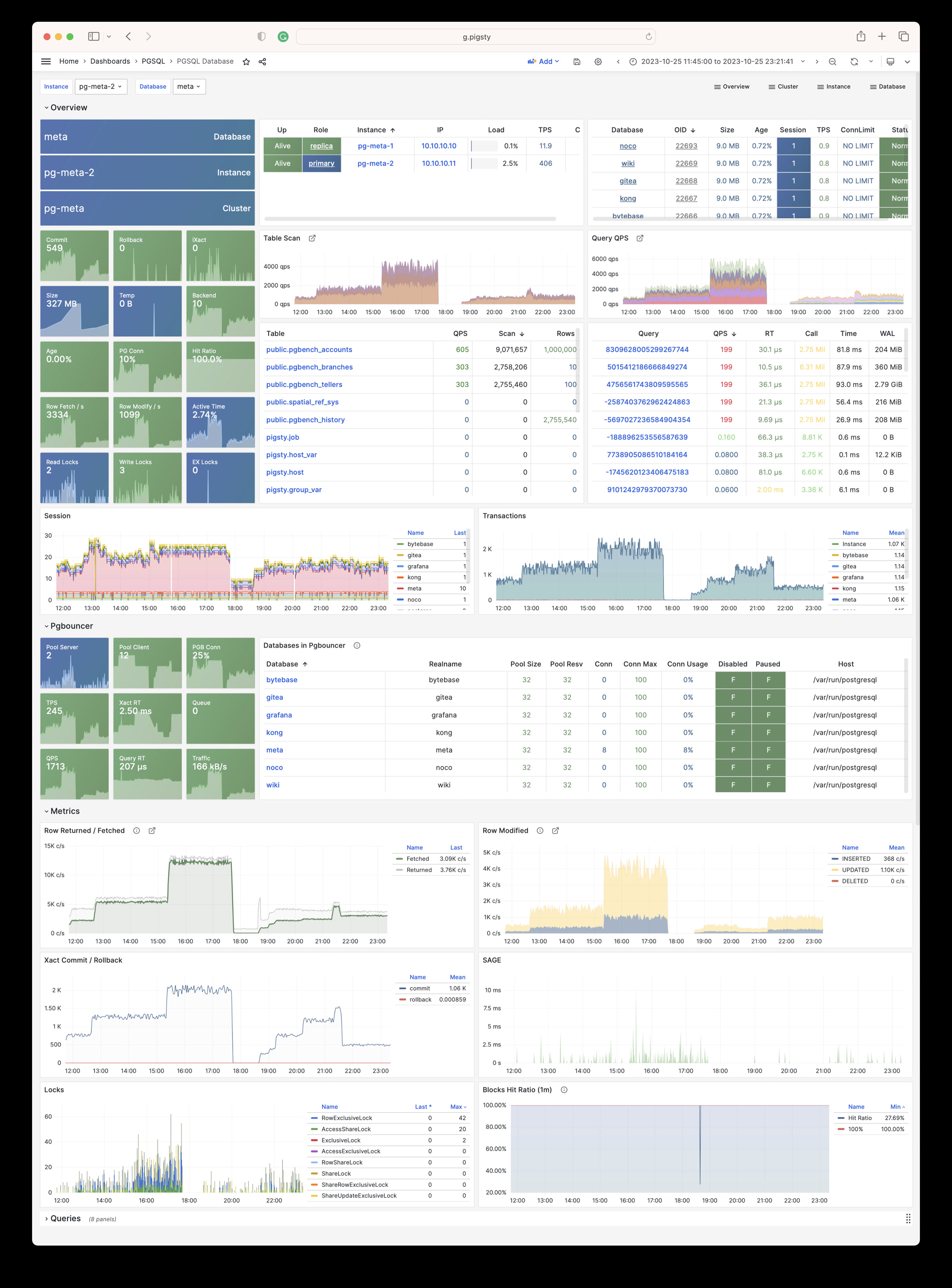
PGSQL Tables : Table/Index access metrics inside a single database
PGSQL Tables
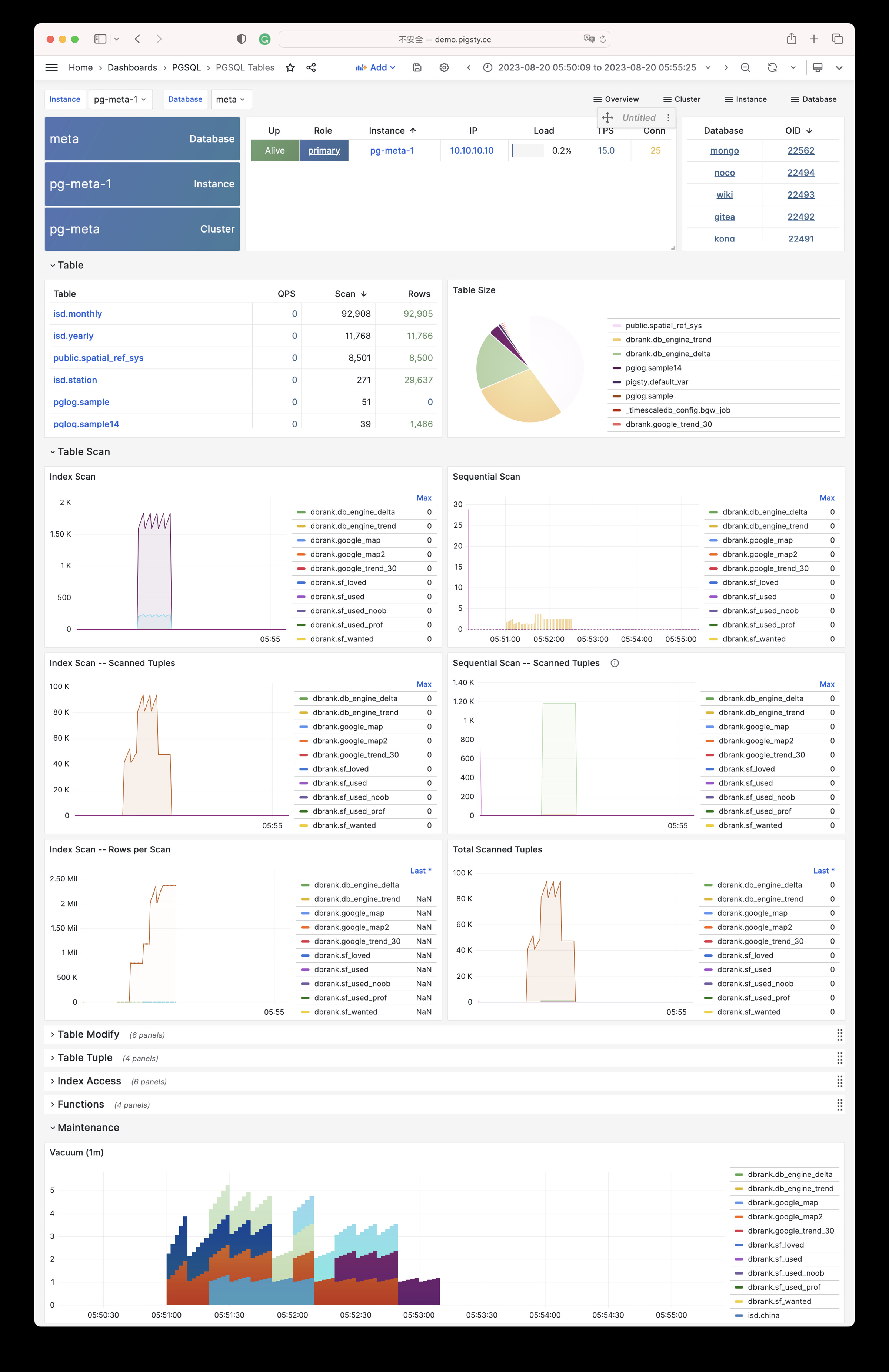
PGSQL Table: Detailed information (QPS/RT/Index/Seq…) about a single table
PGSQL Table
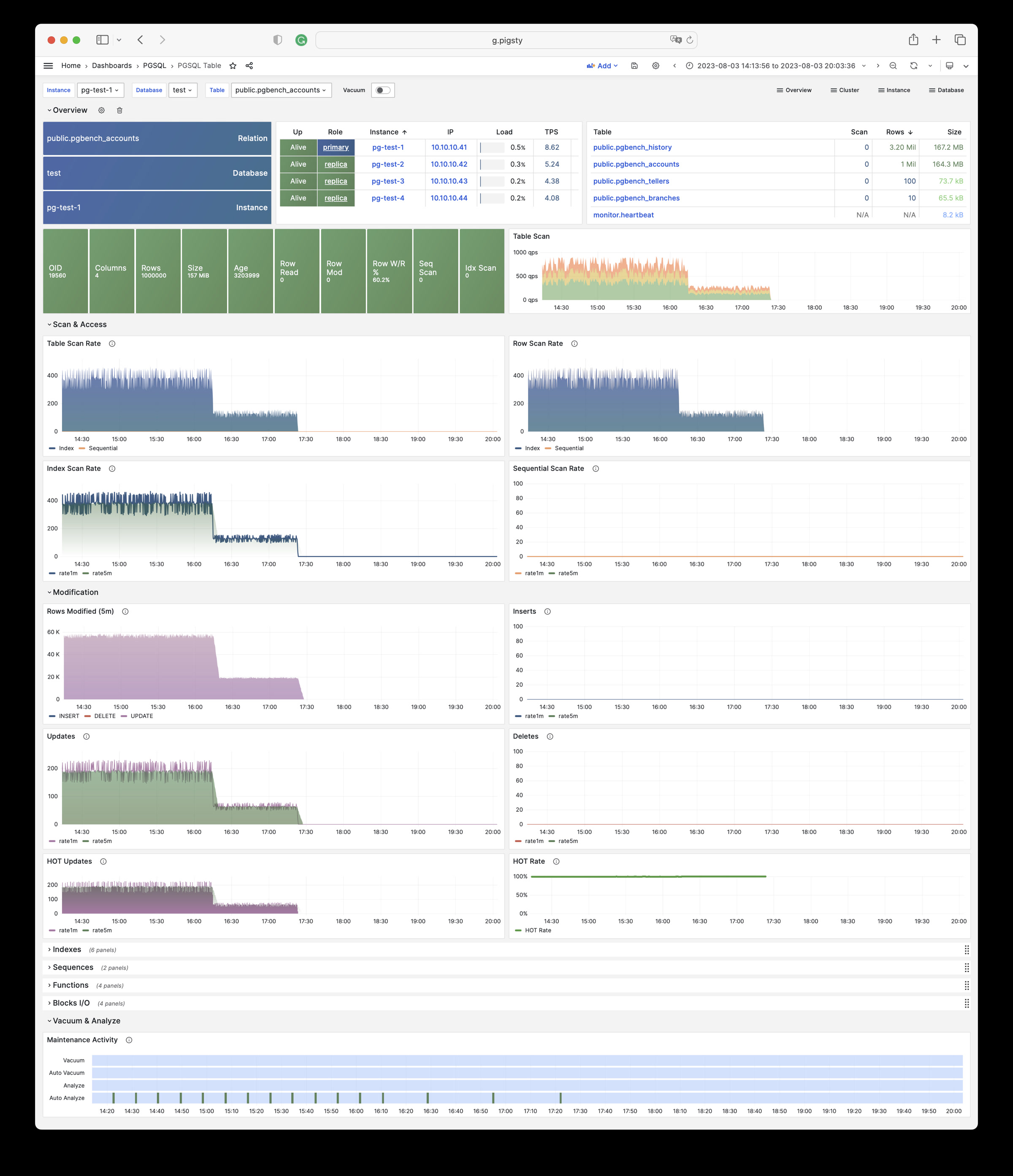
PGSQL Query: Detailed information (QPS/RT) about a single query
PGSQL Query
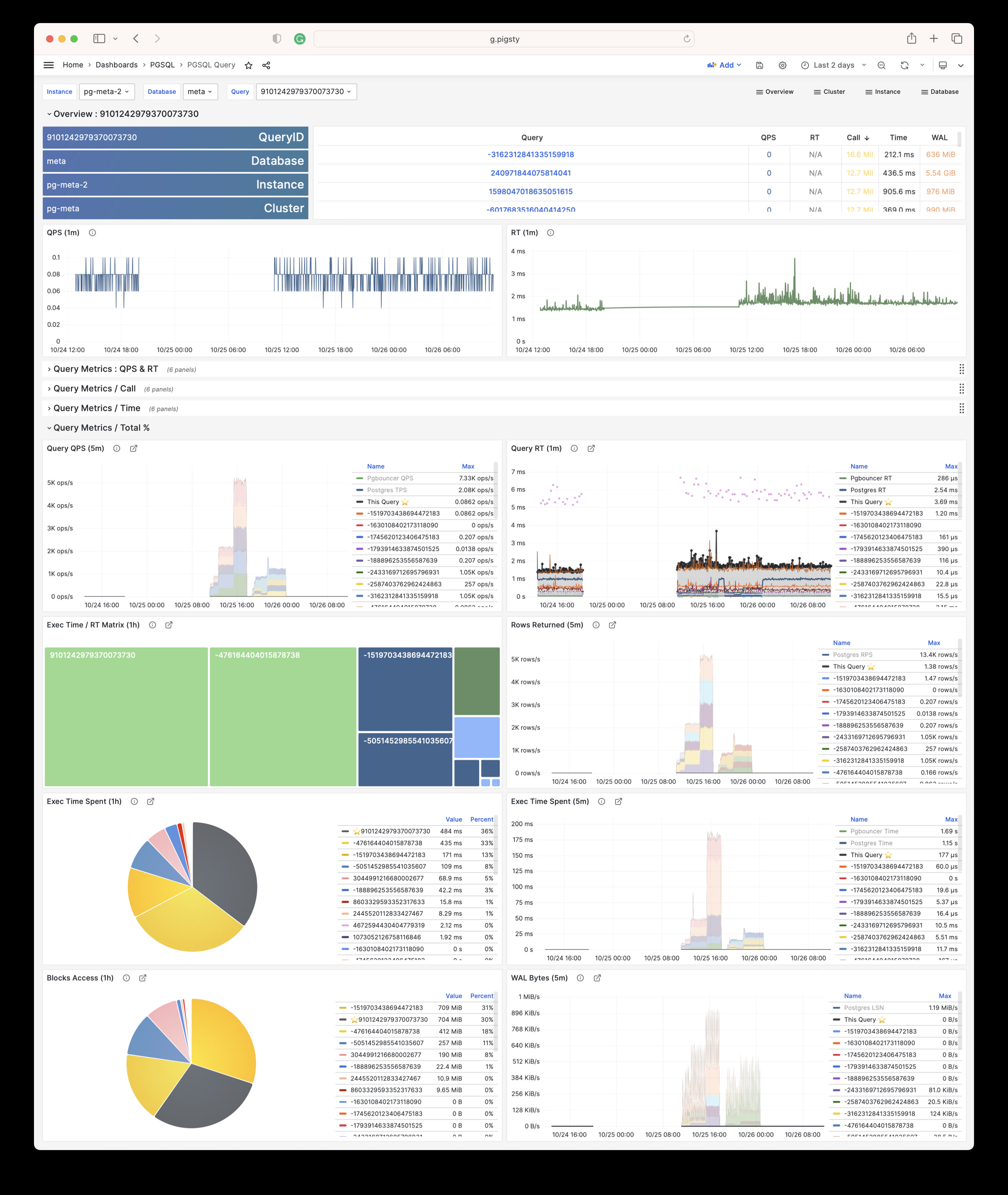
PGCAT
PGCAT Instance: Instance information from database catalog directly
PGCAT Instance
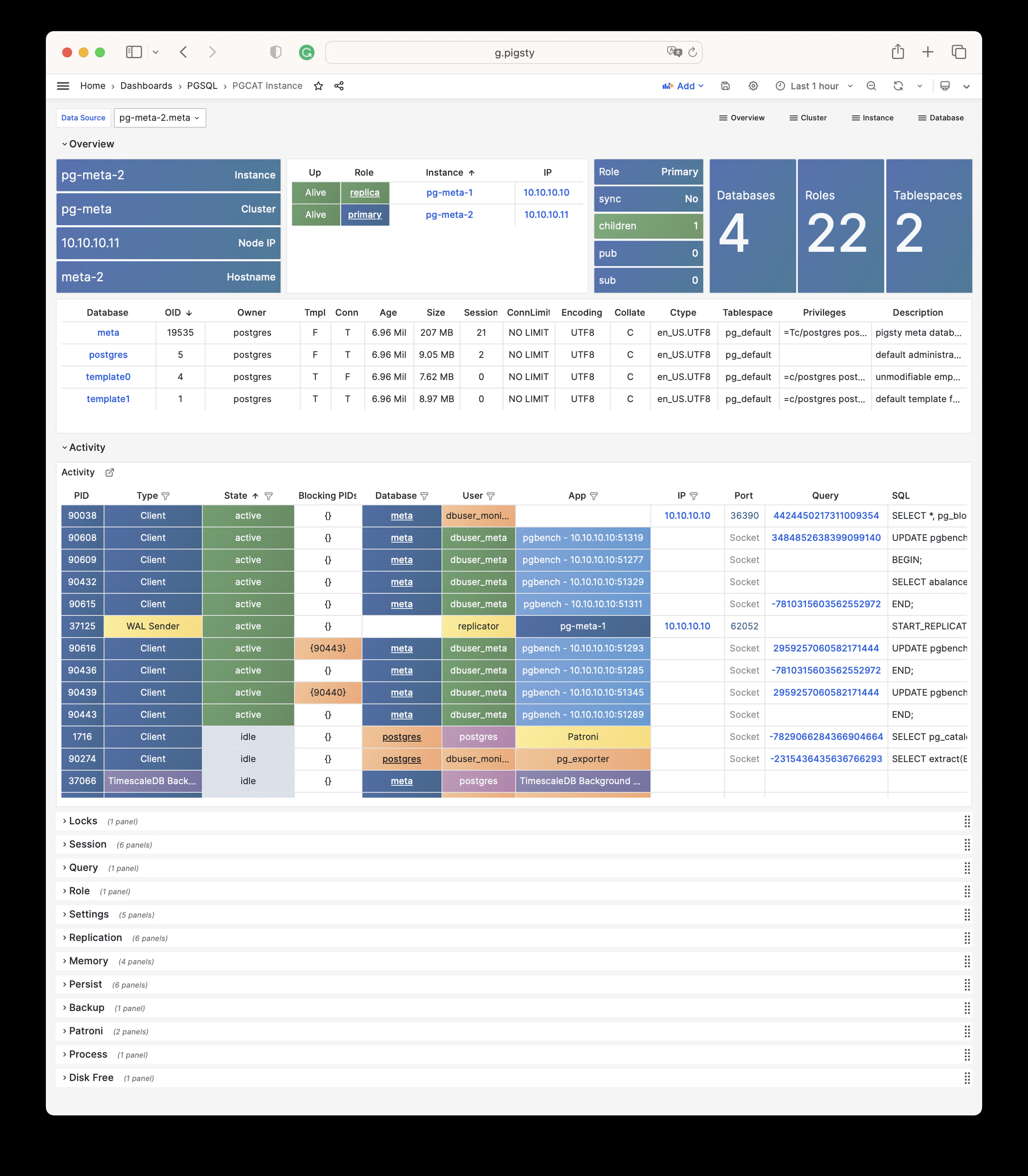
PGCAT Database: Database information from database catalog directly
PGCAT Database
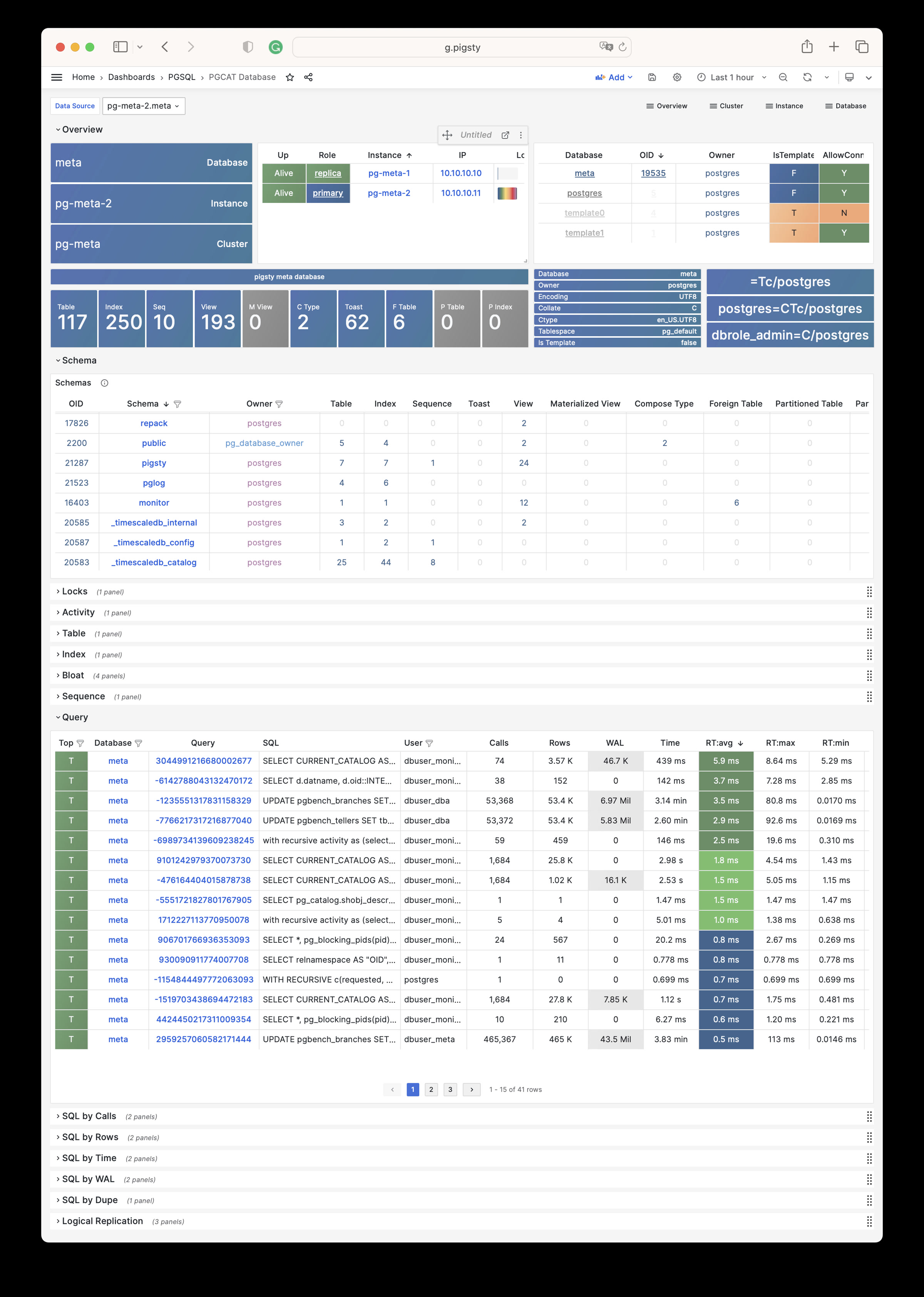
PGCAT Schema: Detailed information about one single schema from database catalog directly
PGCAT Schema
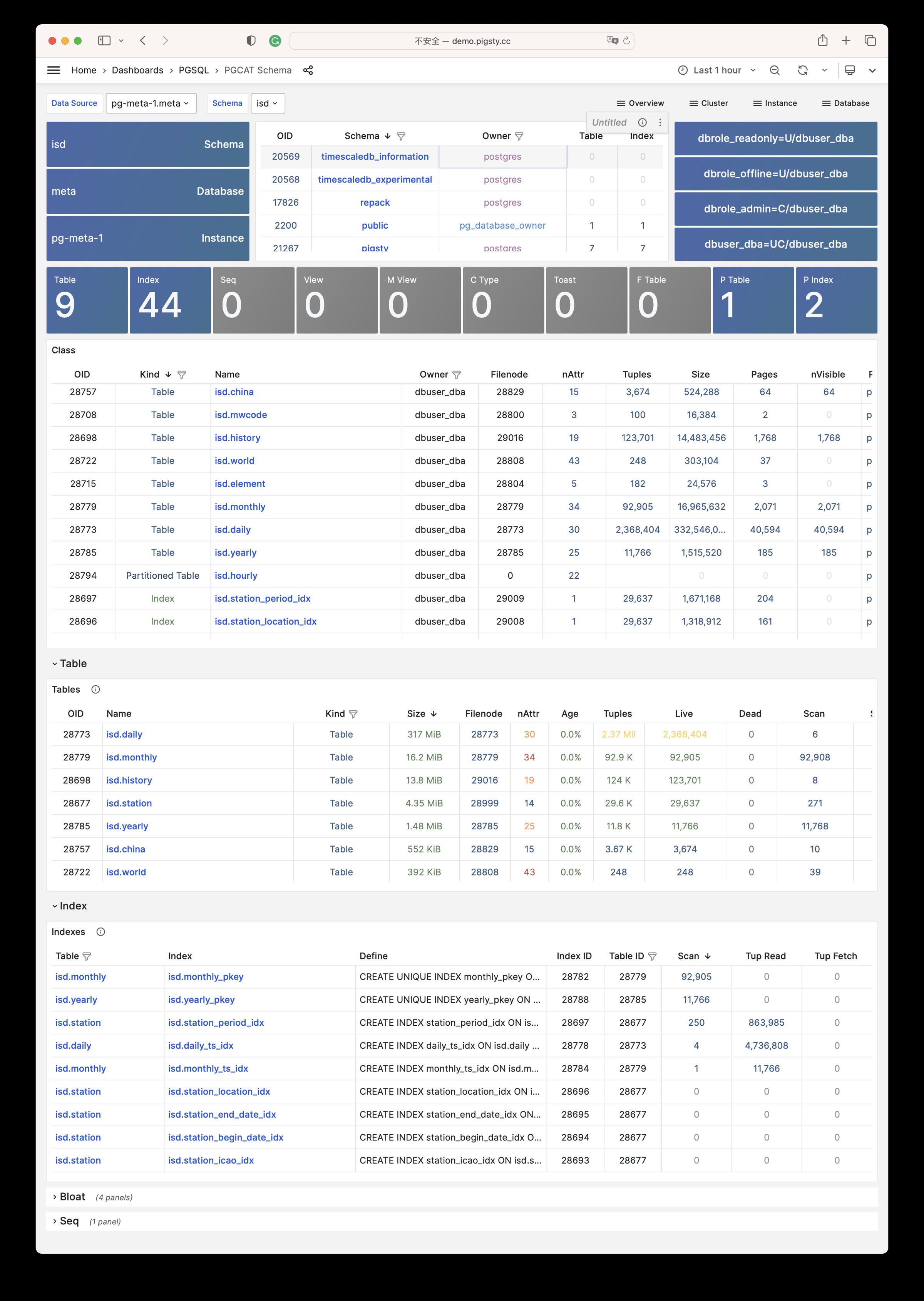
PGCAT Table: Detailed information about one single table from database catalog directly
PGCAT Table
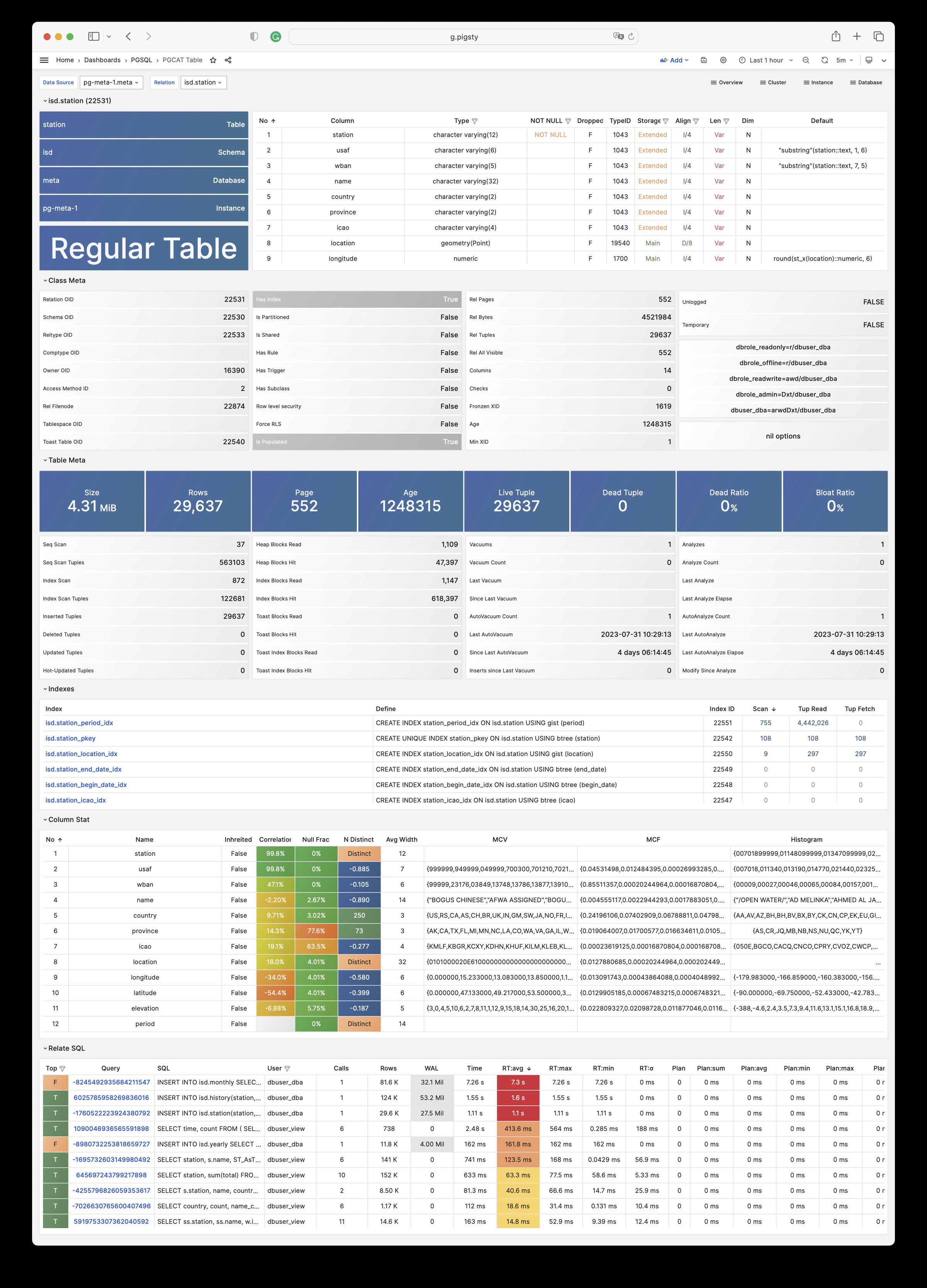
PGCAT Query: Detailed information about one single type of query from database catalog directly
PGCAT Query
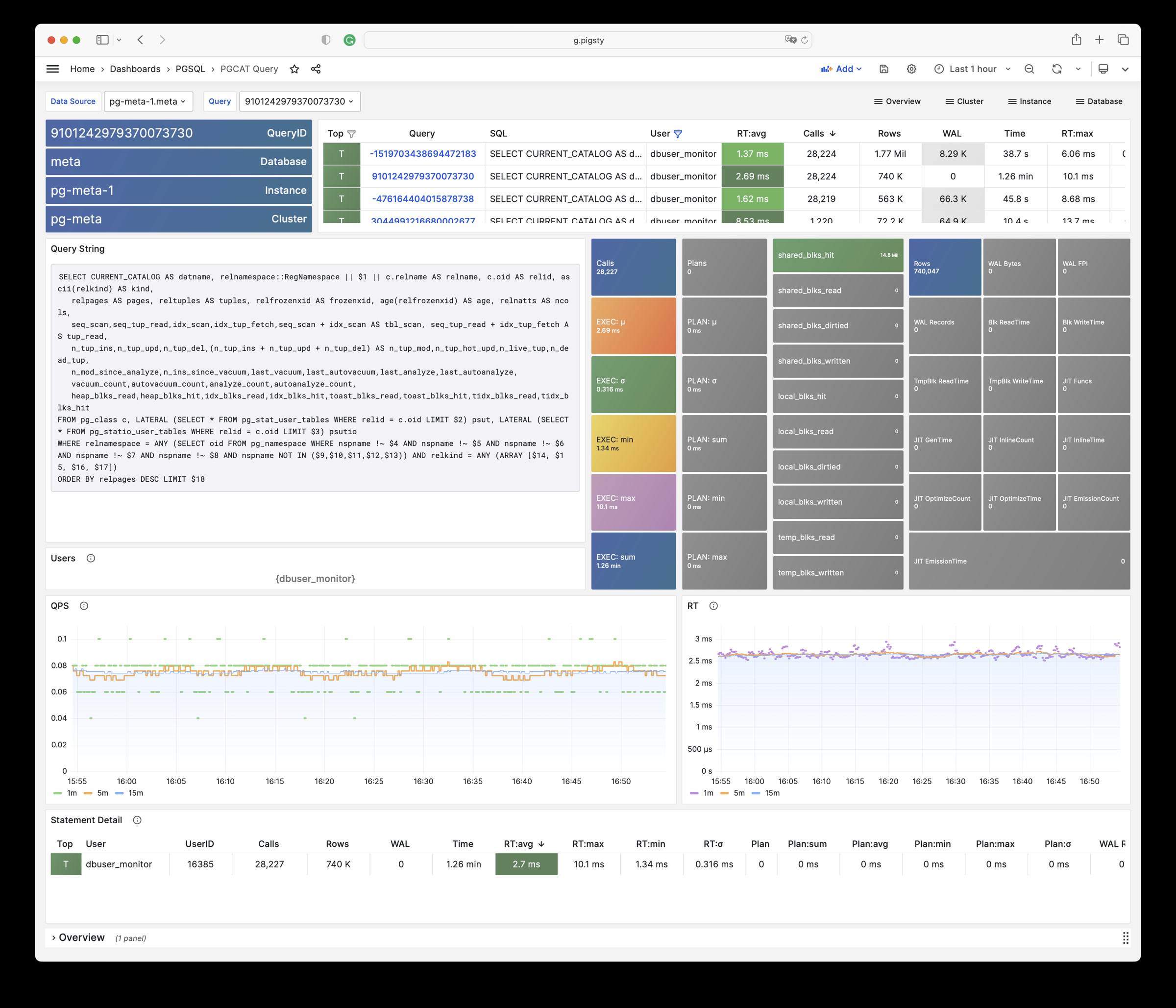
PGCAT Locks: Detailed information about live locks & activity from database catalog directly
PGCAT Locks
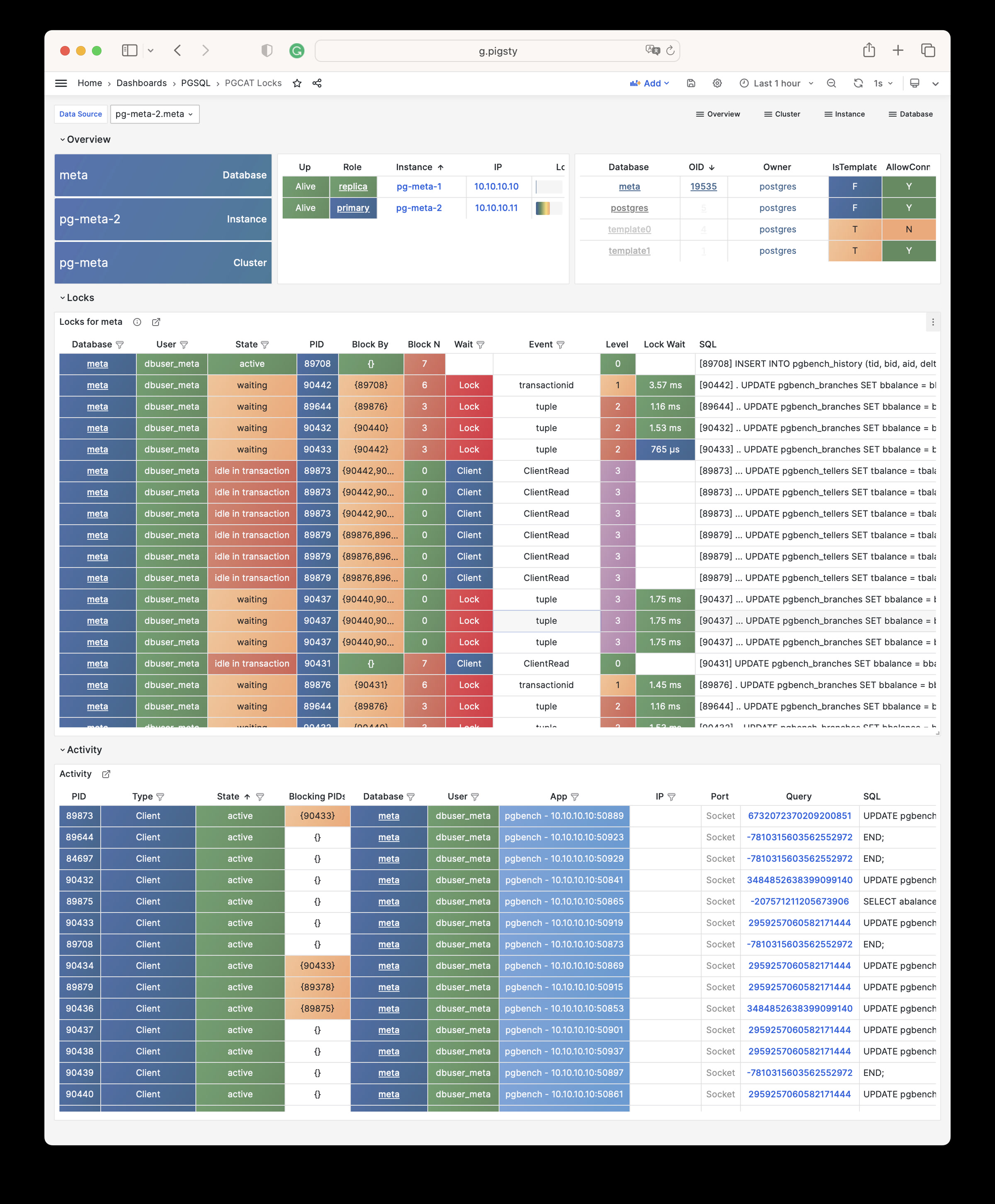
PGLOG
PGLOG Overview: Overview of csv log sample in pigsty meta database
PGLOG Overview
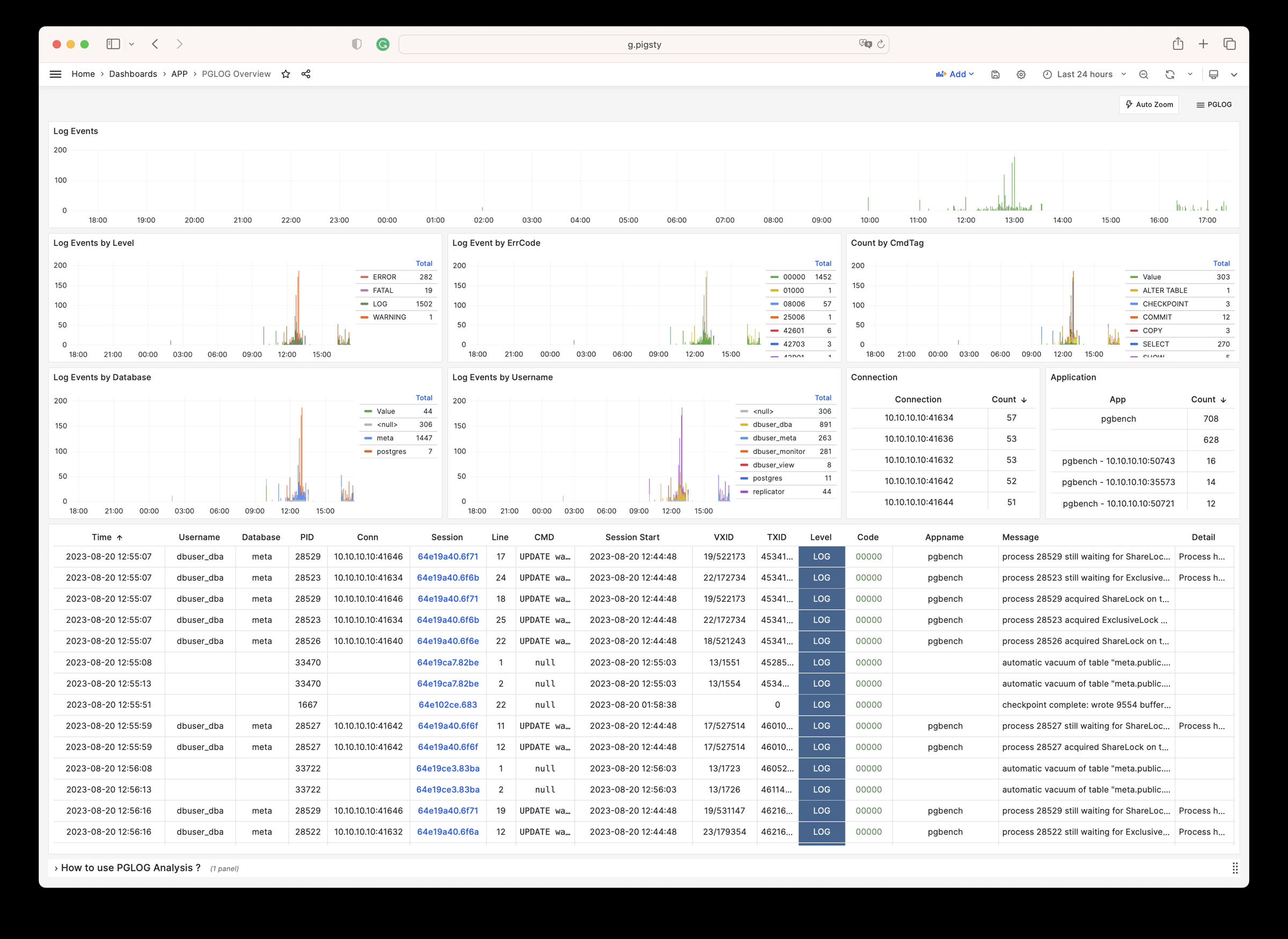
PGLOG Overview: Detail of one single session of csv log sample in pigsty meta database
PGLOG Session
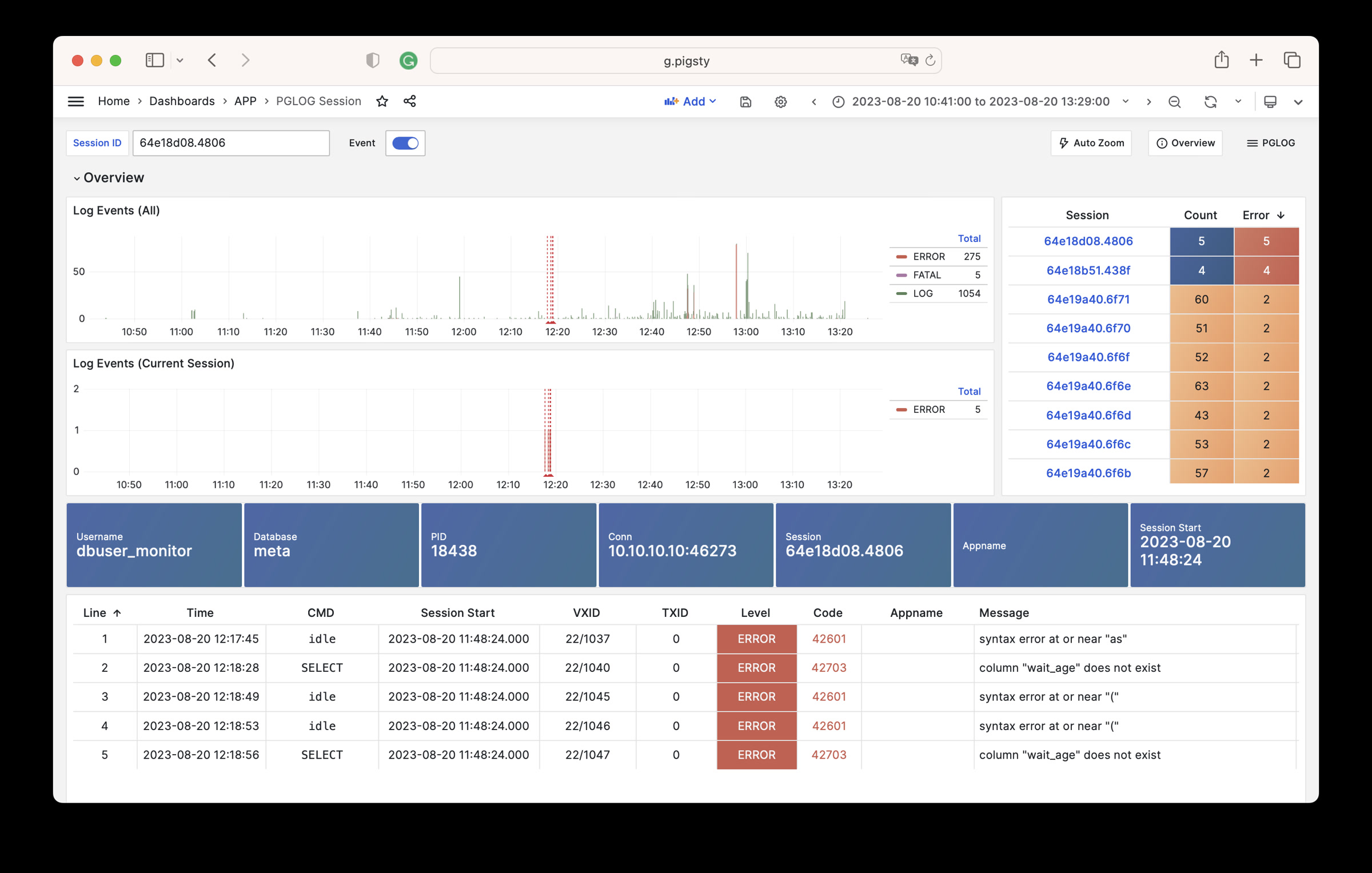
Gallery
PGSQL Shard
PGSQL Cluster
PGSQL Service
PGSQL Activity
PGSQL Replication
PGSQL Databases
PGSQL Instance
PGSQL Proxy
PGSQL Pgbouncer
PGSQL Session
PGSQL Xacts
PGSQL Persist
PGSQL Database
PGSQL Tables
PGSQL Table
PGSQL Query
PGCAT Instance
PGCAT Database
PGCAT Schema
PGCAT Table
PGCAT Lock
PGCAT Query
PGLOG Overview
PGLOG Session
15 - Metrics
PGSQL module has 638 available metrics
| Metric Name | Type | Labels | Description |
|---|---|---|---|
| ALERTS | Unknown | category, job, level, ins, severity, ip, alertname, alertstate, instance, cls |
N/A |
| ALERTS_FOR_STATE | Unknown | category, job, level, ins, severity, ip, alertname, instance, cls |
N/A |
| cls:pressure1 | Unknown | job, cls |
N/A |
| cls:pressure15 | Unknown | job, cls |
N/A |
| cls:pressure5 | Unknown | job, cls |
N/A |
| go_gc_duration_seconds | summary | job, ins, ip, instance, quantile, cls |
A summary of the pause duration of garbage collection cycles. |
| go_gc_duration_seconds_count | Unknown | job, ins, ip, instance, cls |
N/A |
| go_gc_duration_seconds_sum | Unknown | job, ins, ip, instance, cls |
N/A |
| go_goroutines | gauge | job, ins, ip, instance, cls |
Number of goroutines that currently exist. |
| go_info | gauge | version, job, ins, ip, instance, cls |
Information about the Go environment. |
| go_memstats_alloc_bytes | gauge | job, ins, ip, instance, cls |
Number of bytes allocated and still in use. |
| go_memstats_alloc_bytes_total | counter | job, ins, ip, instance, cls |
Total number of bytes allocated, even if freed. |
| go_memstats_buck_hash_sys_bytes | gauge | job, ins, ip, instance, cls |
Number of bytes used by the profiling bucket hash table. |
| go_memstats_frees_total | counter | job, ins, ip, instance, cls |
Total number of frees. |
| go_memstats_gc_sys_bytes | gauge | job, ins, ip, instance, cls |
Number of bytes used for garbage collection system metadata. |
| go_memstats_heap_alloc_bytes | gauge | job, ins, ip, instance, cls |
Number of heap bytes allocated and still in use. |
| go_memstats_heap_idle_bytes | gauge | job, ins, ip, instance, cls |
Number of heap bytes waiting to be used. |
| go_memstats_heap_inuse_bytes | gauge | job, ins, ip, instance, cls |
Number of heap bytes that are in use. |
| go_memstats_heap_objects | gauge | job, ins, ip, instance, cls |
Number of allocated objects. |
| go_memstats_heap_released_bytes | gauge | job, ins, ip, instance, cls |
Number of heap bytes released to OS. |
| go_memstats_heap_sys_bytes | gauge | job, ins, ip, instance, cls |
Number of heap bytes obtained from system. |
| go_memstats_last_gc_time_seconds | gauge | job, ins, ip, instance, cls |
Number of seconds since 1970 of last garbage collection. |
| go_memstats_lookups_total | counter | job, ins, ip, instance, cls |
Total number of pointer lookups. |
| go_memstats_mallocs_total | counter | job, ins, ip, instance, cls |
Total number of mallocs. |
| go_memstats_mcache_inuse_bytes | gauge | job, ins, ip, instance, cls |
Number of bytes in use by mcache structures. |
| go_memstats_mcache_sys_bytes | gauge | job, ins, ip, instance, cls |
Number of bytes used for mcache structures obtained from system. |
| go_memstats_mspan_inuse_bytes | gauge | job, ins, ip, instance, cls |
Number of bytes in use by mspan structures. |
| go_memstats_mspan_sys_bytes | gauge | job, ins, ip, instance, cls |
Number of bytes used for mspan structures obtained from system. |
| go_memstats_next_gc_bytes | gauge | job, ins, ip, instance, cls |
Number of heap bytes when next garbage collection will take place. |
| go_memstats_other_sys_bytes | gauge | job, ins, ip, instance, cls |
Number of bytes used for other system allocations. |
| go_memstats_stack_inuse_bytes | gauge | job, ins, ip, instance, cls |
Number of bytes in use by the stack allocator. |
| go_memstats_stack_sys_bytes | gauge | job, ins, ip, instance, cls |
Number of bytes obtained from system for stack allocator. |
| go_memstats_sys_bytes | gauge | job, ins, ip, instance, cls |
Number of bytes obtained from system. |
| go_threads | gauge | job, ins, ip, instance, cls |
Number of OS threads created. |
| ins:pressure1 | Unknown | job, ins, ip, cls |
N/A |
| ins:pressure15 | Unknown | job, ins, ip, cls |
N/A |
| ins:pressure5 | Unknown | job, ins, ip, cls |
N/A |
| patroni_cluster_unlocked | gauge | job, ins, ip, instance, cls, scope |
Value is 1 if the cluster is unlocked, 0 if locked. |
| patroni_dcs_last_seen | gauge | job, ins, ip, instance, cls, scope |
Epoch timestamp when DCS was last contacted successfully by Patroni. |
| patroni_failsafe_mode_is_active | gauge | job, ins, ip, instance, cls, scope |
Value is 1 if failsafe mode is active, 0 if inactive. |
| patroni_is_paused | gauge | job, ins, ip, instance, cls, scope |
Value is 1 if auto failover is disabled, 0 otherwise. |
| patroni_master | gauge | job, ins, ip, instance, cls, scope |
Value is 1 if this node is the leader, 0 otherwise. |
| patroni_pending_restart | gauge | job, ins, ip, instance, cls, scope |
Value is 1 if the node needs a restart, 0 otherwise. |
| patroni_postgres_in_archive_recovery | gauge | job, ins, ip, instance, cls, scope |
Value is 1 if Postgres is replicating from archive, 0 otherwise. |
| patroni_postgres_running | gauge | job, ins, ip, instance, cls, scope |
Value is 1 if Postgres is running, 0 otherwise. |
| patroni_postgres_server_version | gauge | job, ins, ip, instance, cls, scope |
Version of Postgres (if running), 0 otherwise. |
| patroni_postgres_streaming | gauge | job, ins, ip, instance, cls, scope |
Value is 1 if Postgres is streaming, 0 otherwise. |
| patroni_postgres_timeline | counter | job, ins, ip, instance, cls, scope |
Postgres timeline of this node (if running), 0 otherwise. |
| patroni_postmaster_start_time | gauge | job, ins, ip, instance, cls, scope |
Epoch seconds since Postgres started. |
| patroni_primary | gauge | job, ins, ip, instance, cls, scope |
Value is 1 if this node is the leader, 0 otherwise. |
| patroni_replica | gauge | job, ins, ip, instance, cls, scope |
Value is 1 if this node is a replica, 0 otherwise. |
| patroni_standby_leader | gauge | job, ins, ip, instance, cls, scope |
Value is 1 if this node is the standby_leader, 0 otherwise. |
| patroni_sync_standby | gauge | job, ins, ip, instance, cls, scope |
Value is 1 if this node is a sync standby replica, 0 otherwise. |
| patroni_up | Unknown | job, ins, ip, instance, cls |
N/A |
| patroni_version | gauge | job, ins, ip, instance, cls, scope |
Patroni semver without periods. |
| patroni_xlog_location | counter | job, ins, ip, instance, cls, scope |
Current location of the Postgres transaction log, 0 if this node is not the leader. |
| patroni_xlog_paused | gauge | job, ins, ip, instance, cls, scope |
Value is 1 if the Postgres xlog is paused, 0 otherwise. |
| patroni_xlog_received_location | counter | job, ins, ip, instance, cls, scope |
Current location of the received Postgres transaction log, 0 if this node is not a replica. |
| patroni_xlog_replayed_location | counter | job, ins, ip, instance, cls, scope |
Current location of the replayed Postgres transaction log, 0 if this node is not a replica. |
| patroni_xlog_replayed_timestamp | gauge | job, ins, ip, instance, cls, scope |
Current timestamp of the replayed Postgres transaction log, 0 if null. |
| pg:cls:active_backends | Unknown | job, cls |
N/A |
| pg:cls:active_time_rate15m | Unknown | job, cls |
N/A |
| pg:cls:active_time_rate1m | Unknown | job, cls |
N/A |
| pg:cls:active_time_rate5m | Unknown | job, cls |
N/A |
| pg:cls:age | Unknown | job, cls |
N/A |
| pg:cls:buf_alloc_rate1m | Unknown | job, cls |
N/A |
| pg:cls:buf_clean_rate1m | Unknown | job, cls |
N/A |
| pg:cls:buf_flush_backend_rate1m | Unknown | job, cls |
N/A |
| pg:cls:buf_flush_checkpoint_rate1m | Unknown | job, cls |
N/A |
| pg:cls:cpu_count | Unknown | job, cls |
N/A |
| pg:cls:cpu_usage | Unknown | job, cls |
N/A |
| pg:cls:cpu_usage_15m | Unknown | job, cls |
N/A |
| pg:cls:cpu_usage_1m | Unknown | job, cls |
N/A |
| pg:cls:cpu_usage_5m | Unknown | job, cls |
N/A |
| pg:cls:db_size | Unknown | job, cls |
N/A |
| pg:cls:file_size | Unknown | job, cls |
N/A |
| pg:cls:ixact_backends | Unknown | job, cls |
N/A |
| pg:cls:ixact_time_rate1m | Unknown | job, cls |
N/A |
| pg:cls:lag_bytes | Unknown | job, cls |
N/A |
| pg:cls:lag_seconds | Unknown | job, cls |
N/A |
| pg:cls:leader | Unknown | job, ins, ip, instance, cls |
N/A |
| pg:cls:load1 | Unknown | job, cls |
N/A |
| pg:cls:load15 | Unknown | job, cls |
N/A |
| pg:cls:load5 | Unknown | job, cls |
N/A |
| pg:cls:lock_count | Unknown | job, cls |
N/A |
| pg:cls:locks | Unknown | job, cls, mode |
N/A |
| pg:cls:log_size | Unknown | job, cls |
N/A |
| pg:cls:lsn_rate1m | Unknown | job, cls |
N/A |
| pg:cls:members | Unknown | job, ins, ip, cls |
N/A |
| pg:cls:num_backends | Unknown | job, cls |
N/A |
| pg:cls:partition | Unknown | job, cls |
N/A |
| pg:cls:receiver | Unknown | state, slot_name, job, appname, ip, cls, sender_host, sender_port |
N/A |
| pg:cls:rlock_count | Unknown | job, cls |
N/A |
| pg:cls:saturation1 | Unknown | job, cls |
N/A |
| pg:cls:saturation15 | Unknown | job, cls |
N/A |
| pg:cls:saturation5 | Unknown | job, cls |
N/A |
| pg:cls:sender | Unknown | pid, usename, address, job, ins, appname, ip, cls |
N/A |
| pg:cls:session_time_rate1m | Unknown | job, cls |
N/A |
| pg:cls:size | Unknown | job, cls |
N/A |
| pg:cls:slot_count | Unknown | job, cls |
N/A |
| pg:cls:slot_retained_bytes | Unknown | job, cls |
N/A |
| pg:cls:standby_count | Unknown | job, cls |
N/A |
| pg:cls:sync_state | Unknown | job, cls |
N/A |
| pg:cls:timeline | Unknown | job, cls |
N/A |
| pg:cls:tup_deleted_rate1m | Unknown | job, cls |
N/A |
| pg:cls:tup_fetched_rate1m | Unknown | job, cls |
N/A |
| pg:cls:tup_inserted_rate1m | Unknown | job, cls |
N/A |
| pg:cls:tup_modified_rate1m | Unknown | job, cls |
N/A |
| pg:cls:tup_returned_rate1m | Unknown | job, cls |
N/A |
| pg:cls:wal_size | Unknown | job, cls |
N/A |
| pg:cls:xact_commit_rate15m | Unknown | job, cls |
N/A |
| pg:cls:xact_commit_rate1m | Unknown | job, cls |
N/A |
| pg:cls:xact_commit_rate5m | Unknown | job, cls |
N/A |
| pg:cls:xact_rollback_rate15m | Unknown | job, cls |
N/A |
| pg:cls:xact_rollback_rate1m | Unknown | job, cls |
N/A |
| pg:cls:xact_rollback_rate5m | Unknown | job, cls |
N/A |
| pg:cls:xact_total_rate15m | Unknown | job, cls |
N/A |
| pg:cls:xact_total_rate1m | Unknown | job, cls |
N/A |
| pg:cls:xact_total_sigma15m | Unknown | job, cls |
N/A |
| pg:cls:xlock_count | Unknown | job, cls |
N/A |
| pg:db:active_backends | Unknown | datname, job, ins, ip, instance, cls |
N/A |
| pg:db:active_time_rate15m | Unknown | datname, job, ins, ip, instance, cls |
N/A |
| pg:db:active_time_rate1m | Unknown | datname, job, ins, ip, instance, cls |
N/A |
| pg:db:active_time_rate5m | Unknown | datname, job, ins, ip, instance, cls |
N/A |
| pg:db:age | Unknown | datname, job, ins, ip, instance, cls |
N/A |
| pg:db:age_deriv1h | Unknown | datname, job, ins, ip, instance, cls |
N/A |
| pg:db:age_exhaust | Unknown | datname, job, ins, ip, instance, cls |
N/A |
| pg:db:blk_io_time_seconds_rate1m | Unknown | datname, job, ins, ip, instance, cls |
N/A |
| pg:db:blk_read_time_seconds_rate1m | Unknown | datname, job, ins, ip, instance, cls |
N/A |
| pg:db:blk_write_time_seconds_rate1m | Unknown | datname, job, ins, ip, instance, cls |
N/A |
| pg:db:blks_access_1m | Unknown | datname, job, ins, ip, instance, cls |
N/A |
| pg:db:blks_hit_1m | Unknown | datname, job, ins, ip, instance, cls |
N/A |
| pg:db:blks_hit_ratio1m | Unknown | datname, job, ins, ip, instance, cls |
N/A |
| pg:db:blks_read_1m | Unknown | datname, job, ins, ip, instance, cls |
N/A |
| pg:db:conn_limit | Unknown | datname, job, ins, ip, instance, cls |
N/A |
| pg:db:conn_usage | Unknown | datname, job, ins, ip, instance, cls |
N/A |
| pg:db:db_size | Unknown | datname, job, ins, ip, instance, cls |
N/A |
| pg:db:ixact_backends | Unknown | datname, job, ins, ip, instance, cls |
N/A |
| pg:db:ixact_time_rate1m | Unknown | datname, job, ins, ip, instance, cls |
N/A |
| pg:db:lock_count | Unknown | datname, job, ins, ip, instance, cls |
N/A |
| pg:db:num_backends | Unknown | datname, job, ins, ip, instance, cls |
N/A |
| pg:db:rlock_count | Unknown | datname, job, ins, ip, instance, cls |
N/A |
| pg:db:session_time_rate1m | Unknown | datname, job, ins, ip, instance, cls |
N/A |
| pg:db:temp_bytes_rate1m | Unknown | datname, job, ins, ip, instance, cls |
N/A |
| pg:db:temp_files_1m | Unknown | datname, job, ins, ip, instance, cls |
N/A |
| pg:db:tup_deleted_rate1m | Unknown | datname, job, ins, ip, instance, cls |
N/A |
| pg:db:tup_fetched_rate1m | Unknown | datname, job, ins, ip, instance, cls |
N/A |
| pg:db:tup_inserted_rate1m | Unknown | datname, job, ins, ip, instance, cls |
N/A |
| pg:db:tup_modified_rate1m | Unknown | datname, job, ins, ip, instance, cls |
N/A |
| pg:db:tup_returned_rate1m | Unknown | datname, job, ins, ip, instance, cls |
N/A |
| pg:db:wlock_count | Unknown | datname, job, ins, ip, instance, cls |
N/A |
| pg:db:xact_commit_rate15m | Unknown | datname, job, ins, ip, instance, cls |
N/A |
| pg:db:xact_commit_rate1m | Unknown | datname, job, ins, ip, instance, cls |
N/A |
| pg:db:xact_commit_rate5m | Unknown | datname, job, ins, ip, instance, cls |
N/A |
| pg:db:xact_rollback_rate15m | Unknown | datname, job, ins, ip, instance, cls |
N/A |
| pg:db:xact_rollback_rate1m | Unknown | datname, job, ins, ip, instance, cls |
N/A |
| pg:db:xact_rollback_rate5m | Unknown | datname, job, ins, ip, instance, cls |
N/A |
| pg:db:xact_total_rate15m | Unknown | datname, job, ins, ip, instance, cls |
N/A |
| pg:db:xact_total_rate1m | Unknown | datname, job, ins, ip, instance, cls |
N/A |
| pg:db:xact_total_rate5m | Unknown | datname, job, ins, ip, instance, cls |
N/A |
| pg:db:xact_total_sigma15m | Unknown | datname, job, ins, ip, instance, cls |
N/A |
| pg:db:xlock_count | Unknown | datname, job, ins, ip, instance, cls |
N/A |
| pg:env:active_backends | Unknown | job |
N/A |
| pg:env:active_time_rate15m | Unknown | job |
N/A |
| pg:env:active_time_rate1m | Unknown | job |
N/A |
| pg:env:active_time_rate5m | Unknown | job |
N/A |
| pg:env:age | Unknown | job |
N/A |
| pg:env:cpu_count | Unknown | job |
N/A |
| pg:env:cpu_usage | Unknown | job |
N/A |
| pg:env:cpu_usage_15m | Unknown | job |
N/A |
| pg:env:cpu_usage_1m | Unknown | job |
N/A |
| pg:env:cpu_usage_5m | Unknown | job |
N/A |
| pg:env:ixact_backends | Unknown | job |
N/A |
| pg:env:ixact_time_rate1m | Unknown | job |
N/A |
| pg:env:lag_bytes | Unknown | job |
N/A |
| pg:env:lag_seconds | Unknown | job |
N/A |
| pg:env:lsn_rate1m | Unknown | job |
N/A |
| pg:env:session_time_rate1m | Unknown | job |
N/A |
| pg:env:tup_deleted_rate1m | Unknown | job |
N/A |
| pg:env:tup_fetched_rate1m | Unknown | job |
N/A |
| pg:env:tup_inserted_rate1m | Unknown | job |
N/A |
| pg:env:tup_modified_rate1m | Unknown | job |
N/A |
| pg:env:tup_returned_rate1m | Unknown | job |
N/A |
| pg:env:xact_commit_rate15m | Unknown | job |
N/A |
| pg:env:xact_commit_rate1m | Unknown | job |
N/A |
| pg:env:xact_commit_rate5m | Unknown | job |
N/A |
| pg:env:xact_rollback_rate15m | Unknown | job |
N/A |
| pg:env:xact_rollback_rate1m | Unknown | job |
N/A |
| pg:env:xact_rollback_rate5m | Unknown | job |
N/A |
| pg:env:xact_total_rate15m | Unknown | job |
N/A |
| pg:env:xact_total_rate1m | Unknown | job |
N/A |
| pg:env:xact_total_sigma15m | Unknown | job |
N/A |
| pg:ins:active_backends | Unknown | job, ins, ip, instance, cls |
N/A |
| pg:ins:active_time_rate15m | Unknown | job, ins, ip, instance, cls |
N/A |
| pg:ins:active_time_rate1m | Unknown | job, ins, ip, instance, cls |
N/A |
| pg:ins:active_time_rate5m | Unknown | job, ins, ip, instance, cls |
N/A |
| pg:ins:age | Unknown | job, ins, ip, instance, cls |
N/A |
| pg:ins:blks_hit_ratio1m | Unknown | job, ins, ip, instance, cls |
N/A |
| pg:ins:buf_alloc_rate1m | Unknown | job, ins, ip, instance, cls |
N/A |
| pg:ins:buf_clean_rate1m | Unknown | job, ins, ip, instance, cls |
N/A |
| pg:ins:buf_flush_backend_rate1m | Unknown | job, ins, ip, instance, cls |
N/A |
| pg:ins:buf_flush_checkpoint_rate1m | Unknown | job, ins, ip, instance, cls |
N/A |
| pg:ins:ckpt_1h | Unknown | job, ins, ip, instance, cls |
N/A |
| pg:ins:ckpt_req_1m | Unknown | job, ins, ip, instance, cls |
N/A |
| pg:ins:ckpt_timed_1m | Unknown | job, ins, ip, instance, cls |
N/A |
| pg:ins:conn_limit | Unknown | job, ins, ip, instance, cls |
N/A |
| pg:ins:conn_usage | Unknown | job, ins, ip, instance, cls |
N/A |
| pg:ins:cpu_count | Unknown | job, ins, ip, instance, cls |
N/A |
| pg:ins:cpu_usage | Unknown | job, ins, ip, instance, cls |
N/A |
| pg:ins:cpu_usage_15m | Unknown | job, ins, ip, instance, cls |
N/A |
| pg:ins:cpu_usage_1m | Unknown | job, ins, ip, instance, cls |
N/A |
| pg:ins:cpu_usage_5m | Unknown | job, ins, ip, instance, cls |
N/A |
| pg:ins:db_size | Unknown | job, ins, ip, instance, cls |
N/A |
| pg:ins:file_size | Unknown | job, ins, ip, instance, cls |
N/A |
| pg:ins:fs_size | Unknown | job, ins, ip, instance, cls |
N/A |
| pg:ins:is_leader | Unknown | job, ins, ip, instance, cls |
N/A |
| pg:ins:ixact_backends | Unknown | job, ins, ip, instance, cls |
N/A |
| pg:ins:ixact_time_rate1m | Unknown | job, ins, ip, instance, cls |
N/A |
| pg:ins:lag_bytes | Unknown | job, ins, ip, instance, cls |
N/A |
| pg:ins:lag_seconds | Unknown | job, ins, ip, instance, cls |
N/A |
| pg:ins:load1 | Unknown | job, ins, ip, instance, cls |
N/A |
| pg:ins:load15 | Unknown | job, ins, ip, instance, cls |
N/A |
| pg:ins:load5 | Unknown | job, ins, ip, instance, cls |
N/A |
| pg:ins:lock_count | Unknown | job, ins, ip, instance, cls |
N/A |
| pg:ins:locks | Unknown | job, ins, ip, mode, instance, cls |
N/A |
| pg:ins:log_size | Unknown | job, ins, ip, instance, cls |
N/A |
| pg:ins:lsn_rate1m | Unknown | job, ins, ip, instance, cls |
N/A |
| pg:ins:mem_size | Unknown | job, ins, ip, instance, cls |
N/A |
| pg:ins:num_backends | Unknown | job, ins, ip, instance, cls |
N/A |
| pg:ins:rlock_count | Unknown | job, ins, ip, instance, cls |
N/A |
| pg:ins:saturation1 | Unknown | job, ins, ip, cls |
N/A |
| pg:ins:saturation15 | Unknown | job, ins, ip, cls |
N/A |
| pg:ins:saturation5 | Unknown | job, ins, ip, cls |
N/A |
| pg:ins:session_time_rate1m | Unknown | job, ins, ip, instance, cls |
N/A |
| pg:ins:slot_retained_bytes | Unknown | job, ins, ip, instance, cls |
N/A |
| pg:ins:space_usage | Unknown | job, ins, ip, instance, cls |
N/A |
| pg:ins:status | Unknown | job, ins, ip, instance, cls |
N/A |
| pg:ins:sync_state | Unknown | job, ins, instance, cls |
N/A |
| pg:ins:target_count | Unknown | job, cls, ins |
N/A |
| pg:ins:timeline | Unknown | job, ins, ip, instance, cls |
N/A |
| pg:ins:tup_deleted_rate1m | Unknown | job, ins, ip, instance, cls |
N/A |
| pg:ins:tup_fetched_rate1m | Unknown | job, ins, ip, instance, cls |
N/A |
| pg:ins:tup_inserted_rate1m | Unknown | job, ins, ip, instance, cls |
N/A |
| pg:ins:tup_modified_rate1m | Unknown | job, ins, ip, instance, cls |
N/A |
| pg:ins:tup_returned_rate1m | Unknown | job, ins, ip, instance, cls |
N/A |
| pg:ins:wal_size | Unknown | job, ins, ip, instance, cls |
N/A |
| pg:ins:wlock_count | Unknown | job, ins, ip, instance, cls |
N/A |
| pg:ins:xact_commit_rate15m | Unknown | job, ins, ip, instance, cls |
N/A |
| pg:ins:xact_commit_rate1m | Unknown | job, ins, ip, instance, cls |
N/A |
| pg:ins:xact_commit_rate5m | Unknown | job, ins, ip, instance, cls |
N/A |
| pg:ins:xact_rollback_rate15m | Unknown | job, ins, ip, instance, cls |
N/A |
| pg:ins:xact_rollback_rate1m | Unknown | job, ins, ip, instance, cls |
N/A |
| pg:ins:xact_rollback_rate5m | Unknown | job, ins, ip, instance, cls |
N/A |
| pg:ins:xact_total_rate15m | Unknown | job, ins, ip, instance, cls |
N/A |
| pg:ins:xact_total_rate1m | Unknown | job, ins, ip, instance, cls |
N/A |
| pg:ins:xact_total_rate5m | Unknown | job, ins, ip, instance, cls |
N/A |
| pg:ins:xact_total_sigma15m | Unknown | job, ins, ip, instance, cls |
N/A |
| pg:ins:xlock_count | Unknown | job, ins, ip, instance, cls |
N/A |
| pg:query:call_rate1m | Unknown | datname, query, job, ins, ip, instance, cls |
N/A |
| pg:query:rt_1m | Unknown | datname, query, job, ins, ip, instance, cls |
N/A |
| pg:table:scan_rate1m | Unknown | datname, relname, job, ins, ip, instance, cls |
N/A |
| pg_activity_count | gauge | datname, state, job, ins, ip, instance, cls |
Count of connection among (datname,state) |
| pg_activity_max_conn_duration | gauge | datname, state, job, ins, ip, instance, cls |
Max backend session duration since state change among (datname, state) |
| pg_activity_max_duration | gauge | datname, state, job, ins, ip, instance, cls |
Max duration since last state change among (datname, state) |
| pg_activity_max_tx_duration | gauge | datname, state, job, ins, ip, instance, cls |
Max transaction duration since state change among (datname, state) |
| pg_archiver_failed_count | counter | job, ins, ip, instance, cls |
Number of failed attempts for archiving WAL files |
| pg_archiver_finish_count | counter | job, ins, ip, instance, cls |
Number of WAL files that have been successfully archived |
| pg_archiver_last_failed_time | counter | job, ins, ip, instance, cls |
Time of the last failed archival operation |
| pg_archiver_last_finish_time | counter | job, ins, ip, instance, cls |
Time of the last successful archive operation |
| pg_archiver_reset_time | gauge | job, ins, ip, instance, cls |
Time at which archive statistics were last reset |
| pg_backend_count | gauge | type, job, ins, ip, instance, cls |
Database backend process count by backend_type |
| pg_bgwriter_buffers_alloc | counter | job, ins, ip, instance, cls |
Number of buffers allocated |
| pg_bgwriter_buffers_backend | counter | job, ins, ip, instance, cls |
Number of buffers written directly by a backend |
| pg_bgwriter_buffers_backend_fsync | counter | job, ins, ip, instance, cls |
Number of times a backend had to execute its own fsync call |
| pg_bgwriter_buffers_checkpoint | counter | job, ins, ip, instance, cls |
Number of buffers written during checkpoints |
| pg_bgwriter_buffers_clean | counter | job, ins, ip, instance, cls |
Number of buffers written by the background writer |
| pg_bgwriter_checkpoint_sync_time | counter | job, ins, ip, instance, cls |
Total amount of time that has been spent in the portion of checkpoint processing where files are synchronized to disk, in seconds |
| pg_bgwriter_checkpoint_write_time | counter | job, ins, ip, instance, cls |
Total amount of time that has been spent in the portion of checkpoint processing where files are written to disk, in seconds |
| pg_bgwriter_checkpoints_req | counter | job, ins, ip, instance, cls |
Number of requested checkpoints that have been performed |
| pg_bgwriter_checkpoints_timed | counter | job, ins, ip, instance, cls |
Number of scheduled checkpoints that have been performed |
| pg_bgwriter_maxwritten_clean | counter | job, ins, ip, instance, cls |
Number of times the background writer stopped a cleaning scan because it had written too many buffers |
| pg_bgwriter_reset_time | counter | job, ins, ip, instance, cls |
Time at which bgwriter statistics were last reset |
| pg_boot_time | gauge | job, ins, ip, instance, cls |
unix timestamp when postmaster boot |
| pg_checkpoint_checkpoint_lsn | counter | job, ins, ip, instance, cls |
Latest checkpoint location |
| pg_checkpoint_elapse | gauge | job, ins, ip, instance, cls |
Seconds elapsed since latest checkpoint in seconds |
| pg_checkpoint_full_page_writes | gauge | job, ins, ip, instance, cls |
Latest checkpoint’s full_page_writes enabled |
| pg_checkpoint_newest_commit_ts_xid | counter | job, ins, ip, instance, cls |
Latest checkpoint’s newestCommitTsXid |
| pg_checkpoint_next_multi_offset | counter | job, ins, ip, instance, cls |
Latest checkpoint’s NextMultiOffset |
| pg_checkpoint_next_multixact_id | counter | job, ins, ip, instance, cls |
Latest checkpoint’s NextMultiXactId |
| pg_checkpoint_next_oid | counter | job, ins, ip, instance, cls |
Latest checkpoint’s NextOID |
| pg_checkpoint_next_xid | counter | job, ins, ip, instance, cls |
Latest checkpoint’s NextXID xid |
| pg_checkpoint_next_xid_epoch | counter | job, ins, ip, instance, cls |
Latest checkpoint’s NextXID epoch |
| pg_checkpoint_oldest_active_xid | counter | job, ins, ip, instance, cls |
Latest checkpoint’s oldestActiveXID |
| pg_checkpoint_oldest_commit_ts_xid | counter | job, ins, ip, instance, cls |
Latest checkpoint’s oldestCommitTsXid |
| pg_checkpoint_oldest_multi_dbid | gauge | job, ins, ip, instance, cls |
Latest checkpoint’s oldestMulti’s DB OID |
| pg_checkpoint_oldest_multi_xid | counter | job, ins, ip, instance, cls |
Latest checkpoint’s oldestMultiXid |
| pg_checkpoint_oldest_xid | counter | job, ins, ip, instance, cls |
Latest checkpoint’s oldestXID |
| pg_checkpoint_oldest_xid_dbid | gauge | job, ins, ip, instance, cls |
Latest checkpoint’s oldestXID’s DB OID |
| pg_checkpoint_prev_tli | counter | job, ins, ip, instance, cls |
Latest checkpoint’s PrevTimeLineID |
| pg_checkpoint_redo_lsn | counter | job, ins, ip, instance, cls |
Latest checkpoint’s REDO location |
| pg_checkpoint_time | counter | job, ins, ip, instance, cls |
Time of latest checkpoint |
| pg_checkpoint_tli | counter | job, ins, ip, instance, cls |
Latest checkpoint’s TimeLineID |
| pg_conf_reload_time | gauge | job, ins, ip, instance, cls |
seconds since last configuration reload |
| pg_db_active_time | counter | datname, job, ins, ip, instance, cls |
Time spent executing SQL statements in this database, in seconds |
| pg_db_age | gauge | datname, job, ins, ip, instance, cls |
Age of database calculated from datfrozenxid |
| pg_db_allow_conn | gauge | datname, job, ins, ip, instance, cls |
If false(0) then no one can connect to this database. |
| pg_db_blk_read_time | counter | datname, job, ins, ip, instance, cls |
Time spent reading data file blocks by backends in this database, in seconds |
| pg_db_blk_write_time | counter | datname, job, ins, ip, instance, cls |
Time spent writing data file blocks by backends in this database, in seconds |
| pg_db_blks_access | counter | datname, job, ins, ip, instance, cls |
Number of times disk blocks that accessed read+hit |
| pg_db_blks_hit | counter | datname, job, ins, ip, instance, cls |
Number of times disk blocks were found already in the buffer cache |
| pg_db_blks_read | counter | datname, job, ins, ip, instance, cls |
Number of disk blocks read in this database |
| pg_db_cks_fail_time | gauge | datname, job, ins, ip, instance, cls |
Time at which the last data page checksum failure was detected in this database |
| pg_db_cks_fails | counter | datname, job, ins, ip, instance, cls |
Number of data page checksum failures detected in this database, -1 for not enabled |
| pg_db_confl_confl_bufferpin | counter | datname, job, ins, ip, instance, cls |
Number of queries in this database that have been canceled due to pinned buffers |
| pg_db_confl_confl_deadlock | counter | datname, job, ins, ip, instance, cls |
Number of queries in this database that have been canceled due to deadlocks |
| pg_db_confl_confl_lock | counter | datname, job, ins, ip, instance, cls |
Number of queries in this database that have been canceled due to lock timeouts |
| pg_db_confl_confl_snapshot | counter | datname, job, ins, ip, instance, cls |
Number of queries in this database that have been canceled due to old snapshots |
| pg_db_confl_confl_tablespace | counter | datname, job, ins, ip, instance, cls |
Number of queries in this database that have been canceled due to dropped tablespaces |
| pg_db_conflicts | counter | datname, job, ins, ip, instance, cls |
Number of queries canceled due to conflicts with recovery in this database |
| pg_db_conn_limit | gauge | datname, job, ins, ip, instance, cls |
Sets maximum number of concurrent connections that can be made to this database. -1 means no limit. |
| pg_db_datid | gauge | datname, job, ins, ip, instance, cls |
OID of the database |
| pg_db_deadlocks | counter | datname, job, ins, ip, instance, cls |
Number of deadlocks detected in this database |
| pg_db_frozen_xid | gauge | datname, job, ins, ip, instance, cls |
All transaction IDs before this one have been frozened |
| pg_db_is_template | gauge | datname, job, ins, ip, instance, cls |
If true(1), then this database can be cloned by any user with CREATEDB privileges |
| pg_db_ixact_time | counter | datname, job, ins, ip, instance, cls |
Time spent idling while in a transaction in this database, in seconds |
| pg_db_numbackends | gauge | datname, job, ins, ip, instance, cls |
Number of backends currently connected to this database |
| pg_db_reset_time | counter | datname, job, ins, ip, instance, cls |
Time at which database statistics were last reset |
| pg_db_session_time | counter | datname, job, ins, ip, instance, cls |
Time spent by database sessions in this database, in seconds |
| pg_db_sessions | counter | datname, job, ins, ip, instance, cls |
Total number of sessions established to this database |
| pg_db_sessions_abandoned | counter | datname, job, ins, ip, instance, cls |
Number of database sessions to this database that were terminated because connection to the client was lost |
| pg_db_sessions_fatal | counter | datname, job, ins, ip, instance, cls |
Number of database sessions to this database that were terminated by fatal errors |
| pg_db_sessions_killed | counter | datname, job, ins, ip, instance, cls |
Number of database sessions to this database that were terminated by operator intervention |
| pg_db_temp_bytes | counter | datname, job, ins, ip, instance, cls |
Total amount of data written to temporary files by queries in this database. |
| pg_db_temp_files | counter | datname, job, ins, ip, instance, cls |
Number of temporary files created by queries in this database |
| pg_db_tup_deleted | counter | datname, job, ins, ip, instance, cls |
Number of rows deleted by queries in this database |
| pg_db_tup_fetched | counter | datname, job, ins, ip, instance, cls |
Number of rows fetched by queries in this database |
| pg_db_tup_inserted | counter | datname, job, ins, ip, instance, cls |
Number of rows inserted by queries in this database |
| pg_db_tup_modified | counter | datname, job, ins, ip, instance, cls |
Number of rows modified by queries in this database |
| pg_db_tup_returned | counter | datname, job, ins, ip, instance, cls |
Number of rows returned by queries in this database |
| pg_db_tup_updated | counter | datname, job, ins, ip, instance, cls |
Number of rows updated by queries in this database |
| pg_db_xact_commit | counter | datname, job, ins, ip, instance, cls |
Number of transactions in this database that have been committed |
| pg_db_xact_rollback | counter | datname, job, ins, ip, instance, cls |
Number of transactions in this database that have been rolled back |
| pg_db_xact_total | counter | datname, job, ins, ip, instance, cls |
Number of transactions in this database |
| pg_downstream_count | gauge | state, job, ins, ip, instance, cls |
Count of corresponding state |
| pg_exporter_agent_up | Unknown | job, ins, ip, instance, cls |
N/A |
| pg_exporter_last_scrape_time | gauge | job, ins, ip, instance, cls |
seconds exporter spending on scrapping |
| pg_exporter_query_cache_ttl | gauge | datname, query, job, ins, ip, instance, cls |
times to live of query cache |
| pg_exporter_query_scrape_duration | gauge | datname, query, job, ins, ip, instance, cls |
seconds query spending on scrapping |
| pg_exporter_query_scrape_error_count | gauge | datname, query, job, ins, ip, instance, cls |
times the query failed |
| pg_exporter_query_scrape_hit_count | gauge | datname, query, job, ins, ip, instance, cls |
numbers been scrapped from this query |
| pg_exporter_query_scrape_metric_count | gauge | datname, query, job, ins, ip, instance, cls |
numbers of metrics been scrapped from this query |
| pg_exporter_query_scrape_total_count | gauge | datname, query, job, ins, ip, instance, cls |
times exporter server was scraped for metrics |
| pg_exporter_scrape_duration | gauge | job, ins, ip, instance, cls |
seconds exporter spending on scrapping |
| pg_exporter_scrape_error_count | counter | job, ins, ip, instance, cls |
times exporter was scraped for metrics and failed |
| pg_exporter_scrape_total_count | counter | job, ins, ip, instance, cls |
times exporter was scraped for metrics |
| pg_exporter_server_scrape_duration | gauge | datname, job, ins, ip, instance, cls |
seconds exporter server spending on scrapping |
| pg_exporter_server_scrape_error_count | Unknown | datname, job, ins, ip, instance, cls |
N/A |
| pg_exporter_server_scrape_total_count | gauge | datname, job, ins, ip, instance, cls |
times exporter server was scraped for metrics |
| pg_exporter_server_scrape_total_seconds | gauge | datname, job, ins, ip, instance, cls |
seconds exporter server spending on scrapping |
| pg_exporter_up | gauge | job, ins, ip, instance, cls |
always be 1 if your could retrieve metrics |
| pg_exporter_uptime | gauge | job, ins, ip, instance, cls |
seconds since exporter primary server inited |
| pg_flush_lsn | counter | job, ins, ip, instance, cls |
primary only, location of current wal syncing |
| pg_func_calls | counter | datname, funcname, job, ins, ip, instance, cls |
Number of times this function has been called |
| pg_func_self_time | counter | datname, funcname, job, ins, ip, instance, cls |
Total time spent in this function itself, not including other functions called by it, in ms |
| pg_func_total_time | counter | datname, funcname, job, ins, ip, instance, cls |
Total time spent in this function and all other functions called by it, in ms |
| pg_in_recovery | gauge | job, ins, ip, instance, cls |
server is in recovery mode? 1 for yes 0 for no |
| pg_index_idx_blks_hit | counter | datname, relname, job, ins, relid, ip, instance, cls, idxname |
Number of buffer hits in this index |
| pg_index_idx_blks_read | counter | datname, relname, job, ins, relid, ip, instance, cls, idxname |
Number of disk blocks read from this index |
| pg_index_idx_scan | counter | datname, relname, job, ins, relid, ip, instance, cls, idxname |
Number of index scans initiated on this index |
| pg_index_idx_tup_fetch | counter | datname, relname, job, ins, relid, ip, instance, cls, idxname |
Number of live table rows fetched by simple index scans using this index |
| pg_index_idx_tup_read | counter | datname, relname, job, ins, relid, ip, instance, cls, idxname |
Number of index entries returned by scans on this index |
| pg_index_relpages | gauge | datname, relname, job, ins, relid, ip, instance, cls, idxname |
Size of the on-disk representation of this index in pages |
| pg_index_reltuples | gauge | datname, relname, job, ins, relid, ip, instance, cls, idxname |
Estimate relation tuples |
| pg_insert_lsn | counter | job, ins, ip, instance, cls |
primary only, location of current wal inserting |
| pg_io_evictions | counter | type, job, ins, object, ip, context, instance, cls |
Number of times a block has been written out from a shared or local buffer |
| pg_io_extend_time | counter | type, job, ins, object, ip, context, instance, cls |
Time spent in extend operations in seconds |
| pg_io_extends | counter | type, job, ins, object, ip, context, instance, cls |
Number of relation extend operations, each of the size specified in op_bytes. |
| pg_io_fsync_time | counter | type, job, ins, object, ip, context, instance, cls |
Time spent in fsync operations in seconds |
| pg_io_fsyncs | counter | type, job, ins, object, ip, context, instance, cls |
Number of fsync calls. These are only tracked in context normal |
| pg_io_hits | counter | type, job, ins, object, ip, context, instance, cls |
The number of times a desired block was found in a shared buffer. |
| pg_io_op_bytes | gauge | type, job, ins, object, ip, context, instance, cls |
The number of bytes per unit of I/O read, written, or extended. 8192 by default |
| pg_io_read_time | counter | type, job, ins, object, ip, context, instance, cls |
Time spent in read operations in seconds |
| pg_io_reads | counter | type, job, ins, object, ip, context, instance, cls |
Number of read operations, each of the size specified in op_bytes. |
| pg_io_reset_time | gauge | type, job, ins, object, ip, context, instance, cls |
Timestamp at which these statistics were last reset |
| pg_io_reuses | counter | type, job, ins, object, ip, context, instance, cls |
The number of times an existing buffer in reused |
| pg_io_write_time | counter | type, job, ins, object, ip, context, instance, cls |
Time spent in write operations in seconds |
| pg_io_writeback_time | counter | type, job, ins, object, ip, context, instance, cls |
Time spent in writeback operations in seconds |
| pg_io_writebacks | counter | type, job, ins, object, ip, context, instance, cls |
Number of units of size op_bytes which the process requested the kernel write out to permanent storage. |
| pg_io_writes | counter | type, job, ins, object, ip, context, instance, cls |
Number of write operations, each of the size specified in op_bytes. |
| pg_is_in_recovery | gauge | job, ins, ip, instance, cls |
1 if in recovery mode |
| pg_is_wal_replay_paused | gauge | job, ins, ip, instance, cls |
1 if wal play paused |
| pg_lag | gauge | job, ins, ip, instance, cls |
replica only, replication lag in seconds |
| pg_last_replay_time | gauge | job, ins, ip, instance, cls |
time when last transaction been replayed |
| pg_lock_count | gauge | datname, job, ins, ip, mode, instance, cls |
Number of locks of corresponding mode and database |
| pg_lsn | counter | job, ins, ip, instance, cls |
log sequence number, current write location |
| pg_meta_info | gauge | cls, extensions, version, job, ins, primary_conninfo, conf_path, hba_path, ip, cluster_id, instance, listen_port, wal_level, ver_num, cluster_name, data_dir |
constant 1 |
| pg_query_calls | counter | datname, query, job, ins, ip, instance, cls |
Number of times the statement was executed |
| pg_query_exec_time | counter | datname, query, job, ins, ip, instance, cls |
Total time spent executing the statement, in seconds |
| pg_query_io_time | counter | datname, query, job, ins, ip, instance, cls |
Total time the statement spent reading and writing blocks, in seconds |
| pg_query_rows | counter | datname, query, job, ins, ip, instance, cls |
Total number of rows retrieved or affected by the statement |
| pg_query_sblk_dirtied | counter | datname, query, job, ins, ip, instance, cls |
Total number of shared blocks dirtied by the statement |
| pg_query_sblk_hit | counter | datname, query, job, ins, ip, instance, cls |
Total number of shared block cache hits by the statement |
| pg_query_sblk_read | counter | datname, query, job, ins, ip, instance, cls |
Total number of shared blocks read by the statement |
| pg_query_sblk_written | counter | datname, query, job, ins, ip, instance, cls |
Total number of shared blocks written by the statement |
| pg_query_wal_bytes | counter | datname, query, job, ins, ip, instance, cls |
Total amount of WAL bytes generated by the statement |
| pg_receive_lsn | counter | job, ins, ip, instance, cls |
replica only, location of wal synced to disk |
| pg_recovery_backup_end_lsn | counter | job, ins, ip, instance, cls |
Backup end location |
| pg_recovery_backup_start_lsn | counter | job, ins, ip, instance, cls |
Backup start location |
| pg_recovery_min_lsn | counter | job, ins, ip, instance, cls |
Minimum recovery ending location |
| pg_recovery_min_timeline | counter | job, ins, ip, instance, cls |
Min recovery ending loc’s timeline |
| pg_recovery_prefetch_block_distance | gauge | job, ins, ip, instance, cls |
How many blocks ahead the prefetcher is looking |
| pg_recovery_prefetch_hit | counter | job, ins, ip, instance, cls |
Number of blocks not prefetched because they were already in the buffer pool |
| pg_recovery_prefetch_io_depth | gauge | job, ins, ip, instance, cls |
How many prefetches have been initiated but are not yet known to have completed |
| pg_recovery_prefetch_prefetch | counter | job, ins, ip, instance, cls |
Number of blocks prefetched because they were not in the buffer pool |
| pg_recovery_prefetch_reset_time | counter | job, ins, ip, instance, cls |
Time at which these recovery prefetch statistics were last reset |
| pg_recovery_prefetch_skip_fpw | gauge | job, ins, ip, instance, cls |
Number of blocks not prefetched because a full page image was included in the WAL |
| pg_recovery_prefetch_skip_init | counter | job, ins, ip, instance, cls |
Number of blocks not prefetched because they would be zero-initialized |
| pg_recovery_prefetch_skip_new | counter | job, ins, ip, instance, cls |
Number of blocks not prefetched because they didn’t exist yet |
| pg_recovery_prefetch_skip_rep | counter | job, ins, ip, instance, cls |
Number of blocks not prefetched because they were already recently prefetched |
| pg_recovery_prefetch_wal_distance | gauge | job, ins, ip, instance, cls |
How many bytes ahead the prefetcher is looking |
| pg_recovery_require_record | gauge | job, ins, ip, instance, cls |
End-of-backup record required |
| pg_recv_flush_lsn | counter | state, slot_name, job, ins, ip, instance, cls, sender_host, sender_port |
Last write-ahead log location already received and flushed to disk |
| pg_recv_flush_tli | counter | state, slot_name, job, ins, ip, instance, cls, sender_host, sender_port |
Timeline number of last write-ahead log location received and flushed to disk |
| pg_recv_init_lsn | counter | state, slot_name, job, ins, ip, instance, cls, sender_host, sender_port |
First write-ahead log location used when WAL receiver is started |
| pg_recv_init_tli | counter | state, slot_name, job, ins, ip, instance, cls, sender_host, sender_port |
First timeline number used when WAL receiver is started |
| pg_recv_msg_recv_time | gauge | state, slot_name, job, ins, ip, instance, cls, sender_host, sender_port |
Receipt time of last message received from origin WAL sender |
| pg_recv_msg_send_time | gauge | state, slot_name, job, ins, ip, instance, cls, sender_host, sender_port |
Send time of last message received from origin WAL sender |
| pg_recv_pid | gauge | state, slot_name, job, ins, ip, instance, cls, sender_host, sender_port |
Process ID of the WAL receiver process |
| pg_recv_reported_lsn | counter | state, slot_name, job, ins, ip, instance, cls, sender_host, sender_port |
Last write-ahead log location reported to origin WAL sender |
| pg_recv_reported_time | gauge | state, slot_name, job, ins, ip, instance, cls, sender_host, sender_port |
Time of last write-ahead log location reported to origin WAL sender |
| pg_recv_time | gauge | state, slot_name, job, ins, ip, instance, cls, sender_host, sender_port |
Time of current snapshot |
| pg_recv_write_lsn | counter | state, slot_name, job, ins, ip, instance, cls, sender_host, sender_port |
Last write-ahead log location already received and written to disk, but not flushed. |
| pg_relkind_count | gauge | datname, job, ins, ip, instance, cls, relkind |
Number of relations of corresponding relkind |
| pg_repl_backend_xmin | counter | pid, usename, address, job, ins, appname, ip, instance, cls |
This standby’s xmin horizon reported by hot_standby_feedback. |
| pg_repl_client_port | gauge | pid, usename, address, job, ins, appname, ip, instance, cls |
TCP port number that the client is using for communication with this WAL sender, or -1 if a Unix socket is used |
| pg_repl_flush_diff | gauge | pid, usename, address, job, ins, appname, ip, instance, cls |
Last log position flushed to disk by this standby server diff with current lsn |
| pg_repl_flush_lag | gauge | pid, usename, address, job, ins, appname, ip, instance, cls |
Time elapsed between flushing recent WAL locally and receiving notification that this standby server has written and flushed it |
| pg_repl_flush_lsn | counter | pid, usename, address, job, ins, appname, ip, instance, cls |
Last write-ahead log location flushed to disk by this standby server |
| pg_repl_launch_time | counter | pid, usename, address, job, ins, appname, ip, instance, cls |
Time when this process was started, i.e., when the client connected to this WAL sender |
| pg_repl_lsn | counter | pid, usename, address, job, ins, appname, ip, instance, cls |
Current log position on this server |
| pg_repl_replay_diff | gauge | pid, usename, address, job, ins, appname, ip, instance, cls |
Last log position replayed into the database on this standby server diff with current lsn |
| pg_repl_replay_lag | gauge | pid, usename, address, job, ins, appname, ip, instance, cls |
Time elapsed between flushing recent WAL locally and receiving notification that this standby server has written, flushed and applied it |
| pg_repl_replay_lsn | counter | pid, usename, address, job, ins, appname, ip, instance, cls |
Last write-ahead log location replayed into the database on this standby server |
| pg_repl_reply_time | gauge | pid, usename, address, job, ins, appname, ip, instance, cls |
Send time of last reply message received from standby server |
| pg_repl_sent_diff | gauge | pid, usename, address, job, ins, appname, ip, instance, cls |
Last log position sent to this standby server diff with current lsn |
| pg_repl_sent_lsn | counter | pid, usename, address, job, ins, appname, ip, instance, cls |
Last write-ahead log location sent on this connection |
| pg_repl_state | gauge | pid, usename, address, job, ins, appname, ip, instance, cls |
Current WAL sender encoded state 0-4 for streaming startup catchup backup stopping |
| pg_repl_sync_priority | gauge | pid, usename, address, job, ins, appname, ip, instance, cls |
Priority of this standby server for being chosen as the synchronous standby |
| pg_repl_sync_state | gauge | pid, usename, address, job, ins, appname, ip, instance, cls |
Encoded synchronous state of this standby server, 0-3 for async potential sync quorum |
| pg_repl_time | counter | pid, usename, address, job, ins, appname, ip, instance, cls |
Current timestamp in unix epoch |
| pg_repl_write_diff | gauge | pid, usename, address, job, ins, appname, ip, instance, cls |
Last log position written to disk by this standby server diff with current lsn |
| pg_repl_write_lag | gauge | pid, usename, address, job, ins, appname, ip, instance, cls |
Time elapsed between flushing recent WAL locally and receiving notification that this standby server has written it |
| pg_repl_write_lsn | counter | pid, usename, address, job, ins, appname, ip, instance, cls |
Last write-ahead log location written to disk by this standby server |
| pg_replay_lsn | counter | job, ins, ip, instance, cls |
replica only, location of wal applied |
| pg_seq_blks_hit | counter | datname, job, ins, ip, instance, cls, seqname |
Number of buffer hits in this sequence |
| pg_seq_blks_read | counter | datname, job, ins, ip, instance, cls, seqname |
Number of disk blocks read from this sequence |
| pg_seq_last_value | counter | datname, job, ins, ip, instance, cls, seqname |
The last sequence value written to disk |
| pg_setting_block_size | gauge | job, ins, ip, instance, cls |
pg page block size, 8192 by default |
| pg_setting_data_checksums | gauge | job, ins, ip, instance, cls |
whether data checksum is enabled, 1 enabled 0 disabled |
| pg_setting_max_connections | gauge | job, ins, ip, instance, cls |
number of concurrent connections to the database server |
| pg_setting_max_locks_per_transaction | gauge | job, ins, ip, instance, cls |
no more than this many distinct objects can be locked at any one time |
| pg_setting_max_prepared_transactions | gauge | job, ins, ip, instance, cls |
maximum number of transactions that can be in the prepared state simultaneously |
| pg_setting_max_replication_slots | gauge | job, ins, ip, instance, cls |
maximum number of replication slots |
| pg_setting_max_wal_senders | gauge | job, ins, ip, instance, cls |
maximum number of concurrent connections from standby servers |
| pg_setting_max_worker_processes | gauge | job, ins, ip, instance, cls |
maximum number of background processes that the system can support |
| pg_setting_wal_log_hints | gauge | job, ins, ip, instance, cls |
whether wal_log_hints is enabled, 1 enabled 0 disabled |
| pg_size_bytes | gauge | datname, job, ins, ip, instance, cls |
File size in bytes |
| pg_slot_active | gauge | slot_name, job, ins, ip, instance, cls |
True(1) if this slot is currently actively being used |
| pg_slot_catalog_xmin | counter | slot_name, job, ins, ip, instance, cls |
The oldest transaction affecting the system catalogs that this slot needs the database to retain. |
| pg_slot_confirm_lsn | counter | slot_name, job, ins, ip, instance, cls |
The address (LSN) up to which the logical slot’s consumer has confirmed receiving data. |
| pg_slot_reset_time | counter | slot_name, job, ins, ip, instance, cls |
When statistics were last reset |
| pg_slot_restart_lsn | counter | slot_name, job, ins, ip, instance, cls |
The address (LSN) of oldest WAL which still might be required by the consumer of this slot |
| pg_slot_retained_bytes | gauge | slot_name, job, ins, ip, instance, cls |
Size of bytes that retained for this slot |
| pg_slot_safe_wal_size | gauge | slot_name, job, ins, ip, instance, cls |
bytes that can be written to WAL which will not make slot into lost |
| pg_slot_spill_bytes | counter | slot_name, job, ins, ip, instance, cls |
Bytes that spilled to disk due to logical decode mem exceeding |
| pg_slot_spill_count | counter | slot_name, job, ins, ip, instance, cls |
Xacts that spilled to disk due to logical decode mem exceeding (a xact can be spilled multiple times) |
| pg_slot_spill_txns | counter | slot_name, job, ins, ip, instance, cls |
Xacts that spilled to disk due to logical decode mem exceeding (subtrans included) |
| pg_slot_stream_bytes | counter | slot_name, job, ins, ip, instance, cls |
Bytes that streamed to decoding output plugin after mem exceed |
| pg_slot_stream_count | counter | slot_name, job, ins, ip, instance, cls |
Xacts that streamed to decoding output plugin after mem exceed (a xact can be streamed multiple times) |
| pg_slot_stream_txns | counter | slot_name, job, ins, ip, instance, cls |
Xacts that streamed to decoding output plugin after mem exceed |
| pg_slot_temporary | gauge | slot_name, job, ins, ip, instance, cls |
True(1) if this is a temporary replication slot. |
| pg_slot_total_bytes | counter | slot_name, job, ins, ip, instance, cls |
Number of decoded bytes sent to the decoding output plugin for this slot |
| pg_slot_total_txns | counter | slot_name, job, ins, ip, instance, cls |
Number of decoded xacts sent to the decoding output plugin for this slot |
| pg_slot_wal_status | gauge | slot_name, job, ins, ip, instance, cls |
WAL reserve status 0-3 means reserved,extended,unreserved,lost, -1 means other |
| pg_slot_xmin | counter | slot_name, job, ins, ip, instance, cls |
The oldest transaction that this slot needs the database to retain. |
| pg_slru_blks_exists | counter | job, ins, ip, instance, cls |
Number of blocks checked for existence for this SLRU |
| pg_slru_blks_hit | counter | job, ins, ip, instance, cls |
Number of times disk blocks were found already in the SLRU, so that a read was not necessary |
| pg_slru_blks_read | counter | job, ins, ip, instance, cls |
Number of disk blocks read for this SLRU |
| pg_slru_blks_written | counter | job, ins, ip, instance, cls |
Number of disk blocks written for this SLRU |
| pg_slru_blks_zeroed | counter | job, ins, ip, instance, cls |
Number of blocks zeroed during initializations |
| pg_slru_flushes | counter | job, ins, ip, instance, cls |
Number of flushes of dirty data for this SLRU |
| pg_slru_reset_time | counter | job, ins, ip, instance, cls |
Time at which these statistics were last reset |
| pg_slru_truncates | counter | job, ins, ip, instance, cls |
Number of truncates for this SLRU |
| pg_ssl_disabled | gauge | job, ins, ip, instance, cls |
Number of client connection that does not use ssl |
| pg_ssl_enabled | gauge | job, ins, ip, instance, cls |
Number of client connection that use ssl |
| pg_sync_standby_enabled | gauge | job, ins, ip, names, instance, cls |
Synchronous commit enabled, 1 if enabled, 0 if disabled |
| pg_table_age | gauge | datname, relname, job, ins, ip, instance, cls |
Age of this table in vacuum cycles |
| pg_table_analyze_count | counter | datname, relname, job, ins, ip, instance, cls |
Number of times this table has been manually analyzed |
| pg_table_autoanalyze_count | counter | datname, relname, job, ins, ip, instance, cls |
Number of times this table has been analyzed by the autovacuum daemon |
| pg_table_autovacuum_count | counter | datname, relname, job, ins, ip, instance, cls |
Number of times this table has been vacuumed by the autovacuum daemon |
| pg_table_frozenxid | counter | datname, relname, job, ins, ip, instance, cls |
All txid before this have been frozen on this table |
| pg_table_heap_blks_hit | counter | datname, relname, job, ins, ip, instance, cls |
Number of buffer hits in this table |
| pg_table_heap_blks_read | counter | datname, relname, job, ins, ip, instance, cls |
Number of disk blocks read from this table |
| pg_table_idx_blks_hit | counter | datname, relname, job, ins, ip, instance, cls |
Number of buffer hits in all indexes on this table |
| pg_table_idx_blks_read | counter | datname, relname, job, ins, ip, instance, cls |
Number of disk blocks read from all indexes on this table |
| pg_table_idx_scan | counter | datname, relname, job, ins, ip, instance, cls |
Number of index scans initiated on this table |
| pg_table_idx_tup_fetch | counter | datname, relname, job, ins, ip, instance, cls |
Number of live rows fetched by index scans |
| pg_table_kind | gauge | datname, relname, job, ins, ip, instance, cls |
Relation kind r/table/114 |
| pg_table_n_dead_tup | gauge | datname, relname, job, ins, ip, instance, cls |
Estimated number of dead rows |
| pg_table_n_ins_since_vacuum | gauge | datname, relname, job, ins, ip, instance, cls |
Estimated number of rows inserted since this table was last vacuumed |
| pg_table_n_live_tup | gauge | datname, relname, job, ins, ip, instance, cls |
Estimated number of live rows |
| pg_table_n_mod_since_analyze | gauge | datname, relname, job, ins, ip, instance, cls |
Estimated number of rows modified since this table was last analyzed |
| pg_table_n_tup_del | counter | datname, relname, job, ins, ip, instance, cls |
Number of rows deleted |
| pg_table_n_tup_hot_upd | counter | datname, relname, job, ins, ip, instance, cls |
Number of rows HOT updated (i.e with no separate index update required) |
| pg_table_n_tup_ins | counter | datname, relname, job, ins, ip, instance, cls |
Number of rows inserted |
| pg_table_n_tup_mod | counter | datname, relname, job, ins, ip, instance, cls |
Number of rows modified (insert + update + delete) |
| pg_table_n_tup_newpage_upd | counter | datname, relname, job, ins, ip, instance, cls |
Number of rows updated where the successor version goes onto a new heap page |
| pg_table_n_tup_upd | counter | datname, relname, job, ins, ip, instance, cls |
Number of rows updated (includes HOT updated rows) |
| pg_table_ncols | gauge | datname, relname, job, ins, ip, instance, cls |
Number of columns in the table |
| pg_table_pages | gauge | datname, relname, job, ins, ip, instance, cls |
Size of the on-disk representation of this table in pages |
| pg_table_relid | gauge | datname, relname, job, ins, ip, instance, cls |
Relation oid of this table |
| pg_table_seq_scan | counter | datname, relname, job, ins, ip, instance, cls |
Number of sequential scans initiated on this table |
| pg_table_seq_tup_read | counter | datname, relname, job, ins, ip, instance, cls |
Number of live rows fetched by sequential scans |
| pg_table_size_bytes | gauge | datname, relname, job, ins, ip, instance, cls |
Total bytes of this table (including toast, index, toast index) |
| pg_table_size_indexsize | gauge | datname, relname, job, ins, ip, instance, cls |
Bytes of all related indexes of this table |
| pg_table_size_relsize | gauge | datname, relname, job, ins, ip, instance, cls |
Bytes of this table itself (main, vm, fsm) |
| pg_table_size_toastsize | gauge | datname, relname, job, ins, ip, instance, cls |
Bytes of toast tables of this table |
| pg_table_tbl_scan | counter | datname, relname, job, ins, ip, instance, cls |
Number of scans initiated on this table |
| pg_table_tup_read | counter | datname, relname, job, ins, ip, instance, cls |
Number of live rows fetched by scans |
| pg_table_tuples | counter | datname, relname, job, ins, ip, instance, cls |
All txid before this have been frozen on this table |
| pg_table_vacuum_count | counter | datname, relname, job, ins, ip, instance, cls |
Number of times this table has been manually vacuumed (not counting VACUUM FULL) |
| pg_timestamp | gauge | job, ins, ip, instance, cls |
database current timestamp |
| pg_up | gauge | job, ins, ip, instance, cls |
last scrape was able to connect to the server: 1 for yes, 0 for no |
| pg_uptime | gauge | job, ins, ip, instance, cls |
seconds since postmaster start |
| pg_version | gauge | job, ins, ip, instance, cls |
server version number |
| pg_wait_count | gauge | datname, job, ins, event, ip, instance, cls |
Count of WaitEvent on target database |
| pg_wal_buffers_full | counter | job, ins, ip, instance, cls |
Number of times WAL data was written to disk because WAL buffers became full |
| pg_wal_bytes | counter | job, ins, ip, instance, cls |
Total amount of WAL generated in bytes |
| pg_wal_fpi | counter | job, ins, ip, instance, cls |
Total number of WAL full page images generated |
| pg_wal_records | counter | job, ins, ip, instance, cls |
Total number of WAL records generated |
| pg_wal_reset_time | counter | job, ins, ip, instance, cls |
When statistics were last reset |
| pg_wal_sync | counter | job, ins, ip, instance, cls |
Number of times WAL files were synced to disk via issue_xlog_fsync request |
| pg_wal_sync_time | counter | job, ins, ip, instance, cls |
Total amount of time spent syncing WAL files to disk via issue_xlog_fsync request, in seconds |
| pg_wal_write | counter | job, ins, ip, instance, cls |
Number of times WAL buffers were written out to disk via XLogWrite request. |
| pg_wal_write_time | counter | job, ins, ip, instance, cls |
Total amount of time spent writing WAL buffers to disk via XLogWrite request in seconds |
| pg_write_lsn | counter | job, ins, ip, instance, cls |
primary only, location of current wal writing |
| pg_xact_xmax | counter | job, ins, ip, instance, cls |
First as-yet-unassigned txid. txid >= this are invisible. |
| pg_xact_xmin | counter | job, ins, ip, instance, cls |
Earliest txid that is still active |
| pg_xact_xnum | gauge | job, ins, ip, instance, cls |
Current active transaction count |
| pgbouncer:cls:load1 | Unknown | job, cls |
N/A |
| pgbouncer:cls:load15 | Unknown | job, cls |
N/A |
| pgbouncer:cls:load5 | Unknown | job, cls |
N/A |
| pgbouncer:db:conn_usage | Unknown | datname, job, ins, ip, instance, host, cls, real_datname, port |
N/A |
| pgbouncer:db:conn_usage_reserve | Unknown | datname, job, ins, ip, instance, host, cls, real_datname, port |
N/A |
| pgbouncer:db:pool_current_conn | Unknown | datname, job, ins, ip, instance, host, cls, real_datname, port |
N/A |
| pgbouncer:db:pool_disabled | Unknown | datname, job, ins, ip, instance, host, cls, real_datname, port |
N/A |
| pgbouncer:db:pool_max_conn | Unknown | datname, job, ins, ip, instance, host, cls, real_datname, port |
N/A |
| pgbouncer:db:pool_paused | Unknown | datname, job, ins, ip, instance, host, cls, real_datname, port |
N/A |
| pgbouncer:db:pool_reserve_size | Unknown | datname, job, ins, ip, instance, host, cls, real_datname, port |
N/A |
| pgbouncer:db:pool_size | Unknown | datname, job, ins, ip, instance, host, cls, real_datname, port |
N/A |
| pgbouncer:ins:free_clients | Unknown | job, ins, ip, instance, cls |
N/A |
| pgbouncer:ins:free_servers | Unknown | job, ins, ip, instance, cls |
N/A |
| pgbouncer:ins:load1 | Unknown | job, ins, ip, instance, cls |
N/A |
| pgbouncer:ins:load15 | Unknown | job, ins, ip, instance, cls |
N/A |
| pgbouncer:ins:load5 | Unknown | job, ins, ip, instance, cls |
N/A |
| pgbouncer:ins:login_clients | Unknown | job, ins, ip, instance, cls |
N/A |
| pgbouncer:ins:pool_databases | Unknown | job, ins, ip, instance, cls |
N/A |
| pgbouncer:ins:pool_users | Unknown | job, ins, ip, instance, cls |
N/A |
| pgbouncer:ins:pools | Unknown | job, ins, ip, instance, cls |
N/A |
| pgbouncer:ins:used_clients | Unknown | job, ins, ip, instance, cls |
N/A |
| pgbouncer_database_current_connections | gauge | datname, job, ins, ip, instance, host, cls, real_datname, port |
Current number of connections for this database |
| pgbouncer_database_disabled | gauge | datname, job, ins, ip, instance, host, cls, real_datname, port |
True(1) if this database is currently disabled, else 0 |
| pgbouncer_database_max_connections | gauge | datname, job, ins, ip, instance, host, cls, real_datname, port |
Maximum number of allowed connections for this database |
| pgbouncer_database_min_pool_size | gauge | datname, job, ins, ip, instance, host, cls, real_datname, port |
Minimum number of server connections |
| pgbouncer_database_paused | gauge | datname, job, ins, ip, instance, host, cls, real_datname, port |
True(1) if this database is currently paused, else 0 |
| pgbouncer_database_pool_size | gauge | datname, job, ins, ip, instance, host, cls, real_datname, port |
Maximum number of server connections |
| pgbouncer_database_reserve_pool | gauge | datname, job, ins, ip, instance, host, cls, real_datname, port |
Maximum number of additional connections for this database |
| pgbouncer_exporter_agent_up | Unknown | job, ins, ip, instance, cls |
N/A |
| pgbouncer_exporter_last_scrape_time | gauge | job, ins, ip, instance, cls |
seconds exporter spending on scrapping |
| pgbouncer_exporter_query_cache_ttl | gauge | datname, query, job, ins, ip, instance, cls |
times to live of query cache |
| pgbouncer_exporter_query_scrape_duration | gauge | datname, query, job, ins, ip, instance, cls |
seconds query spending on scrapping |
| pgbouncer_exporter_query_scrape_error_count | gauge | datname, query, job, ins, ip, instance, cls |
times the query failed |
| pgbouncer_exporter_query_scrape_hit_count | gauge | datname, query, job, ins, ip, instance, cls |
numbers been scrapped from this query |
| pgbouncer_exporter_query_scrape_metric_count | gauge | datname, query, job, ins, ip, instance, cls |
numbers of metrics been scrapped from this query |
| pgbouncer_exporter_query_scrape_total_count | gauge | datname, query, job, ins, ip, instance, cls |
times exporter server was scraped for metrics |
| pgbouncer_exporter_scrape_duration | gauge | job, ins, ip, instance, cls |
seconds exporter spending on scrapping |
| pgbouncer_exporter_scrape_error_count | counter | job, ins, ip, instance, cls |
times exporter was scraped for metrics and failed |
| pgbouncer_exporter_scrape_total_count | counter | job, ins, ip, instance, cls |
times exporter was scraped for metrics |
| pgbouncer_exporter_server_scrape_duration | gauge | datname, job, ins, ip, instance, cls |
seconds exporter server spending on scrapping |
| pgbouncer_exporter_server_scrape_total_count | gauge | datname, job, ins, ip, instance, cls |
times exporter server was scraped for metrics |
| pgbouncer_exporter_server_scrape_total_seconds | gauge | datname, job, ins, ip, instance, cls |
seconds exporter server spending on scrapping |
| pgbouncer_exporter_up | gauge | job, ins, ip, instance, cls |
always be 1 if your could retrieve metrics |
| pgbouncer_exporter_uptime | gauge | job, ins, ip, instance, cls |
seconds since exporter primary server inited |
| pgbouncer_in_recovery | gauge | job, ins, ip, instance, cls |
server is in recovery mode? 1 for yes 0 for no |
| pgbouncer_list_items | gauge | job, ins, ip, instance, list, cls |
Number of corresponding pgbouncer object |
| pgbouncer_pool_active_cancel_clients | gauge | datname, job, ins, ip, instance, user, cls, pool_mode |
Client connections that have forwarded query cancellations to the server and are waiting for the server response. |
| pgbouncer_pool_active_cancel_servers | gauge | datname, job, ins, ip, instance, user, cls, pool_mode |
Server connections that are currently forwarding a cancel request |
| pgbouncer_pool_active_clients | gauge | datname, job, ins, ip, instance, user, cls, pool_mode |
Client connections that are linked to server connection and can process queries |
| pgbouncer_pool_active_servers | gauge | datname, job, ins, ip, instance, user, cls, pool_mode |
Server connections that are linked to a client |
| pgbouncer_pool_cancel_clients | gauge | datname, job, ins, ip, instance, user, cls, pool_mode |
Client connections that have not forwarded query cancellations to the server yet. |
| pgbouncer_pool_cancel_servers | gauge | datname, job, ins, ip, instance, user, cls, pool_mode |
cancel requests have completed that were sent to cancel a query on this server |
| pgbouncer_pool_idle_servers | gauge | datname, job, ins, ip, instance, user, cls, pool_mode |
Server connections that are unused and immediately usable for client queries |
| pgbouncer_pool_login_servers | gauge | datname, job, ins, ip, instance, user, cls, pool_mode |
Server connections currently in the process of logging in |
| pgbouncer_pool_maxwait | gauge | datname, job, ins, ip, instance, user, cls, pool_mode |
How long the first(oldest) client in the queue has waited, in seconds, key metric |
| pgbouncer_pool_maxwait_us | gauge | datname, job, ins, ip, instance, user, cls, pool_mode |
Microsecond part of the maximum waiting time. |
| pgbouncer_pool_tested_servers | gauge | datname, job, ins, ip, instance, user, cls, pool_mode |
Server connections that are currently running reset or check query |
| pgbouncer_pool_used_servers | gauge | datname, job, ins, ip, instance, user, cls, pool_mode |
Server connections that have been idle for more than server_check_delay (means have to run check query) |
| pgbouncer_pool_waiting_clients | gauge | datname, job, ins, ip, instance, user, cls, pool_mode |
Client connections that have sent queries but have not yet got a server connection |
| pgbouncer_stat_avg_query_count | gauge | datname, job, ins, ip, instance, cls |
Average queries per second in last stat period |
| pgbouncer_stat_avg_query_time | gauge | datname, job, ins, ip, instance, cls |
Average query duration, in seconds |
| pgbouncer_stat_avg_recv | gauge | datname, job, ins, ip, instance, cls |
Average received (from clients) bytes per second |
| pgbouncer_stat_avg_sent | gauge | datname, job, ins, ip, instance, cls |
Average sent (to clients) bytes per second |
| pgbouncer_stat_avg_wait_time | gauge | datname, job, ins, ip, instance, cls |
Time spent by clients waiting for a server, in seconds (average per second). |
| pgbouncer_stat_avg_xact_count | gauge | datname, job, ins, ip, instance, cls |
Average transactions per second in last stat period |
| pgbouncer_stat_avg_xact_time | gauge | datname, job, ins, ip, instance, cls |
Average transaction duration, in seconds |
| pgbouncer_stat_total_query_count | gauge | datname, job, ins, ip, instance, cls |
Total number of SQL queries pooled by pgbouncer |
| pgbouncer_stat_total_query_time | counter | datname, job, ins, ip, instance, cls |
Total number of seconds spent when executing queries |
| pgbouncer_stat_total_received | counter | datname, job, ins, ip, instance, cls |
Total volume in bytes of network traffic received by pgbouncer |
| pgbouncer_stat_total_sent | counter | datname, job, ins, ip, instance, cls |
Total volume in bytes of network traffic sent by pgbouncer |
| pgbouncer_stat_total_wait_time | counter | datname, job, ins, ip, instance, cls |
Time spent by clients waiting for a server, in seconds |
| pgbouncer_stat_total_xact_count | gauge | datname, job, ins, ip, instance, cls |
Total number of SQL transactions pooled by pgbouncer |
| pgbouncer_stat_total_xact_time | counter | datname, job, ins, ip, instance, cls |
Total number of seconds spent when in a transaction |
| pgbouncer_up | gauge | job, ins, ip, instance, cls |
last scrape was able to connect to the server: 1 for yes, 0 for no |
| pgbouncer_version | gauge | job, ins, ip, instance, cls |
server version number |
| process_cpu_seconds_total | counter | job, ins, ip, instance, cls |
Total user and system CPU time spent in seconds. |
| process_max_fds | gauge | job, ins, ip, instance, cls |
Maximum number of open file descriptors. |
| process_open_fds | gauge | job, ins, ip, instance, cls |
Number of open file descriptors. |
| process_resident_memory_bytes | gauge | job, ins, ip, instance, cls |
Resident memory size in bytes. |
| process_start_time_seconds | gauge | job, ins, ip, instance, cls |
Start time of the process since unix epoch in seconds. |
| process_virtual_memory_bytes | gauge | job, ins, ip, instance, cls |
Virtual memory size in bytes. |
| process_virtual_memory_max_bytes | gauge | job, ins, ip, instance, cls |
Maximum amount of virtual memory available in bytes. |
| promhttp_metric_handler_requests_in_flight | gauge | job, ins, ip, instance, cls |
Current number of scrapes being served. |
| promhttp_metric_handler_requests_total | counter | code, job, ins, ip, instance, cls |
Total number of scrapes by HTTP status code. |
| scrape_duration_seconds | Unknown | job, ins, ip, instance, cls |
N/A |
| scrape_samples_post_metric_relabeling | Unknown | job, ins, ip, instance, cls |
N/A |
| scrape_samples_scraped | Unknown | job, ins, ip, instance, cls |
N/A |
| scrape_series_added | Unknown | job, ins, ip, instance, cls |
N/A |
| up | Unknown | job, ins, ip, instance, cls |
N/A |
16 - FAQ
ABORT due to postgres exists
Set
pg_clean=trueandpg_safeguard=falseto force clean postgres data duringpgsql.yml
This happens when you run pgsql.yml on a node with postgres running, and pg_clean is set to false.
If pg_clean is true (and the pg_safeguard is false, too), the pgsql.yml playbook will remove the existing pgsql data and re-init it as a new one, which makes this playbook fully idempotent.
You can still purge the existing PostgreSQL data by using a special task tag pg_purge
ABORT due to pg_safeguard enabled
Disable
pg_safeguardto remove the Postgres instance.
If pg_safeguard is enabled, you can not remove the running pgsql instance with bin/pgsql-rm and pgsql-rm.yml playbook.
To disable pg_safeguard, you can set pg_safeguard to false in the inventory or pass -e pg_safeguard=false as cli arg to the playbook:
Fail to wait for postgres/patroni primary
There are several possible reasons for this error, and you need to check the system logs to determine the actual cause.
This usually happens when the cluster is misconfigured, or the previous primary is improperly removed. (e.g., trash metadata in DCS with the same cluster name).
You must check /pg/log/* to find the reason.
To delete trash meta from etcd, you can use etcdctl del --prefix /pg/<cls>, do with caution!
- 1: Misconfiguration. Identify the incorrect parameters, modify them, and apply the changes.
- 2: Another cluster with the same cls name already exists in the deployment
- 3: The previous cluster on the node, or previous cluster with same name was not correctly removed.
- To remove obsolete cluster metadata, you can use
etcdctl del --prefix /pg/<cls>to manually delete the residual data.
- To remove obsolete cluster metadata, you can use
- 4: The RPM packages related to your PostgreSQL or node were not successfully installed.
- 5: Your Watchdog kernel module was not correctly enabled or loaded, but required.
- 6: The locale or ctype specified
pg_lc_collateandpg_lc_ctypedoes not exist in OS
Feel free to submit an issue or seek help from the community.
Fail to wait for postgres/patroni replica
Failed Immediately: Usually, this happens because of misconfiguration, network issues, broken DCS metadata, etc…, you have to inspect /pg/log to find out the actual reason.
Failed After a While: This may be due to source instance data corruption. Check PGSQL FAQ: How to create replicas when data is corrupted?
Timeout: If the wait for postgres replica task takes 30min or more and fails due to timeout, This is common for a huge cluster (e.g., 1TB+, which may take hours to create a replica). In this case, the underlying creating replica procedure is still proceeding. You can check cluster status with pg list <cls> and wait until the replica catches up with the primary. Then continue the following tasks:
Install PostgreSQL 12 - 15
To install PostgreSQL 12 - 15, you have to set pg_version to 12, 13, 14, or 15 in the inventory. (usually at cluster level)
How enable hugepage for PostgreSQL?
use
node_hugepage_countandnode_hugepage_ratioor/pg/bin/pg-tune-hugepage
If you plan to enable hugepage, consider using node_hugepage_count and node_hugepage_ratio and apply with ./node.yml -t node_tune .
It’s good to allocate enough hugepage before postgres start, and use pg_tune_hugepage to shrink them later.
If your postgres is already running, you can use /pg/bin/pg-tune-hugepage to enable hugepage on the fly. Note that this only works on PostgreSQL 15+
How to guarantee zero data loss during failover?
Use
crit.ymltemplate, or settingpg_rpoto0, or config cluster with synchronous mode.
Consider using Sync Standby and Quorum Comit to guarantee 0 data loss during failover.
How to survive from disk full?
rm -rf /pg/dummywill free some emergency space.
The pg_dummy_filesize is set to 64MB by default. Consider increasing it to 8GB or larger in the production environment.
It will be placed on /pg/dummy same disk as the PGSQL main data disk. You can remove that file to free some emergency space. At least you can run some shell scripts on that node.
How to create replicas when data is corrupted?
Disable
clonefromon bad instances and reload patroni config.
Pigsty sets the cloneform: true tag on all instances’ patroni config, which marks the instance available for cloning replica.
If this instance has corrupt data files, you can set clonefrom: false to avoid pulling data from the evil instance. To do so:
How to create replicas when data is corrupted?
Disable
clonefromon bad instances and reload patroni config.
Pigsty sets the cloneform: true tag on all instances’ patroni config, which marks the instance available for cloning replica.
If this instance has corrupt data files, you can set clonefrom: false to avoid pulling data from the evil instance. To do so:
Performance impact of monitoring exporter
Not very much, 200ms per 10 ~ 15 seconds, won’t affect the database performance.
The default scrape interval for prometheus is 10s in pigsty, make sure the exporter can finish the scrape within that period.
How to monitor an existing PostgreSQL instance?
Check PGSQL Monitor for details.
How to remove monitor targets from prometheus?
Or
17 - PGSQL Architecture
Overview of the PGSQL module and key concepts
PGSQL for production environments is organized in clusters, which clusters are logical entities consisting of a set of database instances associated by primary-replica. Each database cluster is an autonomous serving unit consisting of at least one database instance (primary).
ER Diagram
Let’s get started with ER diagram. There are four types of core entities in Pigsty’s PGSQL module:
- PGSQL Cluster: An autonomous PostgreSQL business unit, used as the top-level namespace for other entities.
- PGSQL Service: A named abstraction of cluster ability, route traffics, and expose postgres services with node ports.
- PGSQL Instance: A single postgres server which is a group of running processes & database files on a single node.
- PGSQL Node: An abstraction of hardware resources, which can be bare metal, virtual machine, or even k8s pods.

Naming Convention
- The cluster name should be a valid domain name, without any dot:
[a-zA-Z0-9-]+ - Service name should be prefixed with cluster name, and suffixed with a single word: such as
primary,replica,offline,delayed, join by- - Instance name is prefixed with cluster name and suffixed with an integer, join by
-, e.g.,${cluster}-${seq}. - Node is identified by its IP address, and its hostname is usually the same as the instance name since they are 1:1 deployed.
Identity Parameter
Pigsty uses identity parameters to identify entities: PG_ID.
In addition to the node IP address, three parameters: pg_cluster, pg_role, and pg_seq are the minimum set of parameters necessary to define a postgres cluster.
Take the sandbox testing cluster pg-test as an example:
The three members of the cluster are identified as follows.
| cluster | seq | role | host / ip | instance | service | nodename |
|---|---|---|---|---|---|---|
pg-test |
1 |
primary |
10.10.10.11 |
pg-test-1 |
pg-test-primary |
pg-test-1 |
pg-test |
2 |
replica |
10.10.10.12 |
pg-test-2 |
pg-test-replica |
pg-test-2 |
pg-test |
3 |
replica |
10.10.10.13 |
pg-test-3 |
pg-test-replica |
pg-test-3 |
There are:
- One Cluster: The cluster is named as
pg-test. - Two Roles:
primaryandreplica. - Three Instances: The cluster consists of three instances:
pg-test-1,pg-test-2,pg-test-3. - Three Nodes: The cluster is deployed on three nodes:
10.10.10.11,10.10.10.12, and10.10.10.13. - Four services:
- read-write service:
pg-test-primary - read-only service:
pg-test-replica - directly connected management service:
pg-test-default - offline read service:
pg-test-offline
- read-write service:
And in the monitoring system (Prometheus/Grafana/Loki), corresponding metrics will be labeled with these identities:
Component Overview
Here is how PostgreSQL module components and their interactions. From top to bottom:
- Cluster DNS is resolved by DNSMASQ on infra nodes
- Cluster VIP is manged by
vip-manager, which will bind to cluster primary.vip-managerwill acquire cluster leader info written bypatronifrometcdcluster directly
- Cluster services are exposed by Haproxy on nodes, services are distinguished by node ports (543x).
- Haproxy port 9101: monitoring metrics & stats & admin page
- Haproxy port 5433: default service that routes to primary pgbouncer: primary
- Haproxy port 5434: default service that routes to replica pgbouncer: replica
- Haproxy port 5436: default service that routes to primary postgres: default
- Haproxy port 5438: default service that routeroutesto offline postgres: offline
- HAProxy will route traffic based on health check information provided by
patroni.
- Pgbouncer is a connection pool middleware that buffers connections, exposes extra metrics, and brings extra flexibility @ port 6432
- Pgbouncer is stateless and deployed with the Postgres server in a 1:1 manner through a local unix socket.
- Production traffic (Primary/Replica) will go through pgbouncer by default (can be skipped by
pg_default_service_dest) - Default/Offline service will always bypass pgbouncer and connect to target Postgres directly.
- Postgres provides relational database services @ port 5432
- Install PGSQL module on multiple nodes will automatically form a HA cluster based on streaming replication
- PostgreSQL is supervised by
patroniby default.
- Patroni will supervise PostgreSQL server @ port 8008 by default
- Patroni spawn postgres servers as the child process
- Patroni uses
etcdas DCS: config storage, failure detection, and leader election. - Patroni will provide Postgres information through a health check. Which is used by HAProxy
- Patroni metrics will be scraped by prometheus on infra nodes
- PG Exporter will expose postgres metrics @ port 9630
- PostgreSQL’s metrics will be scraped by prometheus on infra nodes
- Pgbouncer Exporter will expose pgbouncer metrics @ port 9631
- Pgbouncer’s metrics will be scraped by prometheus on infra nodes
- pgBackRest will work on the local repo by default (
pgbackrest_method)- If
local(default) is used as the backup repo, pgBackRest will create local repo under the primary’spg_fs_bkup - If
miniois used as the backup repo, pgBackRest will create the repo on the dedicated MinIO cluster inpgbackrest_repo.minio
- If
- Postgres-related logs (postgres,pgbouncer,patroni,pgbackrest) are exposed by promtail @ port 9080
- Promtail will send logs to Loki on infra nodes
High Availability
Primary Failure RTO ≈ 30s, RPO < 1MB, Replica Failure RTO≈0 (reset current conn)
Pigsty’s PostgreSQL cluster has battery-included high-availability powered by patroni, etcd, and haproxy
When the primary fails, one of the replicas will be promoted to primary automatically, and read-write traffic will be routed to the new primary immediately. The impact is: write queries will be blocked for 15 ~ 40s until the new leader is elected.
When a replica fails, read-only traffic will be routed to the other replicas, if all replicas fail, read-only traffic will fall back to the primary. The impact would be very small: a few running queries on that replica will abort due to a connection reset.
Failure detection is done by patroni and etcd, the leader will hold a lease, and if it fails, the lease will be released due to timeout, and the other instance will elect a new leader to take over.
The ttl can be tuned with pg_rto, which is 30s by default, increasing it will cause longer failover wait time, while decreasing it will increase the false-positive failover rate (e.g. network jitter).
Pigsty will use availability first mode by default, which means when primary fails, it will try to failover ASAP, data not replicated to the replica may be lost (usually 100KB), and the max potential data loss is controlled by pg_rpo, which is 1MB by default.
Point-In-Time Recovery
Rollback clusters to a past state to mitigate data loss from software bugs or human errors.
Pigsty’s PostgreSQL cluster features auto-configured PITR, leveraging pgBackRest and, optionally, MinIO.
While high availability counters hardware failures, it’s not effective against unintentional data deletions or overwrites: changes sync and apply to replicas instantly. PITR fill this gap. If operating a single instance, PITR can serve as a high availability substitute, providing a safety net.
For cluster rollback to a specific backup, users should maintain regular base backups. For rollbacks to arbitrary points, WAL archives since the last backup are required. Pigsty automates these with pgBackRest for backup management, WAL archiving, and PITR execution.
Backup repositories are configurable (pgbackrest_repo): defaulting to the primary’s local file system (local), but alternatives include other disk paths, bundled MinIO (minio), or cloud S3 services.
Out-of-the-box, Pigsty has two backup strategies: local file system repository with daily full backups or dedicated MinIO/S3 storage with weekly full and daily incremental backups, retaining two weeks’ worth by default.