这是本节的多页打印视图。 .
模块:MONGO
使用 FerretDB 为 PostgreSQL 添加 MongoDB 兼容的协议支持! 配置 | 管理 | 剧本 | 监控 | 参数
概览
MongoDB 曾经是一项令人惊叹的技术,让开发者能够抛开关系型数据库的“模式束缚”,快速构建应用程序。然而随着时间推移,MongoDB 放弃了它的开源本质,将许可证更改为 SSPL,这使得许多开源项目和早期商业项目无法使用它。大多数 MongoDB 用户其实并不需要 MongoDB 提供的高级功能,但他们确实需要一个易于使用的开源文档数据库解决方案。为了填补这个空白,FerretDB 应运而生。
PostgreSQL 的 JSON 功能支持已经足够完善了:二进制存储 JSONB,GIN 任意字段索引 ,各种 JSON 处理函数,JSON PATH 和 JSON Schema,它早已是一个功能完备,性能强大的文档数据库了。但是提供替代的功能,和直接仿真还是不一样的。FerretDB 可以为使用 MongoDB 驱动的应用程序提供一个丝滑迁移到 PostgreSQL 的过渡方案。
Pigsty 在 1.x 中就提供了基于 Docker 的 FerretDB 模板,在 v2.3 中更是提供了原生部署支持。它作为一个选装项,对丰富 PostgreSQL 生态大有裨益。Pigsty 社区已经与 FerretDB 社区成为了合作伙伴,后续将进行深度的合作与适配支持。
配置
在部署 Mongo (FerretDB) 集群前,你需要先在配置清单中使用相关参数定义好它。
下面的例子将默认的单节点 pg-meta 集群的 meta 数据库作为 FerretDB 的底层存储:
这里 mongo_cluster 与 mongo_seq 属于不可或缺的身份参数,对于 FerretDB 来说,还有一个必须提供的参数是 mongo_pgurl,指定了底层 PG 的位置。
您可以使用 服务 来接入高可用的 PostgreSQL 集群,并部署多个 FerretDB 实例副本并绑定 L2 VIP 以实现 FerretDB 层本身的高可用。
管理
创建Mongo集群
在配置清单中定义好MONGO集群后,您可以使用以下命令完成安装。
因为 FerretDB 使用了 PostgreSQL 作为底层存储,所以重复运行此剧本通常并无大碍。
移除Mongo集群
要移除 Mongo/FerretDB 集群,运行 mongo.yml 剧本的子任务:mongo_purge,并使用 mongo_purge 命令行参数即可:
连接到FerretDB
你可以使用 MongoDB 连接串,用任何语言的 MongoDB 驱动访问 FerretDB,这里以上面安装的 mongosh 命令行工具为例:
Pigsty 管理的 PostgreSQL 集群默认使用 scram-sha-256 作为默认的认证方式,因此,您必须使用 PLAIN 认证方式连接至 FerretDB。 参阅 FerretDB:认证 获取详细信息。
你也可以使用其他 PostgreSQL 用户来访问 FerretDB,只要在连接串中指定即可:
快速上手
你可以连接到 FerretDB 并假装它是一个 MongoDB 集群。
MongoDB 的命令会被翻译为SQL命令,在底下的 PostgreSQL 中执行:
如果你不是很熟悉 MongoDB,这里有一个快速上手教程,同样适用于 FerretDB: Perform CRUD Operations with MongoDB Shell
如果你希望生成一些样例负载,可以使用 mongosh 执行以下的简易测试剧本:
你可以查阅 FerretDB 支持的 MongoDB命令,同时还有一些已知的区别,对于基本的使用来说,通常不是什么大问题。
剧本
Pigsty 提供了一个内置的剧本: mongo.yml,用于在节点上安装 FerretDB 集群。
mongo.yml
该剧本由以下子任务组成:
mongo_check:检查 mongo 身份参数mongo_dbsu:创建操作系统用户 mongodmongo_install:安装 mongo/ferretdb RPM包mongo_purge:清理现有 mongo/ferretdb 集群(默认不执行)mongo_config:配置 mongo/ferretdbmongo_cert:签发 mongo/ferretdb SSL证书
mongo_launch:启动 mongo/ferretdb 服务mongo_register:将 mongo/ferretdb 注册到 Prometheus 监控中
监控
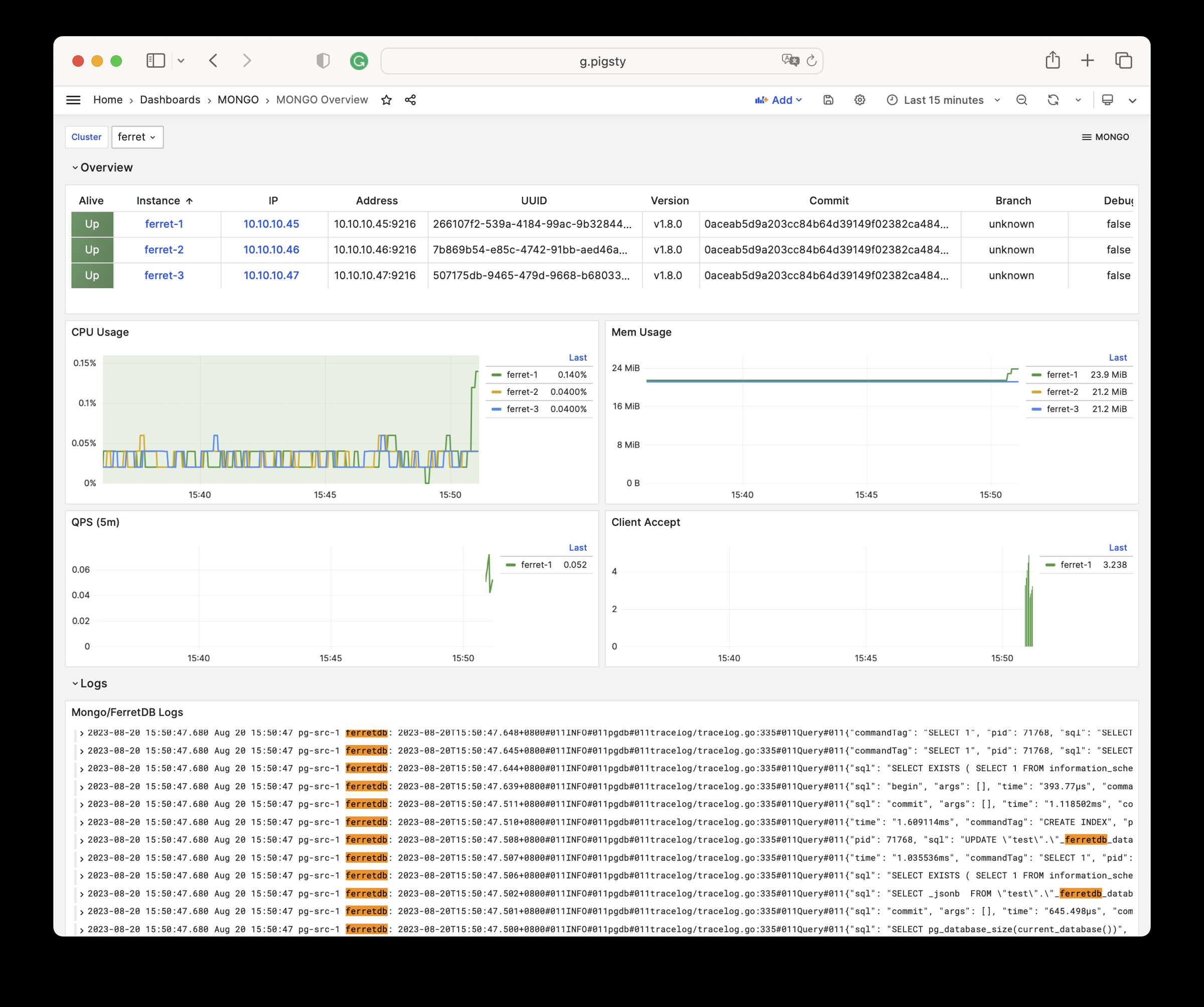
MONGO 模块提供了一个简单的监控面板:Mongo Overview
Mongo Overview
Mongo Overview: Mongo/FerretDB 集群概览
这个监控面板提供了关于 FerretDB 的基本监控指标,因为 FerretDB 底层使用了 PostgreSQL,所以更多的监控指标,还请参考 PostgreSQL 监控。
参数
MONGO 模块中提供了9个相关的配置参数,如下表所示:
| 参数 | 类型 | 级别 | 注释 |
|---|---|---|---|
mongo_seq |
int | I | mongo 实例号,必选身份参数 |
mongo_cluster |
string | C | mongo 集群名,必选身份参数 |
mongo_pgurl |
pgurl | C/I | mongo/ferretdb 底层使用的 PGURL 连接串,必选 |
mongo_ssl_enabled |
bool | C | mongo/ferretdb 是否启用SSL?默认为 false |
mongo_listen |
ip | C | mongo 监听地址,默认留控则监听所有地址 |
mongo_port |
port | C | mongo 服务端口,默认使用 27017 |
mongo_ssl_port |
port | C | mongo TLS 监听端口,默认使用 27018 |
mongo_exporter_port |
port | C | mongo exporter 端口,默认使用 9216 |
mongo_extra_vars |
string | C | MONGO 服务器额外环境变量,默认为空白字符串 |
1 - 指标列表
MONGO 模块包含有 54 类可用监控指标。
| Metric Name | Type | Labels | Description |
|---|---|---|---|
| ferretdb_client_accepts_total | Unknown | error, cls, ip, ins, instance, job |
N/A |
| ferretdb_client_duration_seconds_bucket | Unknown | error, le, cls, ip, ins, instance, job |
N/A |
| ferretdb_client_duration_seconds_count | Unknown | error, cls, ip, ins, instance, job |
N/A |
| ferretdb_client_duration_seconds_sum | Unknown | error, cls, ip, ins, instance, job |
N/A |
| ferretdb_client_requests_total | Unknown | cls, ip, ins, opcode, instance, command, job |
N/A |
| ferretdb_client_responses_total | Unknown | result, argument, cls, ip, ins, opcode, instance, command, job |
N/A |
| ferretdb_postgresql_metadata_databases | gauge | cls, ip, ins, instance, job |
The current number of database in the registry. |
| ferretdb_postgresql_pool_size | gauge | cls, ip, ins, instance, job |
The current number of pools. |
| ferretdb_up | gauge | cls, version, commit, ip, ins, dirty, telemetry, package, update_available, uuid, instance, job, branch, debug |
FerretDB instance state. |
| go_gc_duration_seconds | summary | cls, ip, ins, instance, quantile, job |
A summary of the pause duration of garbage collection cycles. |
| go_gc_duration_seconds_count | Unknown | cls, ip, ins, instance, job |
N/A |
| go_gc_duration_seconds_sum | Unknown | cls, ip, ins, instance, job |
N/A |
| go_goroutines | gauge | cls, ip, ins, instance, job |
Number of goroutines that currently exist. |
| go_info | gauge | cls, version, ip, ins, instance, job |
Information about the Go environment. |
| go_memstats_alloc_bytes | gauge | cls, ip, ins, instance, job |
Number of bytes allocated and still in use. |
| go_memstats_alloc_bytes_total | counter | cls, ip, ins, instance, job |
Total number of bytes allocated, even if freed. |
| go_memstats_buck_hash_sys_bytes | gauge | cls, ip, ins, instance, job |
Number of bytes used by the profiling bucket hash table. |
| go_memstats_frees_total | counter | cls, ip, ins, instance, job |
Total number of frees. |
| go_memstats_gc_sys_bytes | gauge | cls, ip, ins, instance, job |
Number of bytes used for garbage collection system metadata. |
| go_memstats_heap_alloc_bytes | gauge | cls, ip, ins, instance, job |
Number of heap bytes allocated and still in use. |
| go_memstats_heap_idle_bytes | gauge | cls, ip, ins, instance, job |
Number of heap bytes waiting to be used. |
| go_memstats_heap_inuse_bytes | gauge | cls, ip, ins, instance, job |
Number of heap bytes that are in use. |
| go_memstats_heap_objects | gauge | cls, ip, ins, instance, job |
Number of allocated objects. |
| go_memstats_heap_released_bytes | gauge | cls, ip, ins, instance, job |
Number of heap bytes released to OS. |
| go_memstats_heap_sys_bytes | gauge | cls, ip, ins, instance, job |
Number of heap bytes obtained from system. |
| go_memstats_last_gc_time_seconds | gauge | cls, ip, ins, instance, job |
Number of seconds since 1970 of last garbage collection. |
| go_memstats_lookups_total | counter | cls, ip, ins, instance, job |
Total number of pointer lookups. |
| go_memstats_mallocs_total | counter | cls, ip, ins, instance, job |
Total number of mallocs. |
| go_memstats_mcache_inuse_bytes | gauge | cls, ip, ins, instance, job |
Number of bytes in use by mcache structures. |
| go_memstats_mcache_sys_bytes | gauge | cls, ip, ins, instance, job |
Number of bytes used for mcache structures obtained from system. |
| go_memstats_mspan_inuse_bytes | gauge | cls, ip, ins, instance, job |
Number of bytes in use by mspan structures. |
| go_memstats_mspan_sys_bytes | gauge | cls, ip, ins, instance, job |
Number of bytes used for mspan structures obtained from system. |
| go_memstats_next_gc_bytes | gauge | cls, ip, ins, instance, job |
Number of heap bytes when next garbage collection will take place. |
| go_memstats_other_sys_bytes | gauge | cls, ip, ins, instance, job |
Number of bytes used for other system allocations. |
| go_memstats_stack_inuse_bytes | gauge | cls, ip, ins, instance, job |
Number of bytes in use by the stack allocator. |
| go_memstats_stack_sys_bytes | gauge | cls, ip, ins, instance, job |
Number of bytes obtained from system for stack allocator. |
| go_memstats_sys_bytes | gauge | cls, ip, ins, instance, job |
Number of bytes obtained from system. |
| go_threads | gauge | cls, ip, ins, instance, job |
Number of OS threads created. |
| mongo_up | Unknown | cls, ip, ins, instance, job |
N/A |
| process_cpu_seconds_total | counter | cls, ip, ins, instance, job |
Total user and system CPU time spent in seconds. |
| process_max_fds | gauge | cls, ip, ins, instance, job |
Maximum number of open file descriptors. |
| process_open_fds | gauge | cls, ip, ins, instance, job |
Number of open file descriptors. |
| process_resident_memory_bytes | gauge | cls, ip, ins, instance, job |
Resident memory size in bytes. |
| process_start_time_seconds | gauge | cls, ip, ins, instance, job |
Start time of the process since unix epoch in seconds. |
| process_virtual_memory_bytes | gauge | cls, ip, ins, instance, job |
Virtual memory size in bytes. |
| process_virtual_memory_max_bytes | gauge | cls, ip, ins, instance, job |
Maximum amount of virtual memory available in bytes. |
| promhttp_metric_handler_errors_total | counter | job, cls, ip, ins, instance, cause |
Total number of internal errors encountered by the promhttp metric handler. |
| promhttp_metric_handler_requests_in_flight | gauge | cls, ip, ins, instance, job |
Current number of scrapes being served. |
| promhttp_metric_handler_requests_total | counter | job, cls, ip, ins, instance, code |
Total number of scrapes by HTTP status code. |
| scrape_duration_seconds | Unknown | cls, ip, ins, instance, job |
N/A |
| scrape_samples_post_metric_relabeling | Unknown | cls, ip, ins, instance, job |
N/A |
| scrape_samples_scraped | Unknown | cls, ip, ins, instance, job |
N/A |
| scrape_series_added | Unknown | cls, ip, ins, instance, job |
N/A |
| up | Unknown | cls, ip, ins, instance, job |
N/A |
2 - 常见问题
安装MongoSH
您可以使用 MongoSH 作为客户端工具访问 FerretDB 集群
当然,您也可以直接安装 mongosh 的 RPM 包: